Operation
R-Concept
103 / 476
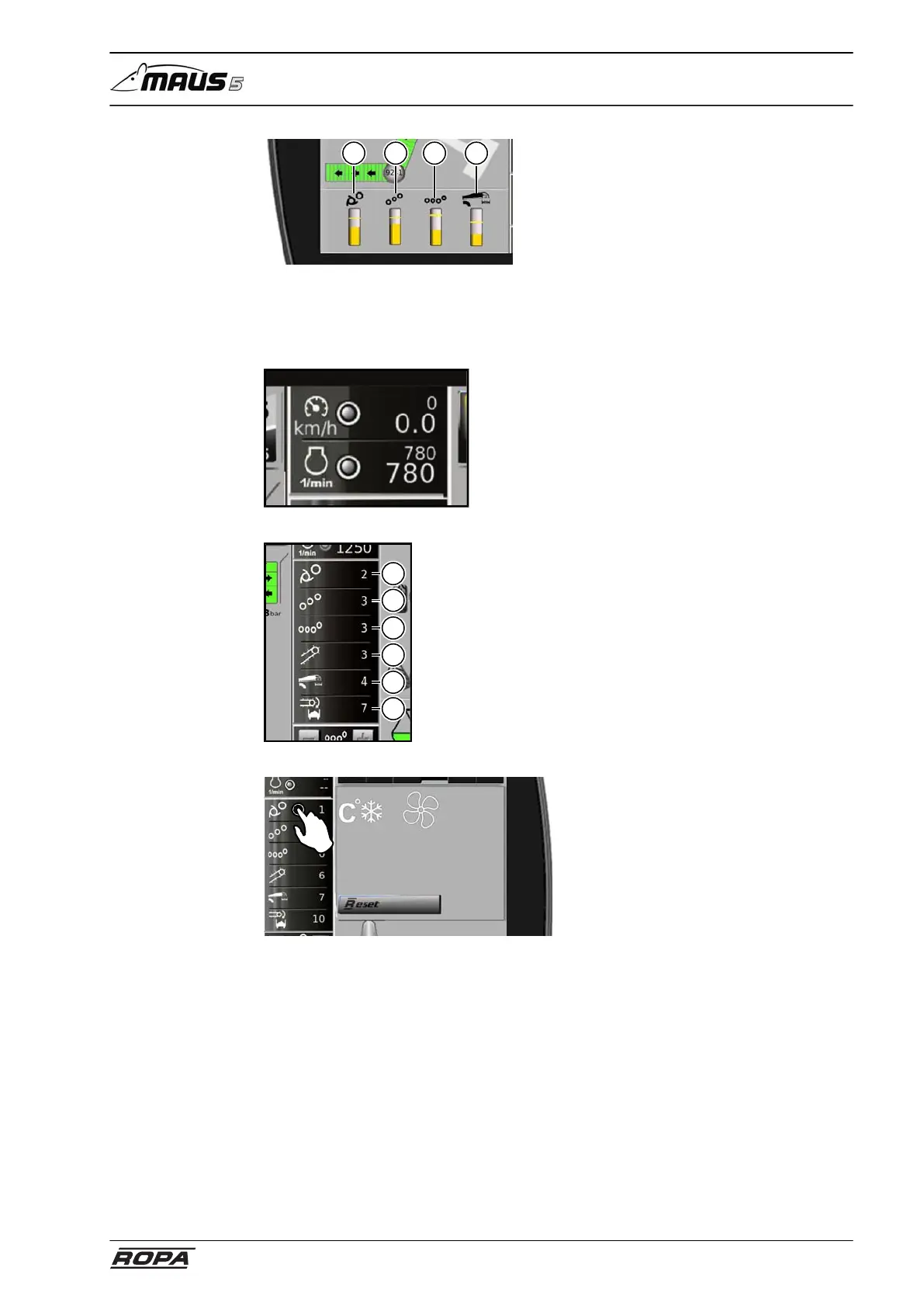
1 2 3 4
[C] Display area warning thresholds
(1) Pickup rollers load
(2) Conveyor rollers load
(3) 4 pinch rollers load
(4) Recleaning load
It does not apply to infeed and truck con-
veyor drives since these are monitored
with rotational speed sensor only and not
with pressure sensor.
[E] Display field driving and rotational
speed diesel engine
(see page 140)
(see page 159)
1
6
5
4
3
2
[F] Quick overview loading parameters
Display of set rotational speeds of:
(1) Pickup rollers
(2) Conveyor rollers
(3) 4 pinch rollers
(4) Infeed conveyor
(5) Recleaning
(6) Truck conveyor
The quick overview of loading parameters
can be adjusted individually. Press and
hold the icon (e.g. Pickup rollers rpm),
which you want to remove from the quick
overview, for approx. 2 sec., draw it on
the place of the icon which you want to
put on the place of Pickup rollers rpm.
To resort the icons, please press and hold
again the desired icon for approx. 2 sec.
and draw it on the place of the icon you
want to exchange with.
With the soft key "Reset" you can return
the factory setting as described in the
paragraph (E) Quick overview loading
parameters.



 To Next Page