Operation
Park heating (option)
292 / 476
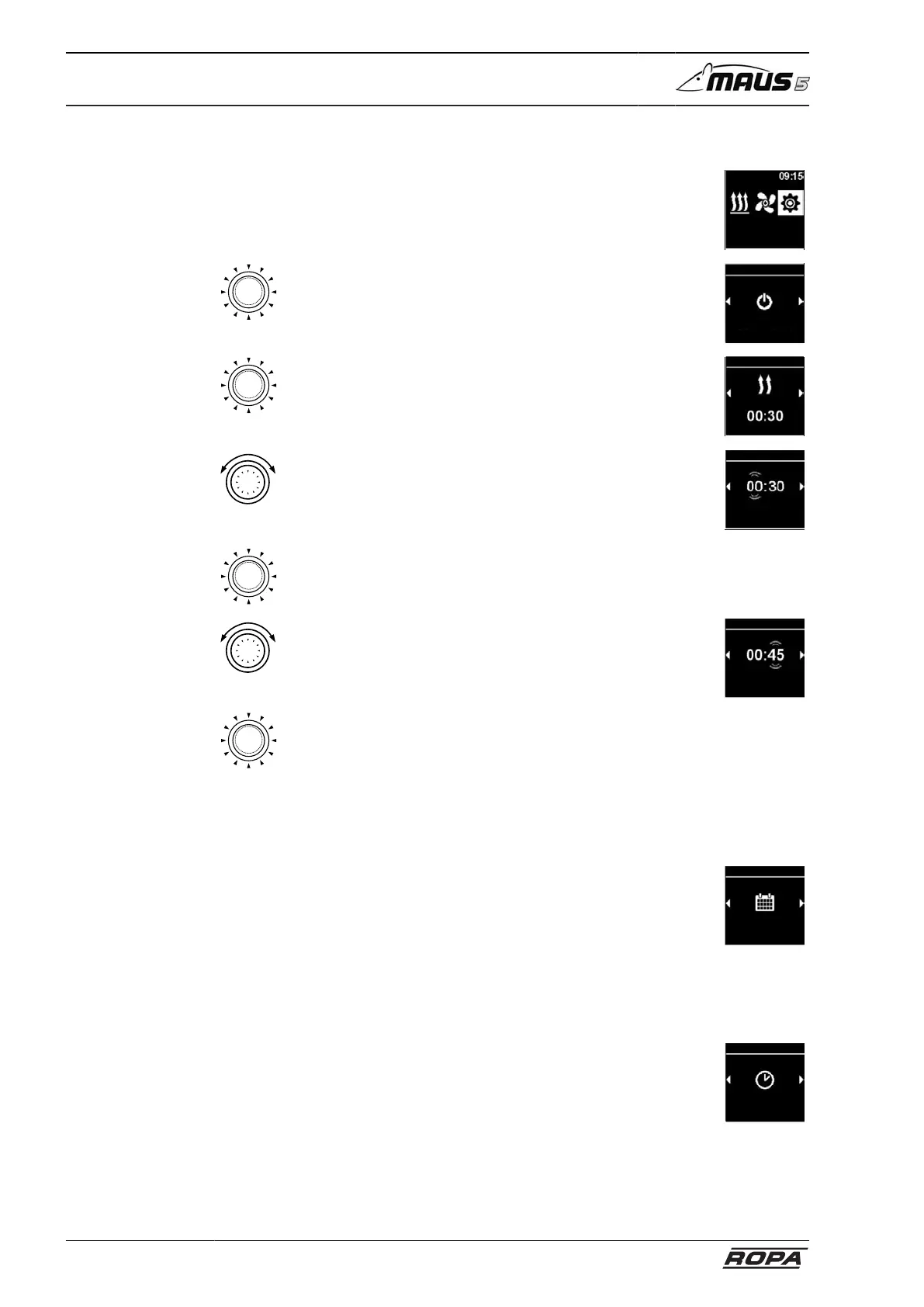
6.22.2.8 Adjust immediate start key
– Select Settings icon in the main menu
Settings
– Press control button
– Select immediate start
Immediate start
Settings
– Heating mode appears on display
– Press control button to confirm the selection
– Operating time flashes on the display
Settings
– Rotate control button
– Set "Hour" operating period
If the control button is rotated clockwise, the maximum oper-
ating period can be selected and activated.
Duration
Heating
– Press control button to confirm the selection
– Rotate control button
– Set "Minute" operating period
Duration
Heating
– Press control button to confirm the selection
The immediate start button is configured with settings.
6.22.2.9 Set day of the week
The setting is made similarly to setting the immediate start key (see page 292).
– Select "Day of the week" in the settings menu
Day of the week
Settings
6.22.2.10 Set time
The setting is made similarly to setting the immediate start key (see page 292).
– Select "Time" in the settings menu
Zeit
Einstellungen



 To Next Page