Operation
Park heating (option)
288 / 476
6.22.2.2 Switch on heater with the Heater menu
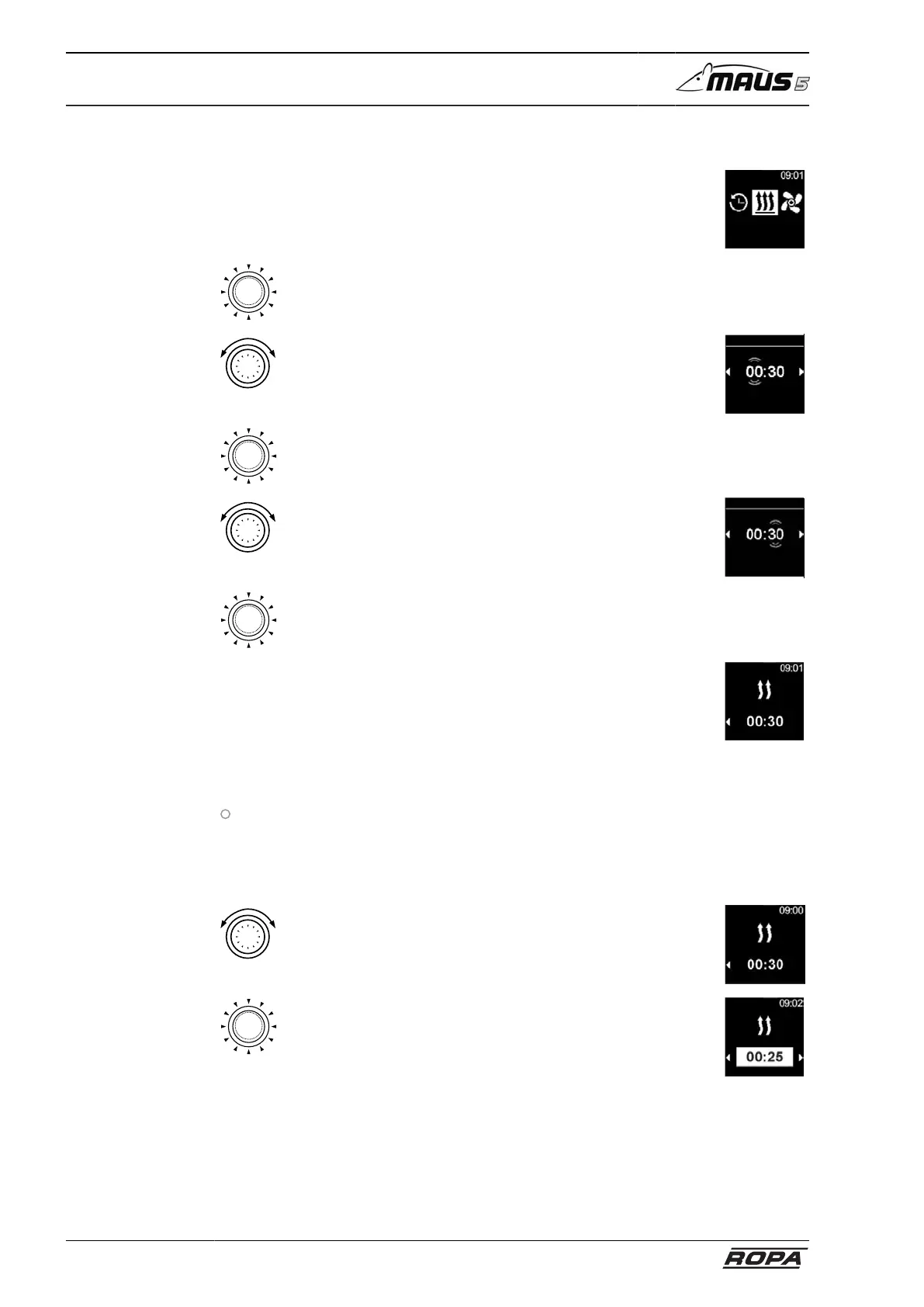
– Select the Heater icon in the main menu
Heating
– Press control button
– Operating time flashes on the display
– Rotate control button
– Set "Hour" operating period
– If the control button is rotated clockwise, the maximum
operating period can be selected and activated.
Duration
Heating
– Press control button to confirm the selection
– Rotate control button
– Set "Minutes" operating period
Duration
Heating
– Press control button to confirm the selection
– Heating is started
– Display shows the heat icon and the preset remaining
runtime
– Immediate start key is green
6.22.2.3 Adjust remaining runtime during operation
Heater is in heating mode
The remaining runtime can only be reduced during operation. No more changes can
be made once the minimum runtime has fallen below 10 minutes. The system must be
switched off and on again to increase the runtime.
– Press control button to adjust the desired remaining run-
time.
– The remaining runtime can be reduced by rotating the
control button anticlockwise.
– Press the control button within 5 seconds to confirm the
selection



 To Next Page