Operation
Park heating (option)
289 / 476
6.22.2.4 Switch off heater
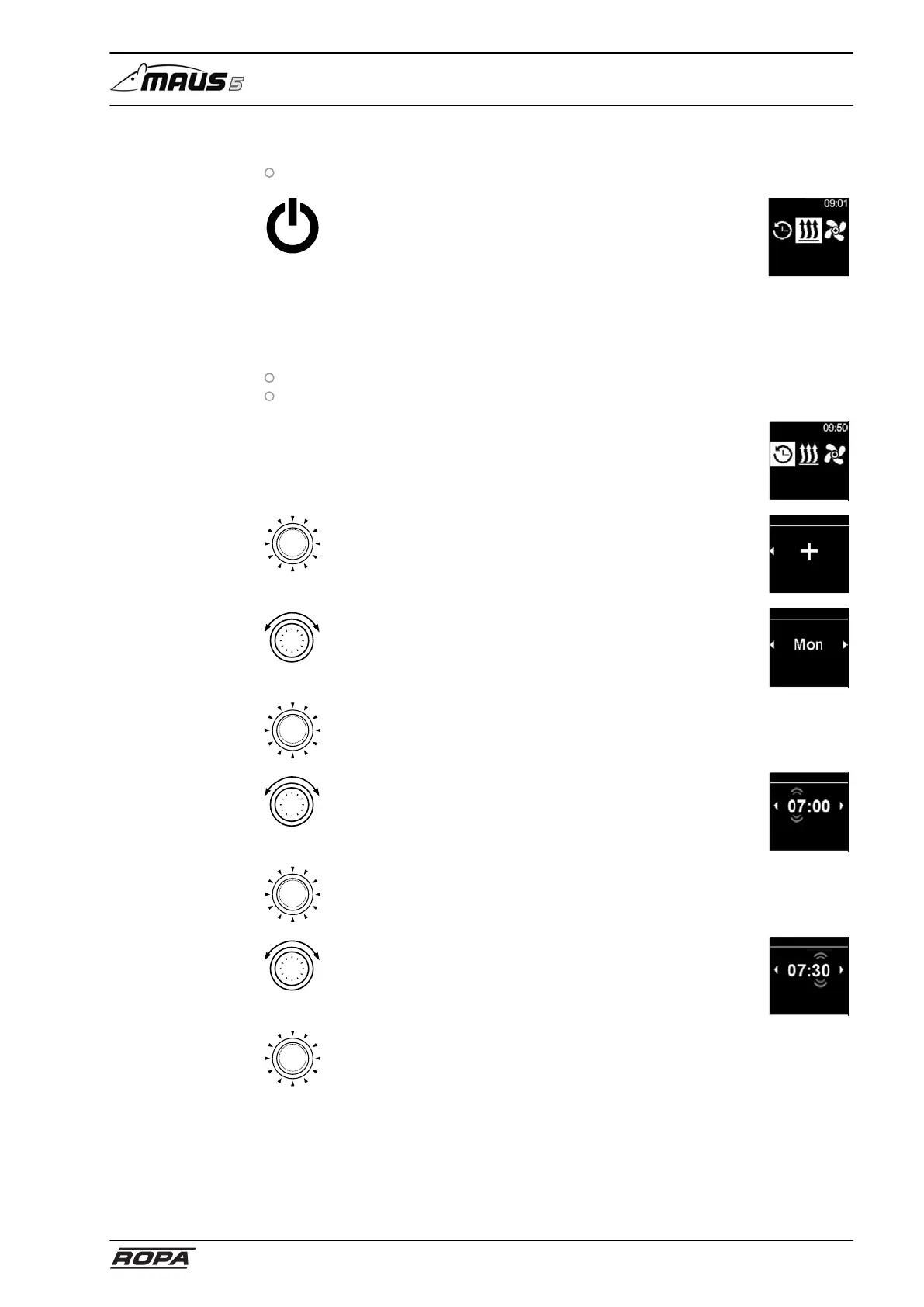
Heater is in heating mode
– Press immediate start button
– Display shows the main menu
– The immediate start button switches from green to white
Heating
6.22.2.5 Setting and activating timer
Setting and activating timer
Time and current day are set
Heater is switched off
– Select Timer icon in the main menu
Timer
– Press control button
– "Add timer" appears on the display (if a timer has not yet
been created)
– Press control button to add a new timer
Timer
add
Timer
– Rotate control button
– Select day of the week
Tag
Timer
– Press control button to confirm the selection
– Rotate control button
– Set "hour" power-up time
Power-up time
Timer
– Press control button to confirm the selection
– Rotate control button
– Set "minute" power-up time
Power-up time
Timer
– Press control button to confirm the selection



 To Next Page