Operation
Folding the machine out/in
178 / 476
6.12.2 Folding out machine with the help of automatic folding rear
Condition for this is that the machine front is already folded out and the driver's cabin is
raised to the end-stop. (see page 176)
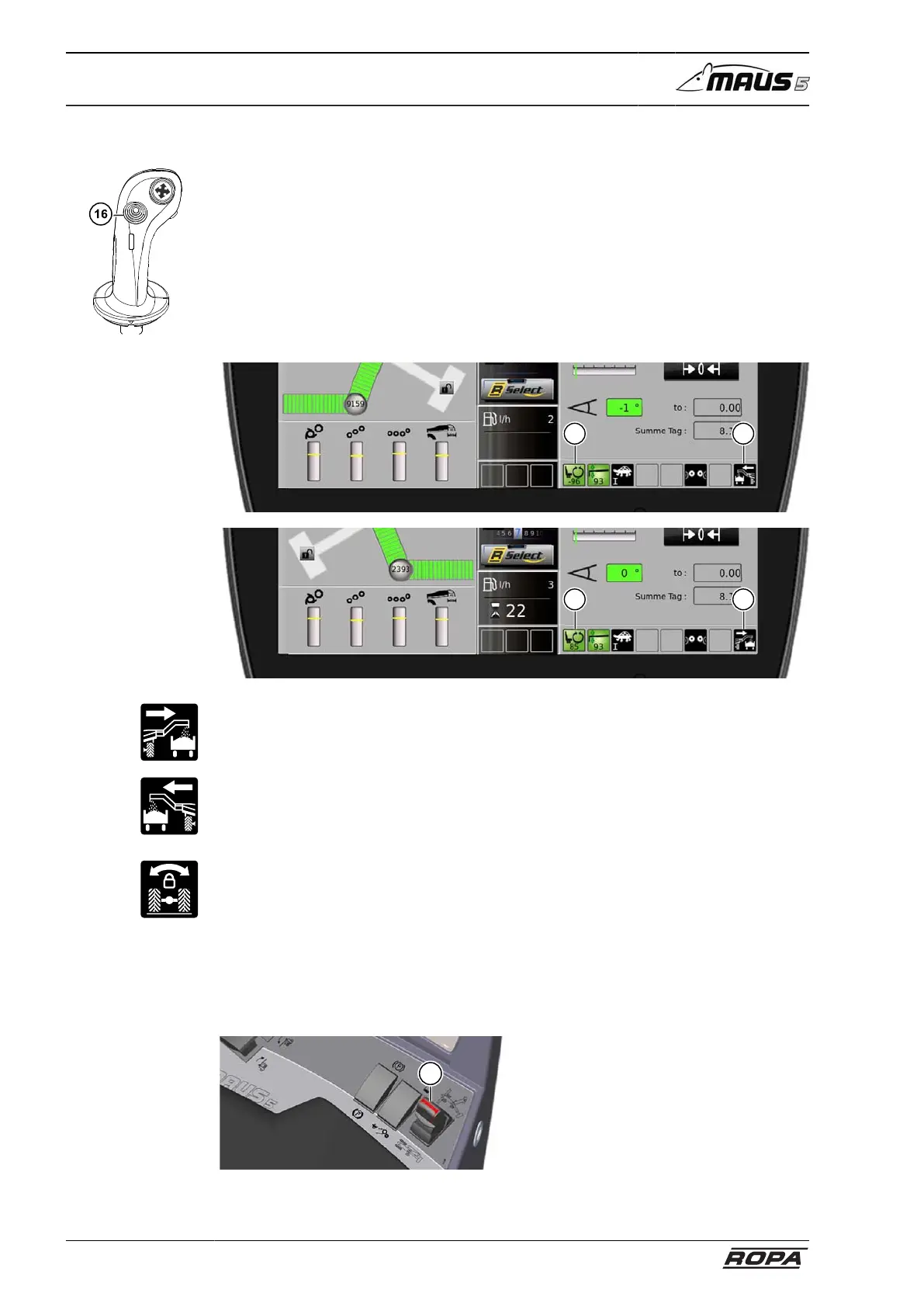
Select loading direction with the X-Y key (16). The selected loading direction deter-
mines the destination of the truck conveyor. To do so, press the X-Y key (16) to the left
or to the right and hold it for approx. two seconds in this position. The selected loading
direction (2) is displayed on the R-Touch.
Loading direction to the right:
Turn the rotatable seat until it almost reaches the end-stop and until the rotatable seat
status indicator (1) on the R-Touch shows green (display range 85 % – 100 %).
In the case of loading direction to the left:
Choose the line of sight direction that is most favorable for you. Make sure that you
always turn the rotatable seat until it almost reaches the end-stop.
– Switch on the oscillating axle support for the rear axle before folding out the
machine. (see page 176)
You start the automatic folding by:
– Move analogue rocker switch (7) to the right (do not click into position because,
for safety reasons, latching-in stops all movements) and, shortly before latching-in,
hold the switch in that position until all the processes are finished.
7



 To Next Page