DMG 3200/3100/3000 – User Manual
Page 122 (306)
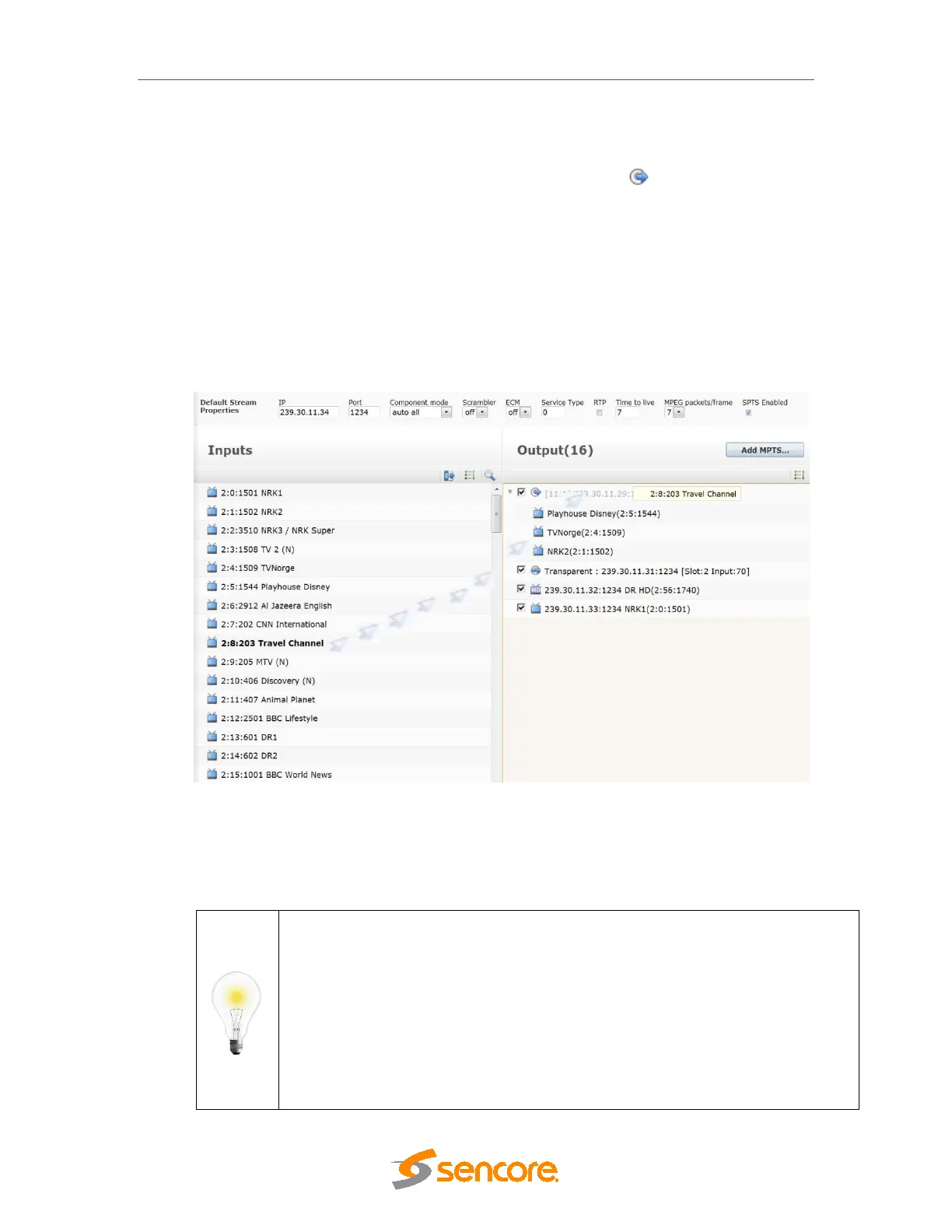
input services, you only need to drag a service from the Inputs panel and drop it on the Output
panel (Figure 8.2)
• To add a service to an MPTS, drop it on the MPTS symbol . This applies to IP
MPTS outputs as well as QAM/COFDM/ASI/etc outputs.
• To add an IP SPTS to an IP output module, drop the service anywhere in the empty
space on the Output panel.
• To add a Transparent output drag and drop the input port to an empty space on the
Output panel (IP output) or the output MPTS (other modules).
To toggle transmission of an output stream on or off, use the checkboxes on the left of that
particular stream to enable or disable it.
Figure 7.2 - Dragging and Dropping a Service
Once the output is configured, the system will automatically generate PSI/SI as well as add the
service related PIDs to the output (as configured in Outputs
PSI). For more information on
PSI/SI configuration, refer to Sections
7.3.4.
If you are unable to drag and drop an input service to an output, there could be a
conflict in your output setup, most likely due to a duplicate ServiceID/Program
Number.
For example, if you already have an output service with ServiceID 100, and you
attempt to drag and drop an input service, with ServiceID 100 – the system will
assume that you are trying to create two output services with the same ID. To get
around this, first remap the output service ID for the existing one. Then, add the new
service.
This is only relevant when adding the same ServiceID to an MPTS.



 To Next Page