CLI
In
addition to the Workbench, the Amiga includes another user interface, the
Command Line Interface (CLI). To make an icon for the CLI appear
in
the
System drawer on the Workbench, select the ON gadget immediately to the right
of
"C
LI" on the Preferences screen, then se
le
ct the Save gadget to save the new
setting. If the system drawer is already open when you leave Preferences, you
must
dose
it and reopen it to make the icon appear. To learn about the CLI, see
Chapter 7.
Display Centering
To center the image on a video
di
splay, move
th
e Pointer into
th
e corner
of
the r
symbol that appears
in
the
Di
splay Centering Gadget, ho
ld
down the Selection
button, then move the mouse to change the pos
iti
on
of
the
im
age.
Serial Connector
If you have a peripheral hooked up to the serial connector
of
Y0
4r Amiga, you
can change various parameters, such
as
th
e rate
at
which informa
ti
on is trans-
ferred through the connector.
To
do this, select the gadget labeled Change Serial.
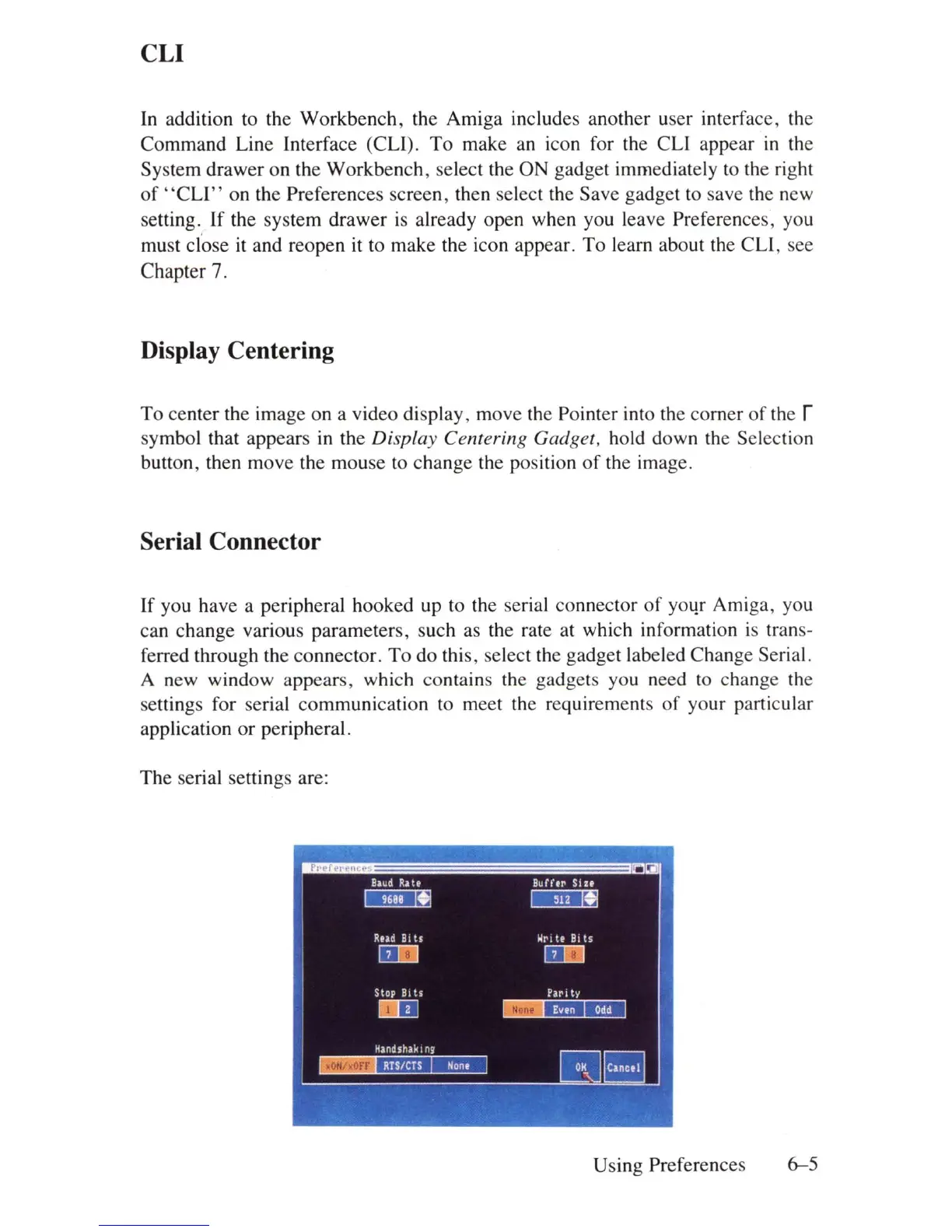
A new window appears, which contains the gadgets you need to change the
settings for serial communication to meet
th
e requirements
of
your particular
application
or
peripheral.
The serial settings ar
e:
Using Preferences
6-5















 To Next Page