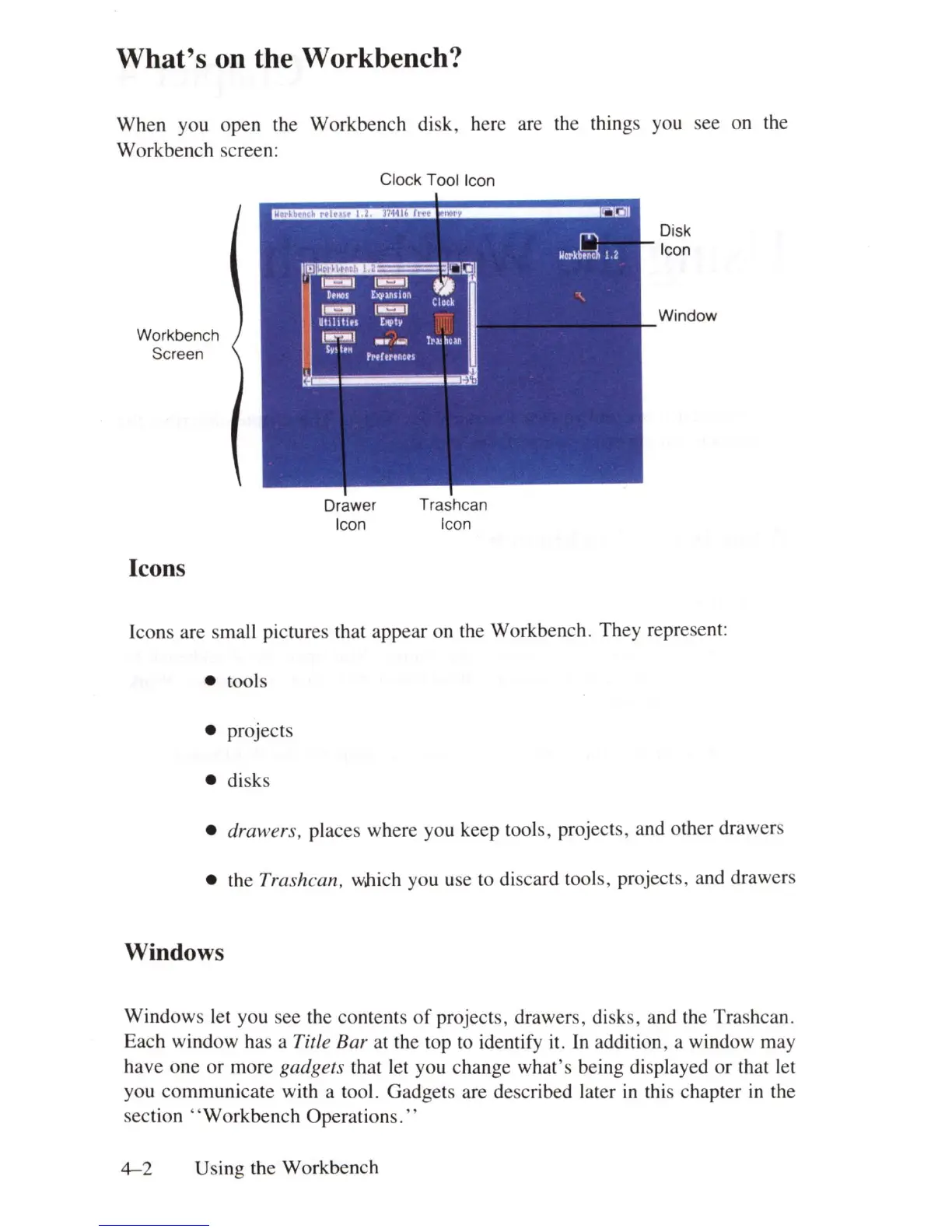
What's on the Workbench?
When you open the Workbench disk , here are the things you see on the
Workbench creen:
Workbench
Screen
Icons
Drawer
Icon
Clock Tool Icon
Trashcan
Icon
Disk
Icon
Window
Icons are small pictures that appear on the Workbench. They represent:
• tools
• projects
• disks
• drawers, places where you keep tools, projects, and other drawers
• the
Trashcan, which you use to discard tools, projects, and drawers
Windows
Windows let you see the contents
of
projects, drawers, disks, and the Trashcan.
Each window has a
Title Bar at the top to identify it.
In
addition, a window may
have one
or
more gadgets that let you change what's being displayed or that let
you communicate with a tool . Gadgets are described later
in
this chapter
in
the
section " Workbench Operations."
4-2
Using the Workbench















 To Next Page