Printers
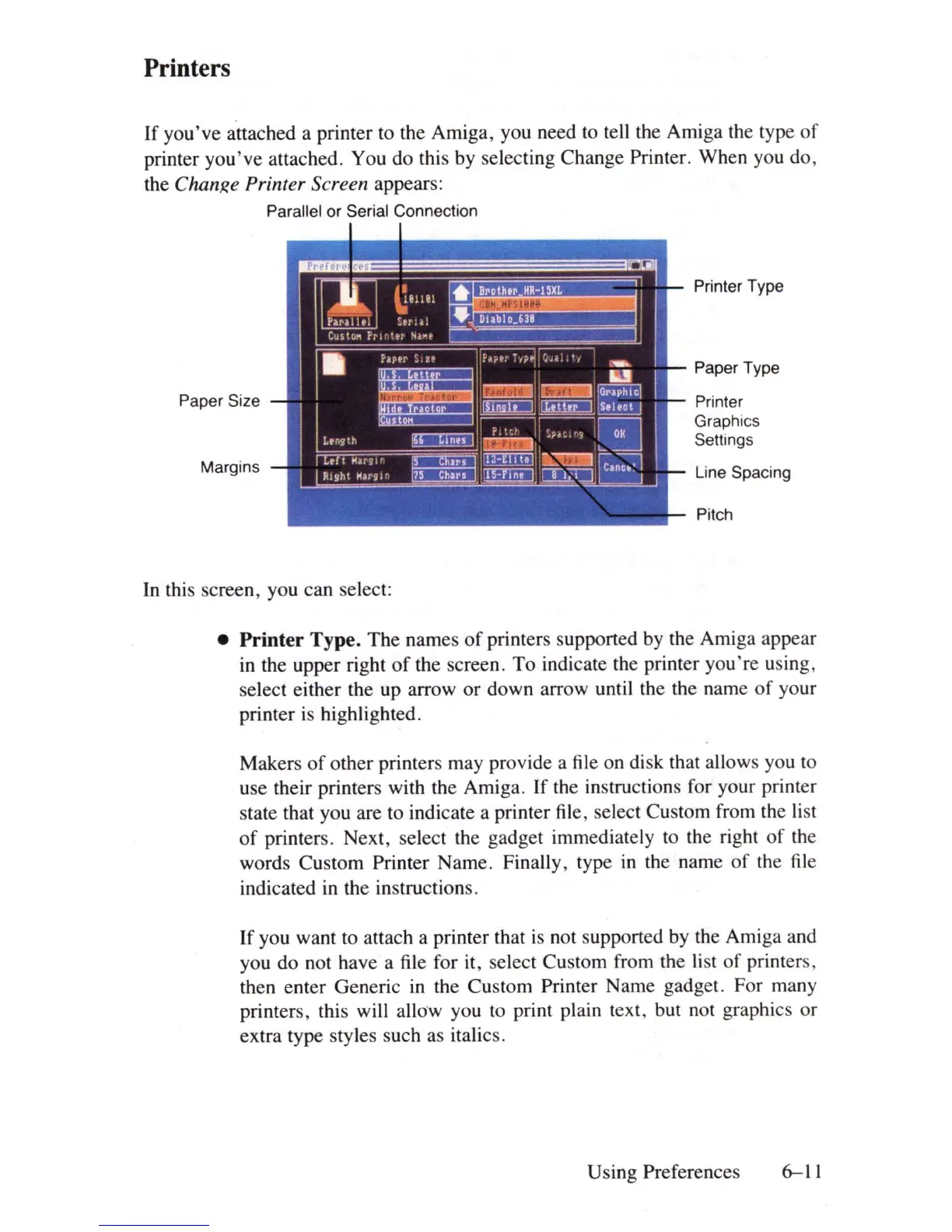
If you've attached a printer to the Amiga, you need to tell the Amiga the type
of
printer
you've
attached. You do this by selecting Change Printer. When you do,
the
ChanRe Printer Screen appears:
Parallel or Serial Connection
Paper Size
Margins
In this screen, you can select:
Printer Type
Paper Type
Printer
Graphics
Settings
Line Spacing
Pitch
• Printer
Ty
pe. The names
of
printers supported
by
the Amiga appear
in
the upper right
of
the screen. To indicate the printer you're using,
select either the up arrow or down arrow until the the name
of
your
printer
is
highlighted.
Makers
of
other printers may provide a file on disk that allows you to
use their printers with the Amiga. If the instructions for your printer
state that you are to indicate a printer file, select Custom from the
li
st
of
printers. Next, select the gadget immediately to the right
of
the
words Custom Printer Name. Finally, type
in
the name
of
the file
indicated
in
the instructions.
If you want to attach a printer that
is
not supported by the Amiga and
you do not have a file for
it
, select Custom from the
li
st
of
printers,
then enter Generic
in
the Custom Printer Name gadget. For many
printers, this will allow you to print plain text, but not graphics or
extra type styles such as italics.
Using Preferences 6-11















 To Next Page