System 3505 Installation & Operation Manual
Digitize, Inc. 700248-0002 Rev. C 02/16
Specification Subject to Change Without Notice
1-5
MBD-4800, SYS 3 STD MEM (Full Memory Board): P/N 400349-0004
MBD-EMPTY, MBD Empty, (Empty Memory Board): P/N 400349-0003
Each MBD-EMPTY provides space for up to eight MEM-600 memory modules, or a
total of 4800 screens. The MBD-4800 contains all 4800 screens, and is installed in
any of the card slots of the SYSTEM 3505. Each MBD-4800 has a DIP switch to use
to set the address of the board. A total of eight motherboards may be installed in one
System. The number is limited only by the number of available card slots. A fully
loaded System can allow access to 37,950 field programmable user text screens.
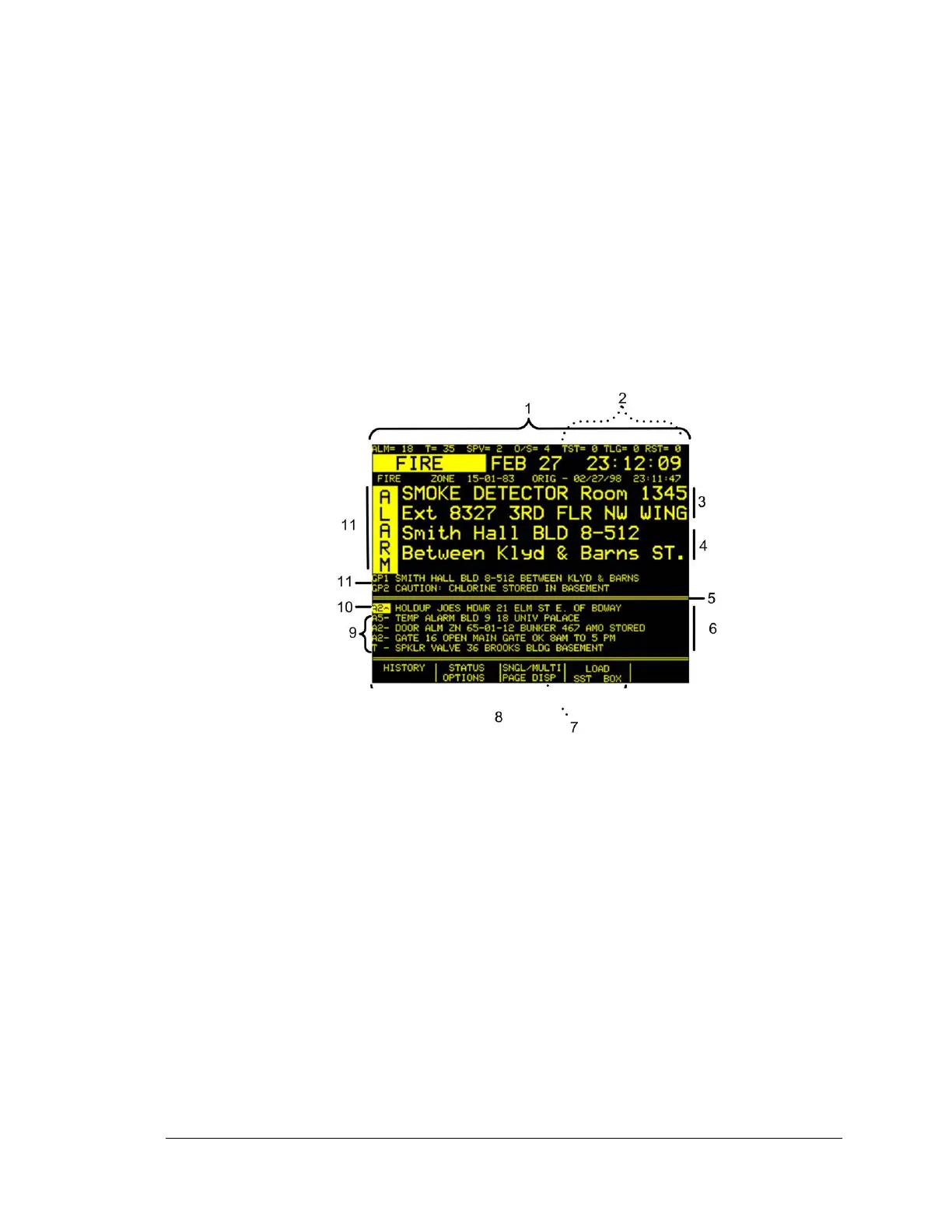
Figure 1-1 Key
1. Activity Indicators
2. Optional Activity indicators (subject to change based upon the options
installed on the System 3505 )
3. First page of Control Panel text from the FACP for 15-01-83*
4. First page of Generic Message for Zone 15-GP1*
5. Separator
6. Additional active conditions appear in small type below the large type*
7. Use the Single/Multi Page Display key to limit or maximize information
displayed. When Single is selected, the additional active conditions
(displayed below the mid screen Separator) are hidden from view.
8. Programmable keys vary by unit and are determined by the options
installed on the System 3505. Keys may change when scroll buttons
are pressed. Refer to section 6.2 for more detail.
9. ACKnowledge conditions.
10. Un-ACKnowledge conditions.
11. Current and open conditions. Second and third user pages; area
changes based upon customer and FACP messages.
12. Incoming condition flashes (Alarm, Trouble, Out of Service). After
ACK the condition remains illuminated until cleared.
Figure 1-1 System 3505 Information Display





 To Next Page