System 3505 Installation & Operation Manual
Digitize, Inc. 700248-0002 Rev. C 02/16
Specification Subject to Change Without Notice
5-7
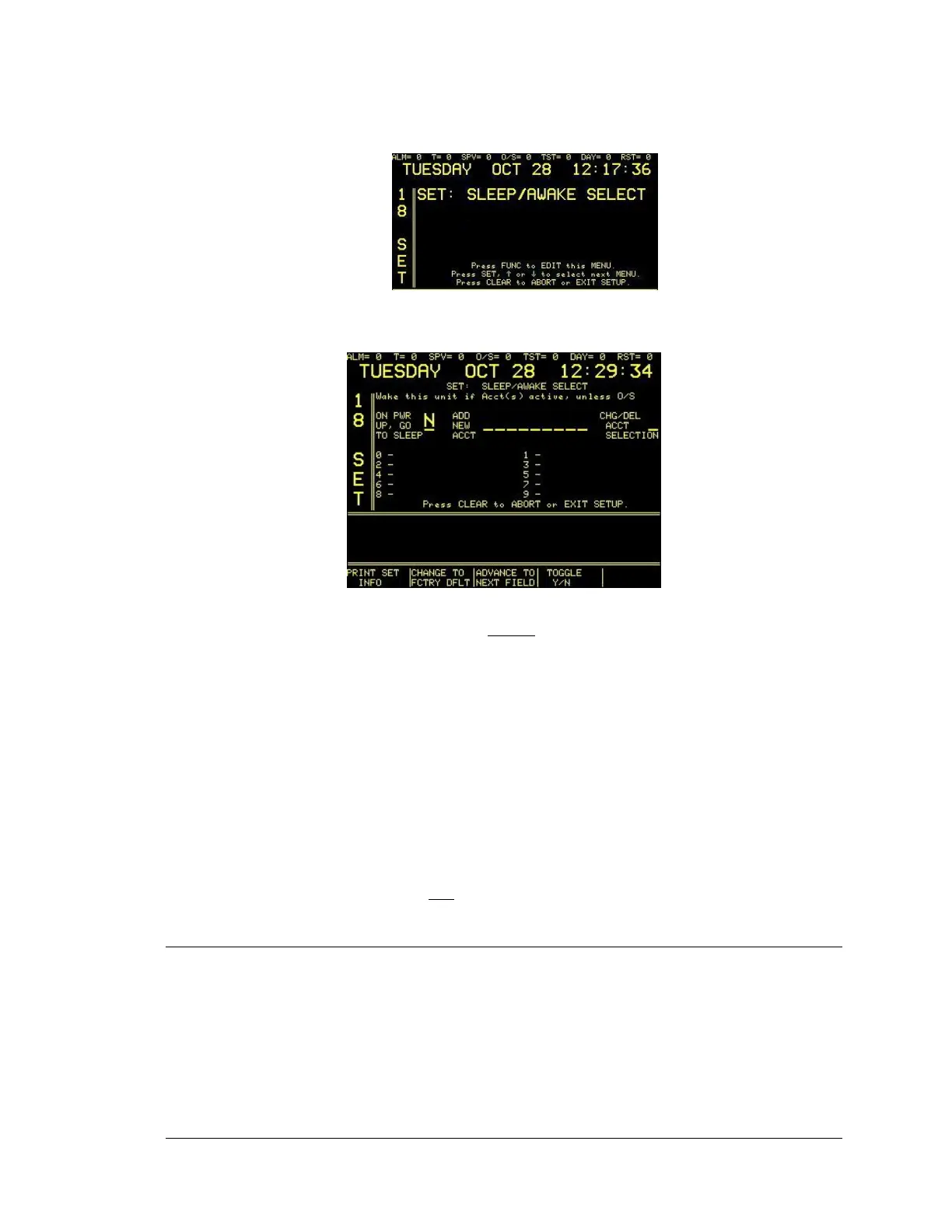
Enter “18”, press the SET button and the display will read:
Enter password if prompted. Press the FUNC button to select this screen. The next screen will
read:
Users may want to press “PRINT SET INFO” before
making changes to accounts; the record can
be useful when correcting any data entry errors.
• Press ADVANCE TO NEXT FIELD or FUNC to move between fields.
• Press TOGGLE Y/N or the
↑ ↓
to indicate Yes or No, as required to direct “ON PWR
UP, GO TO SLEEP.
• Advance the blinking cursor to “ADD NEW ACCT” and then use the numeric keypad
to enter the desired account number to add to Sleep/Awake mode.
• Press the CLEAR key to save changes and return to main set menu.
• Press PRINT SET INFO to create a printed record of the new settings. Review new
settings for accuracy.
• Press CLEAR to exit Setup.
NOTE: When pressed, CHANGE TO FCTRY DFLT will reset accounts to factory default
settings. Power-up Sleep Select does not apply to systems with a T-BAR.
5.16 TELEGRAPH/DIGITAL DIALER AUTO CLEAR SETUP
Enter “19”, press the SET button and the display will read:





 To Next Page