System 3505 Installation & Operation Manual
Digitize, Inc. 700248-0002 Rev. C 02/16
Specification Subject to Change Without Notice
7-2
J- Radionics 3/1, extended with parity format
K- Silent Knight, Contact ID (Ademco)
The DDI-9/10E card processes dialer Alarm, Trouble and Restore conditions. The SYSTEM
3505 displays and prints the incoming DDI-9/10E signals. The user can specify Restoral = Yes or
No for each account number. After an alarm or trouble condition appears, the CLEAR button
will blink if an invalid account number comes through or if Restoral = N is selected for that
account number. In this instance the operator can hit the CLEAR button when the light is
blinking and the condition will be cleared. If the dialer has a restoral feature, the user would
select Restoral = Y and the dialer would send a restoral automatically, thus restoring the account
on the SYSTEM 3505. All active accounts are maintained on the SYSTEM 3505 until restored.
If an abnormal condition occurs (i.e. the dialer is reset and no restoral will be received) the
operator may also clear the condition as follows: when the dialer message is on the display, press
DIALER LOOK UP; then, when the account in the alarm area of the display, press CLEAR to
CLEAR the dialer Alarm or Trouble condition. For systems utilizing an automation system, the
CLEARING process can be sent to the Automation as a restoral, if the 2 9 SET menu is set to
“Send Restore when Account CLEARS” is set to Y.
7.1.1
DDI-10E Setup
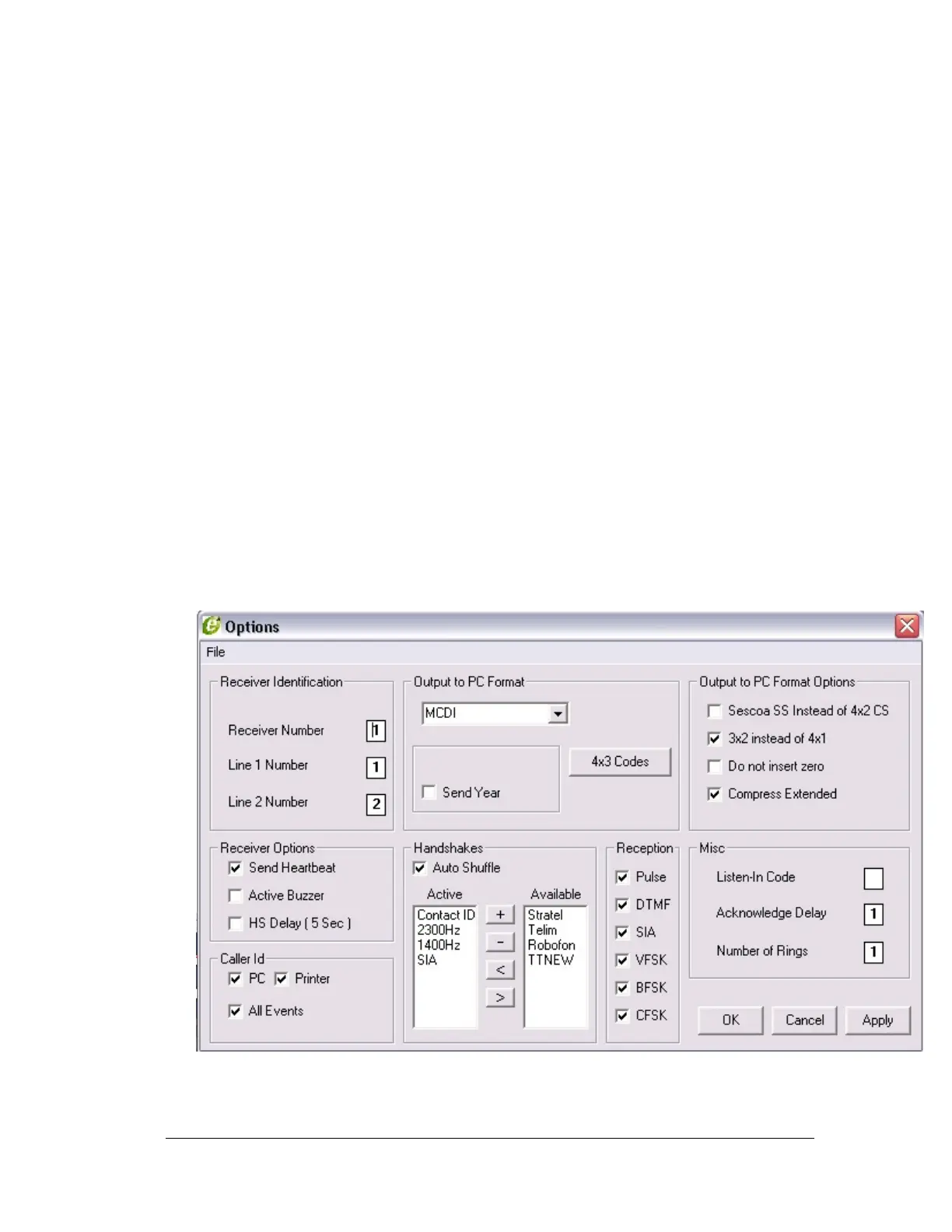
Setup for the DDI-10E is performed using WinExsa 3 Configurator software.
This Windows based utility (on CD) is shipped with the DDI-10 unit. All the
required selections are shown below; refer to this illustration when performing
setup of the DDI-10E.
DDI-10E users, please note: though the set-up is performed differently, all other content
contained in this chapter remains applicable. Please refer to Appendix B, SET Menus, Step-
by-Step Procedures (16 SET Menu) for more details.





 To Next Page