System 3505 Installation & Operation Manual
Digitize, Inc. 700248-0002 Rev. C 02/16
Specification Subject to Change Without Notice
4-7
any) appear. A sample screen is illustrated below. The display order can be changed with
the 39 SET menu.
WATER FLOW
3RD FLOOR ROOM 35
**JOE’S HARDWARE 21 ELM STREE MR WOODS 555-
1212
**!!!CAUTION!!! CHLORINE STORED IN BASEMENT
!!FIRE 555-1234
FUTOFF VALVE CORNER ELM AND BROAD ST
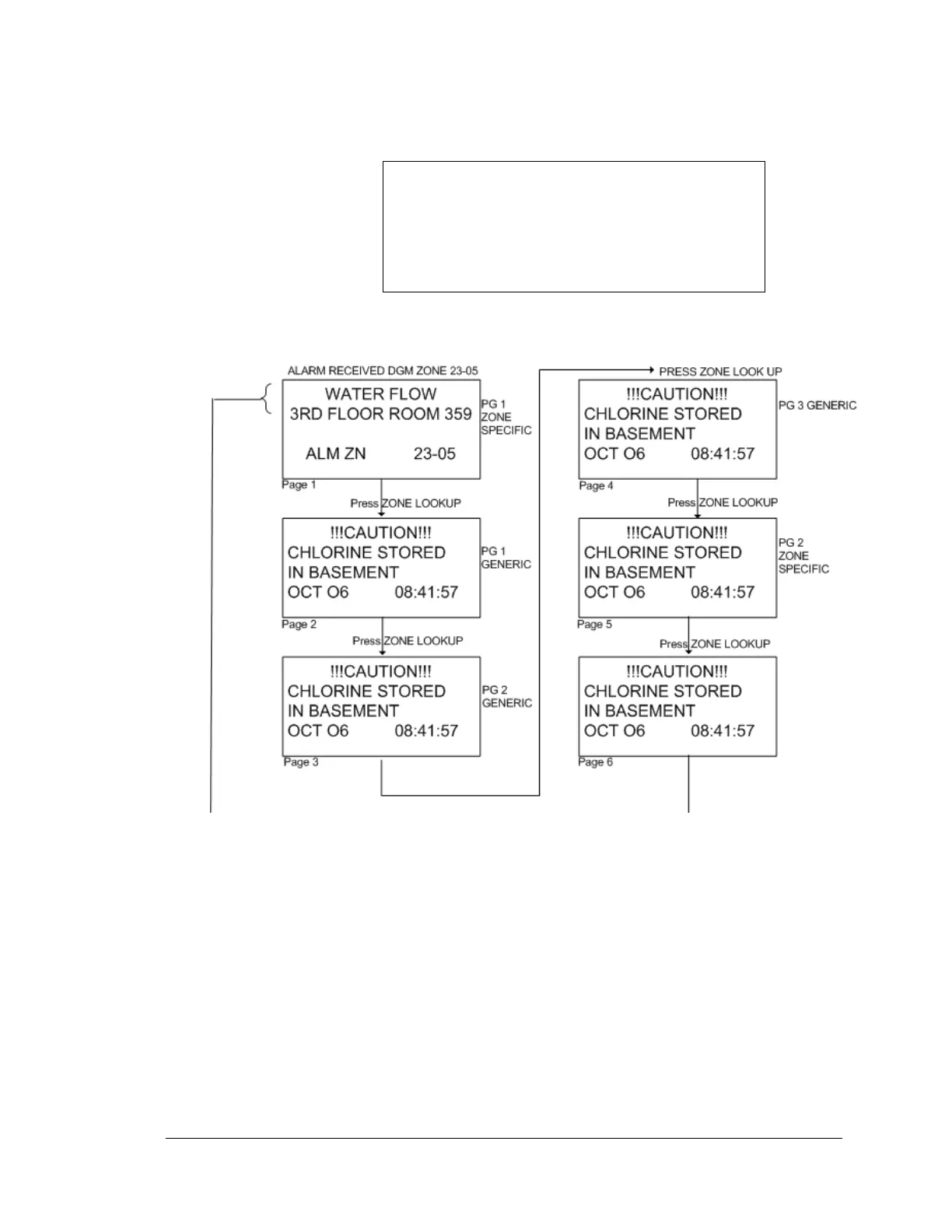
The user may also press the ZONE LOOK UP key on the SYSTEM 3505 to view the
other pages of text messages. After pressing ZONE LOOK UP, the SYSTEM 3505 will
present the text screens in this order: page 1 of the account specific, page 1 of the generic
(if any), page 2 of the generic (if any), page 3 of the generic (if any), etc. After the last
page of the generic information the SYSTEM 3505 will show page 2 of the account
specific (if any), page 3 of the account specific (if any), etc. After the last page of
account specific, the last page notice will display. (Note that the generic messages have
the fourth line underlined).
At the same time the strip printer will print the following information:
JOE’S HARDWARE……………………LINE 1 FROM GENERIC MESSAGE
WATER FLOW………………………….LINE 1 FROM ZONE SPECIFIC MESSAGE
ALARM ZONE 23-05…………….....AUTOMATICALLY PRINTED
06-OCT-98 08:41:57
The user can alter this information using the SET 4 menu. If the Remote Line Printer
option is attached to the SYSTEM 3505, the following printout would occur upon receipt
of the DGM alarm 23-05. Note that each of the three generic screens will print as a
single line of text first, fallowed by the two lines of zone specific information. The “**-”





 To Next Page