100 Keysight N9915-90020 User’s Guide
NA (Network Analyzer) Mode
NA Mode Settings
How to set Scale
1. Press Scale / Amptd.
2. Then choose from the following methods:
—
Autoscale Automatically adjusts the Y-axis to comfortably fit the
Minimum and Maximum amplitude of the trace on the screen.
— Autoscale All Autoscales all of the traces on the screen, useful only
for multi-trace configurations.
— Set Scale, acquisition, and Reference Position
— Scale Manually enter a scale per division to view specific
areas of the trace.
— Ref Level Manually set the value of the reference line.
Enter a negative value by pressing Run/Hold (+/-)
either
before or after typing a value.
— Ref Pos Manually set the position of the reference line.
Values must be between 0 (TOP line) and 10 (BOTTOM
line)
Magnitude Offset
Magnitude Offset allows you to offset the magnitude (not phase) data by a
fixed and/ or sloped value in dB. If the display format is Linear Magnitude or
Real (unitless), the conversion from dB is performed and the correct amount of
offset is implemented.
The Magnitude offset setting affects only the active trace.
How to set Magnitude Offset
1. Press Scale / Amptd
2. Then
More
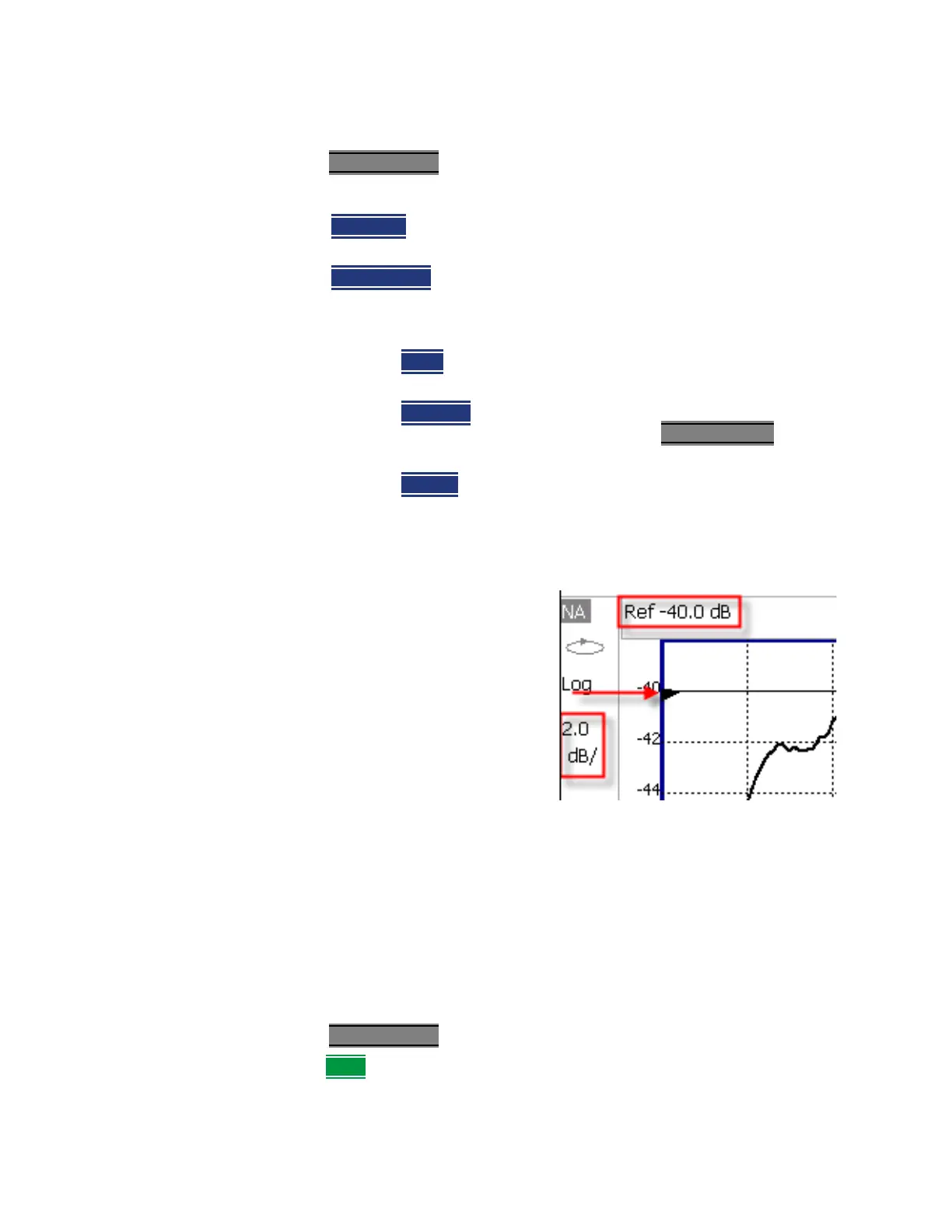
Scale annotation on the FieldFox screen
—Reference Line = red arrow
—Ref Level = –40 dB
—Ref Position = 1
—Scale = 2 dB per division













 To Next Page