Keysight N9915-90020 User’s Guide 245
SA (Spectrum Analyzer) Mode (Option 233–Mixed Analyzers)FUTURE
Spectrum Emission Mask (SEM) — (SA Mode Only)
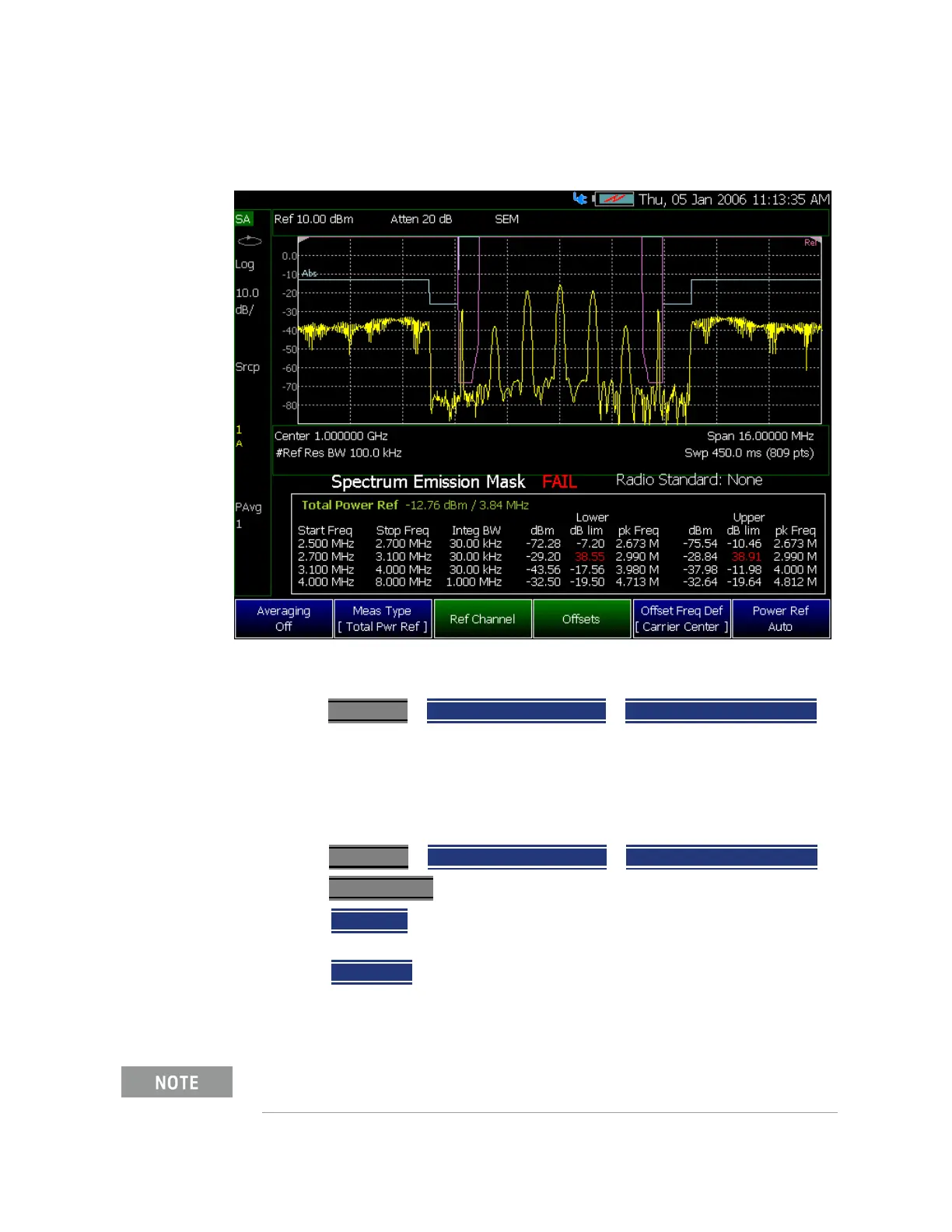
Figure 9-28 SEM Example FAIL Data - Absolute Limit (Blue), Relative Limit (Violet), Trace
(Yellow), and Tabular Data
How to select Spectrum Emission Mask (SEM) Measurement
—Press Measure 1 > Channel Measurements > Spectrum Emission Mask
When SEM is selected, the following settings are maintained from a previous
measurement: Center Frequency, Preamp ON|OFF, and RF Attenuation.
Setting up the FieldFox for Spectrum Emission Mask (SEM) Measurement
1. Press Measure 1
> Channel Measurements > Spectrum Emission Mask
2. Press Meas Setup 4 then optionally select:
— Averaging Enable/disables averaging and sets the number of trace
averages (Default is OFF).
— Meas Type Then select one of the following:
Measurement Type (Meas Type) enables the user to select the
method used to calculate the reference power level.
The displayed green power (dBm)/frequency (Hz) text changes as the
Meas Type is toggled.













 To Next Page