Data Analysis FeaturesDELETE_IF
All about Markers
Keysight N9915-90020 User’s Guide 747
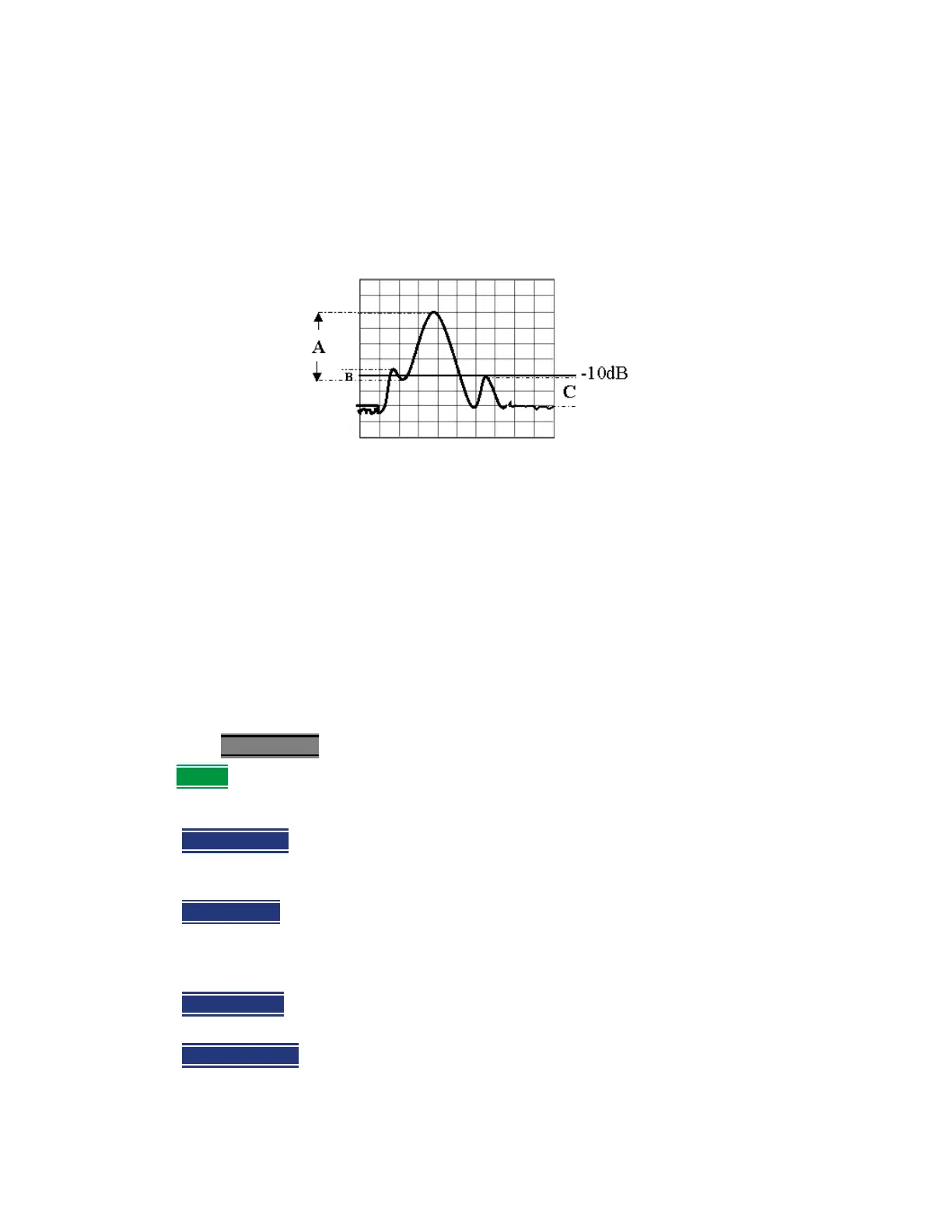
Peak Excursion and Peak Threshold example—the settings for the trace in the following
image are:
——Threshold: –10 dB
——Excursion: 1 dB
——Scale = 1 dB / Division.
Peak A = Valid Peak (Above Threshold and Excursion Settings)
Peak B = Invalid Peak (Below 1 dB Excursion Setting)
Peak C = Invalid Peak (Below –10 dB Threshold Setting)
Marker Functions
Marker functions are used to change FieldFox frequency or distance settings to those of the active
marker.
How to use Marker Functions
1. Activate the marker to move.
2. Then press Mkr ->/Tools
3. Then Mkr -> (this step not required for all modes)
4. Then choose one of the following:
—
Mkr -> Center (Not available in DTF, I/Q Analyzer (waveform), or SA mode with zero
span) The center frequency of the measurement becomes the value of the active marker.
The frequency span is adjusted accordingly.
—
Mkr -> Delay (NA mode ONLY.) The group delay value of the active marker becomes the
electrical delay setting of the trace. Learn how to set group delay format in
“Calibration
Settings” on page 97
. Learn more about electrical delay in “Electrical Delay” on
page 101
.
—
Mkr-> RefLev (IQ Analyzer (NOT waveform) and SA mode ONLY) The acquisition
becomes the magnitude of the active marker.
— Mkr->TuneFreq
(SA mode with Tune & Listen ONLY) The Tune & Listen Frequency
becomes the frequency of the active marker (When AM Metrics or FM Metrics are
selected this softkey is inactive).













 To Next Page