552 Keysight N9915-90020 User’s Guide
Interference Analyzer (SA Mode) – Option 236
Record/Playback (SA Option)
Record Source
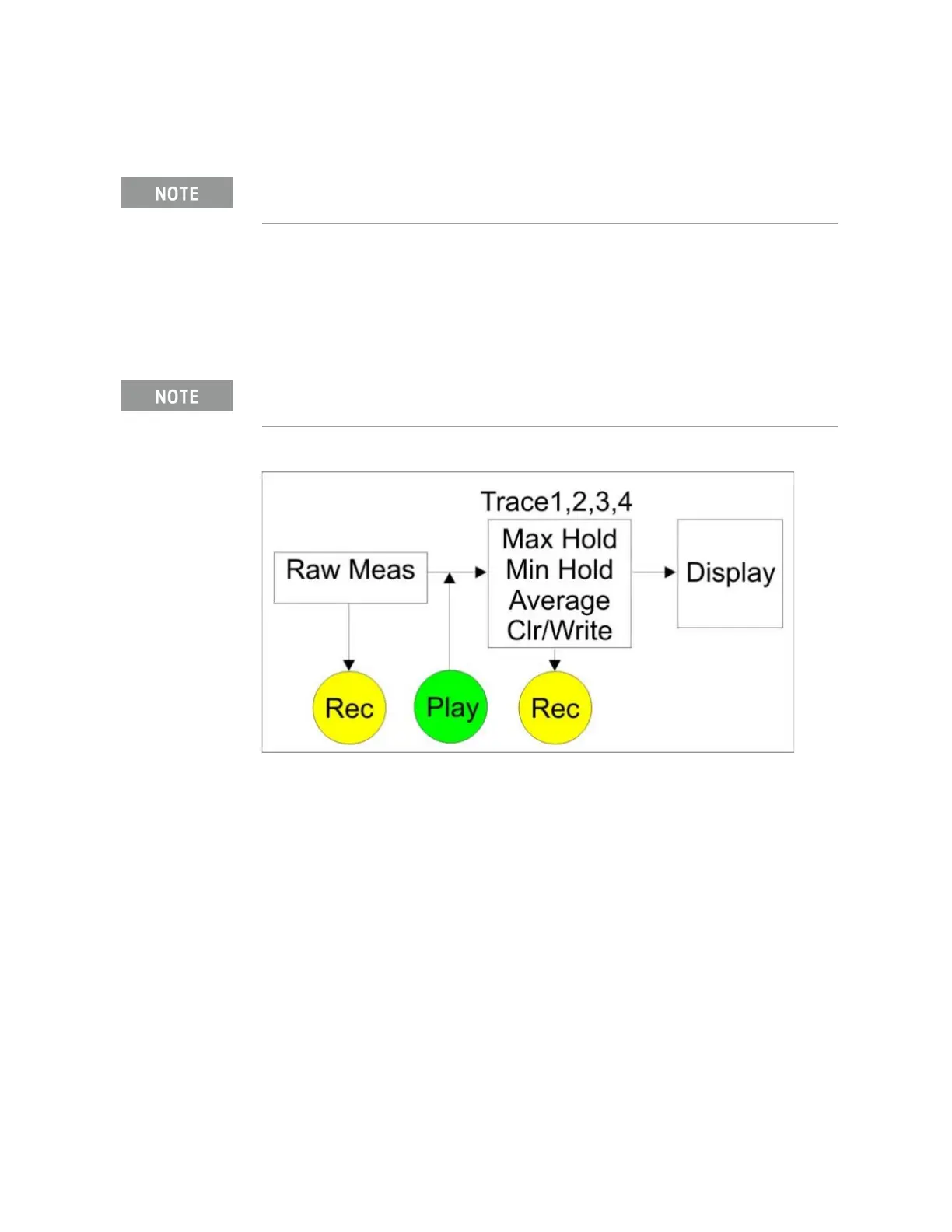
For SA mode, the simplest way to use Record Playback is to record RawMeas
data, which can then be played back into all of the current Trace States.
However, for more complicated processing, refer to the following diagrams.
These figures illustrate where in the FieldFox data flow data is recorded and
played back.
Figure 19-7 FieldFox SA Mode: Data Flow and Record Playback Data Points
SA Data Recording:
— Data can be recorded at the Raw Meas block where data is acquired after
ResBW, VideoBW, and Detector processing, but before any trace state
processing.
— Data can be recorded from Traces 1,2,3, or 4 which includes the trace state
(Max Hold, Min Hold, and so forth).
— Recording from a Clear/Write trace yields exactly the same data as
recording from the Raw Meas block.
— Data is ALWAYS played back at the same location in the data flow: just after
the Raw Meas block, through all currently active Traces, and onto the
display.
— See an example using Record Playback with Max Hold traces in
“Record
Playback Example (SA Only)” on page 554
.
The RawMeas data setting only applies to SA Mode.
For this discussion, it is important to understand Trace States. Learn more
in
“Trace Display States (SA Mode)” on page 203.













 To Next Page