196 Keysight N9915-90020 User’s Guide
SA (Spectrum Analyzer) Mode (Option 233–Mixed Analyzers)FUTURE
SA Mode Settings
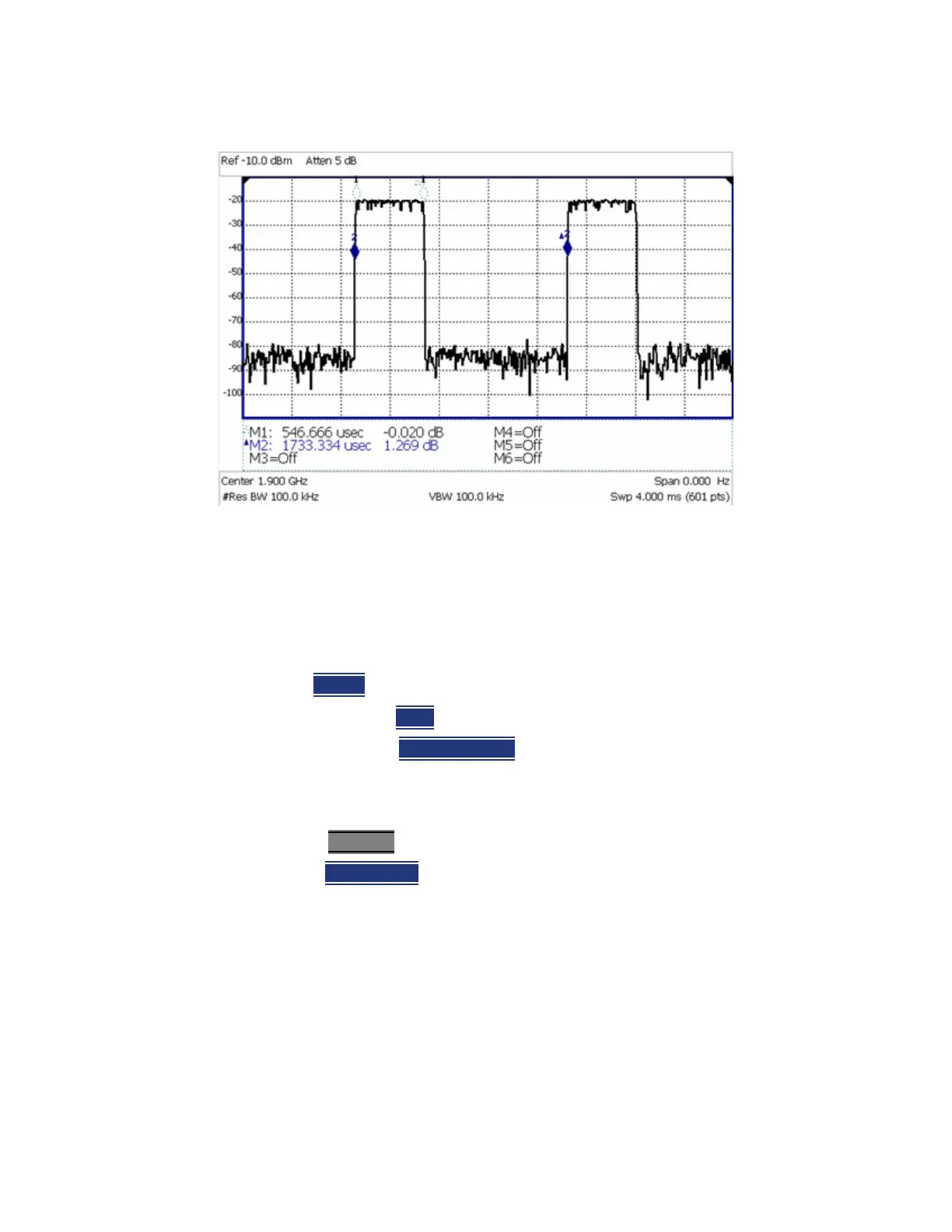
Figure 9-16 GSM Signal, Framed Data Format
The graphic above shows a GSM signal, framed data format, with timeslot 0
and 3 “on”. Sweep Time is set to approximately the frame interval. Press Single
several times until the waveform section of interest is viewable and stable.
Then markers can be used to measure the timeslot width and interval as
shown.
How to set Zero Span
—Set
Center to the frequency of interest
— then set Span to 0 Hz
—or select
Zero/Last Span
. Each key press toggles the frequency span
between 0 Hz and the last specified frequency span.
How to change Sweep Time in Zero Span
—Press Sweep 3
—Then Sweep Time
— Enter a value using the numeric keypad. Sweep time is limited to 1000
seconds for N991xB/2xB/3xB models.
— Then select a multiplier key. Learn more in
“Multiplier Abbreviations” on
page 46
.
Learn more about SA mode Sweep Time in the Supplemental Online Help:
https://rfmw.em.keysight.com/wireless/helpfiles/FieldFoxOnlineSupplement
alHelp/Home.htm
.













 To Next Page