ON-BOARD DIAGNOSTIC
U–55
U
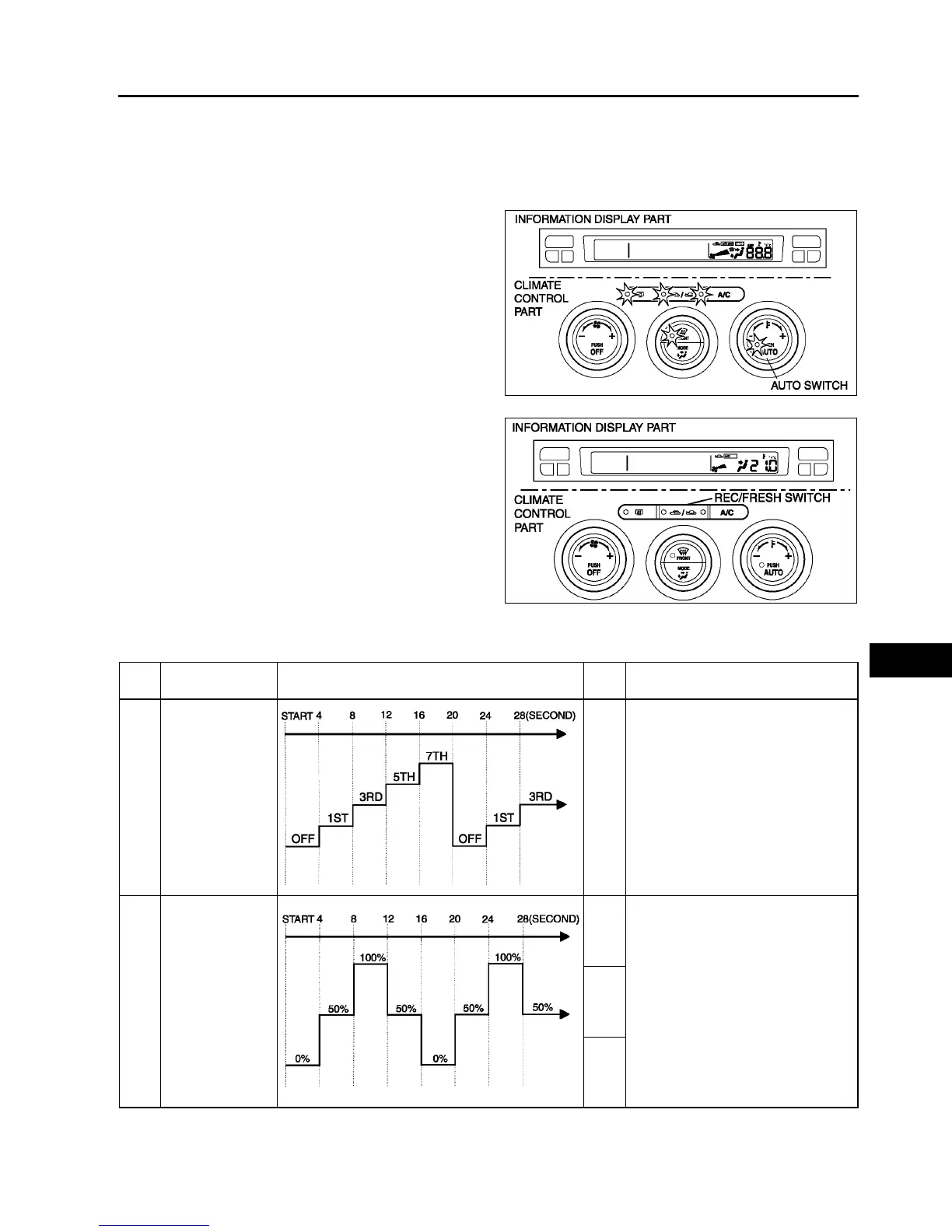
Output Device Operation Check Mode
Inspection
1. Warm up the engine.
2. Turn the ignition switch to LOCK position.
3. Start up the on-board diagnostic function (present failure indication mode).
4. Press the AUTO switch.
5. Verify that all the indicator lights of the climate
control unit and center panel (climate control part)
illuminate for 4 seconds.
6. Verify the operation of the each output device
when changing steps by pressing the REC/
FRESH switch, and referring to the output device
operation check chart.
• If not as specified, inspect the malfunctioning
system.
Note
• If the AUTO switch is pressed again, the on-
board diagnostic function will return to
present failure indication mode.
7. Turn the ignition switch to LOCK position to end
the on-board diagnostic function.
Output device operation check table
A6E8570W002
A6E8570W003
Step Operating device Operating conditions
Moni
tor
*
Other device conditions
1 Blower motor
speed
1
• Air mix actuator operation
— 50%
• Airflow mode actuator operation
— VENT
• Air intake actuator operation
— FRESH
• A/C compressor operation
— ON
2 Air mix actuator
operation
21.0
• Blower motor speed
— 3rd
• Airflow mode actuator operation
— VENT
• Air intake actuator operation
— FRESH
• A/C compressor operation
— ON
20.5
20.0



 To Next Page