T–94
AUDIO AND NAVIGATION SYSTEM
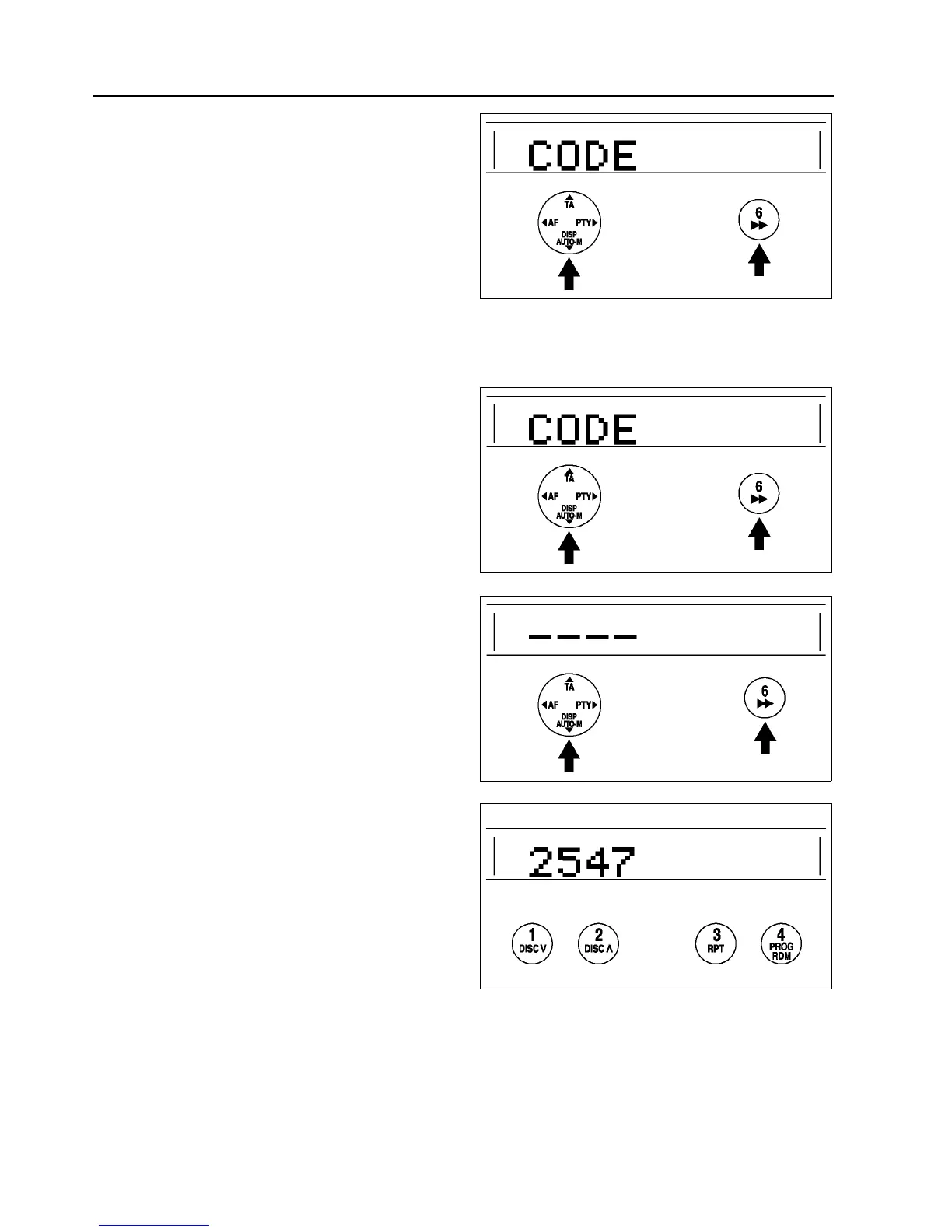
6. With the code number displayed, press the
AUTO-M button, then simultaneously press
channel button 6 for approximately 2 seconds.
“CODE” will be displayed for approximately 5
seconds. After it disappears, the code number is
set.
7. If “Err” (error) appears on the display, repeat the
procedure from Step 1. If input error is repeated
three times, turn the ignition switch to LOCK
position and repeat the procedure from Step 1.
Canceling the Code Number
Complete each step (Steps 1–3) within 10 seconds or the canceling procedure will be canceled.
1. Turn the ignition switch to ACC position and then turn off the audio unit.
2. First press the AUTO-M button, then
simultaneously press channel button 6 for
approximately 2 seconds until “CODE” appears
on the display.
3. Press the AUTO-M button again, then
simultaneously press channel button 6 until bars
appear on the display.
4. Use channel buttons 1–4 to input the current code
number. Press button 1 for the first digit, 2 for the
second, 3 for the third, and 4 for the last digit.
Input the number within 10 seconds. If the
display is deleted, repeat the procedure from Step
1.
Note
• Perform Step 5 within 10 seconds after
Step 4.
A6E8124W025
A6E8124W025
A6E8124W026
A6E8124W027



 To Next Page