VLANs
65
Managed Switches
The Interface field in the table heading displays 1/0/1.
c. In the Switchport Mode field, select Access.
d. In the Access VLAN ID field, select 1000.
e. Click Apply.
3. Configure port 1/0/2 as an access port in VLAN 2000.
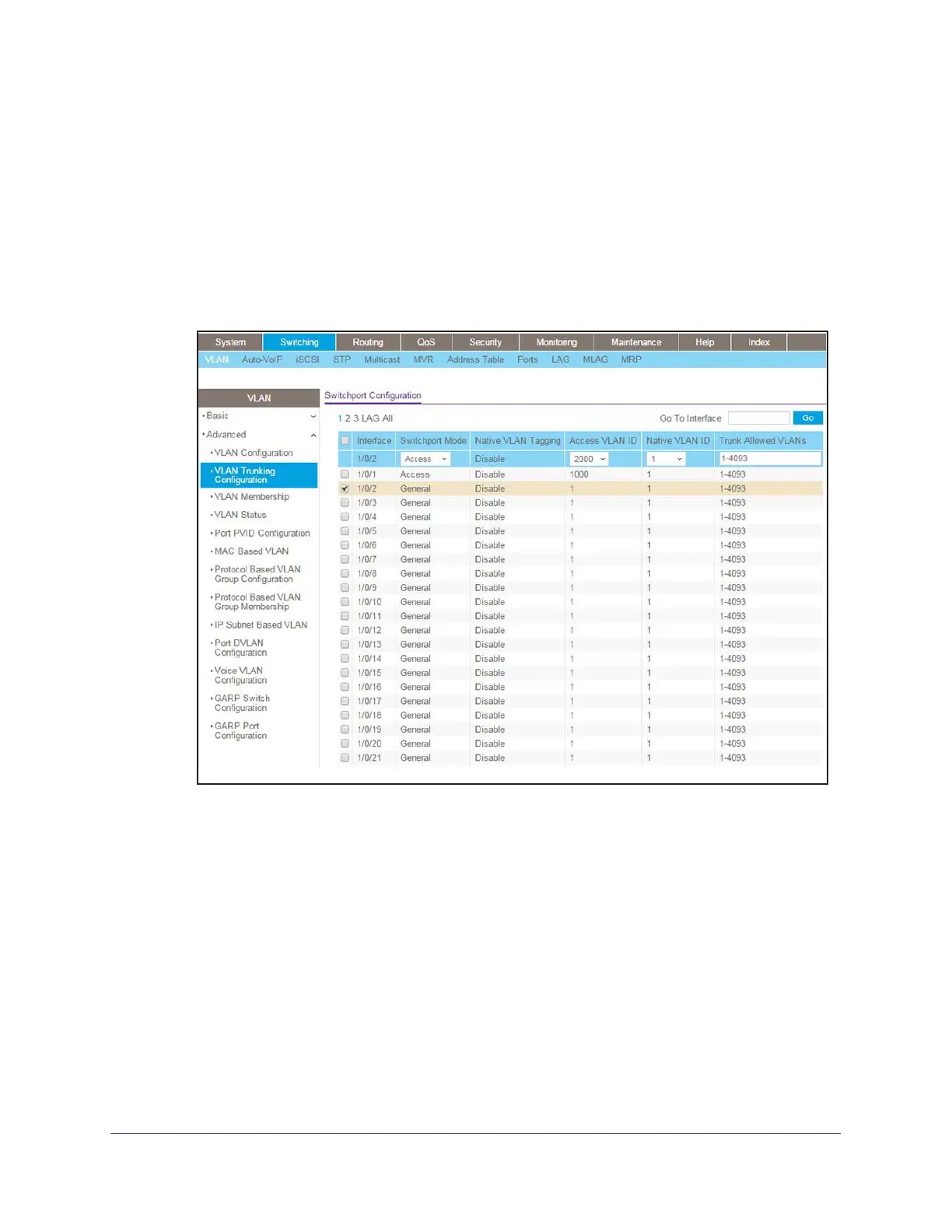
a. Select Switching > VLAN > Advanced > VLAN Trunking Configuration.
A screen similar to the following displays.
b. Select the check box that corresponds to interface 1/0/2.
The Interface field in the table heading displays 1/0/2.
c. In the Switchport Mode field, select Access.
d. In the Access VLAN ID field, select 2000.
e. Click Apply.
4. Configure port 1/0/3 as a trunk port that allows VLANs 1000 and 2000.
a. Select Switching > VLAN > Advanced > VLAN Trunking Configuration.
A screen similar to the following displays.









 To Next Page