DEQX User Manual
14.3 MULTICHANNEL OR HOME THEATER CONFIGURATIONS
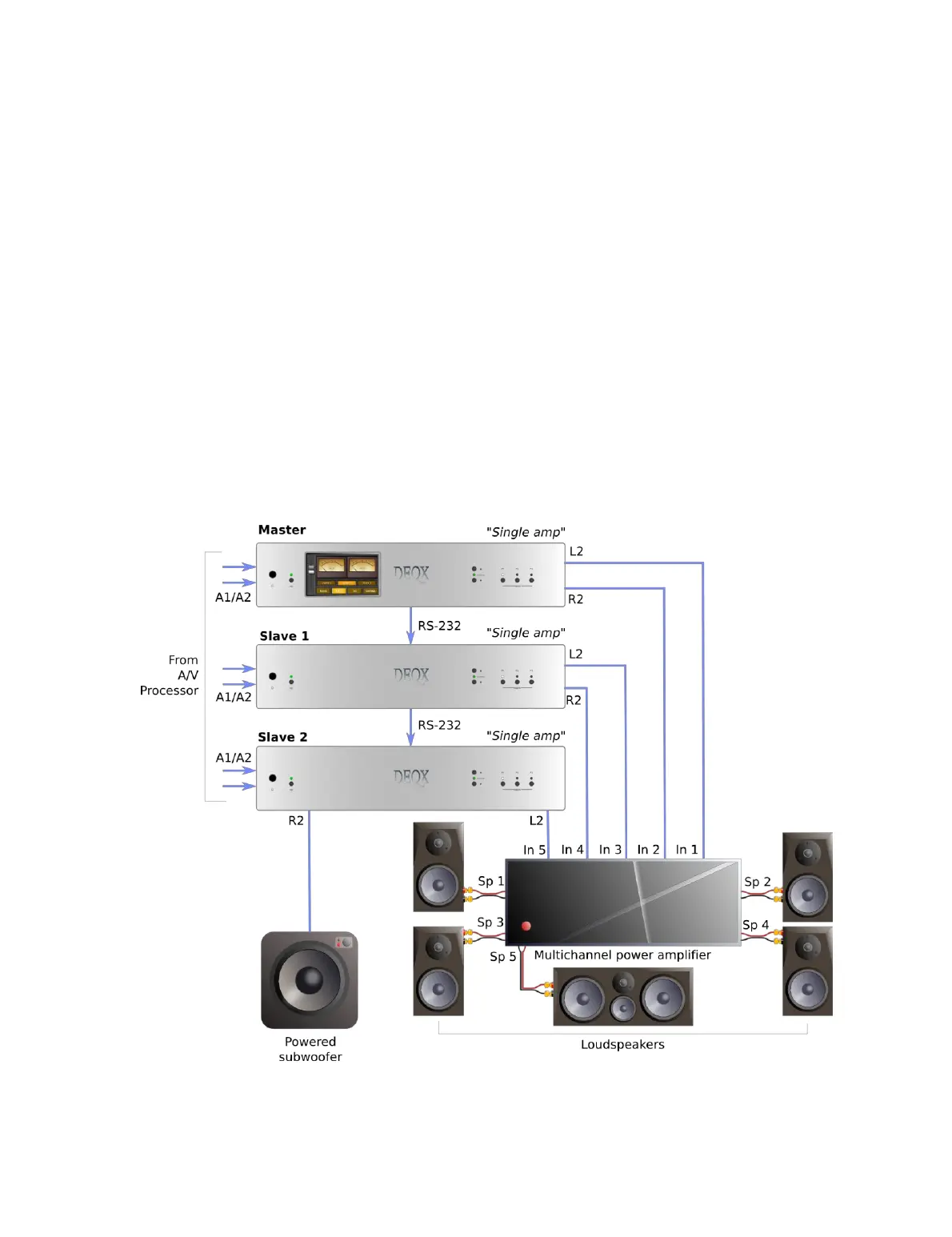
Multiple DEQX units can be slaved in a multichannel or home theater system. All slave
units are set to a fixed input (usually one of the analog inputs) and have audio provided
from a multichannel decoder or A/V processor. (The Digital Thru of the master is not
used in this type of system.)
A typical configuration is to use a PreMATE+ as the master unit, and PreMATE or HDP-
Express II units for the slaves. The RS-232 connections are “daisy chained” from master
to slave to slave. Figure 10 illustrates the key connections for a 5.1 system. Expansion to
higher numbers of channels is straightforward.
To configure each slave unit in DEQX-Cal, open the Options dialog (from the Tools
menu) and disable the front panel buttons and remote control. In the IO Manager,
select either Analog 1 or Analog 2 as the input source.
If desired, active speakers on all channels can be implemented by using an HDP-5 as the
master unit and HDP-4 or HDP-Express II units for the slaves.
Figure 10. Multichannel or home theater DEQX system



 To Next Page