Chapter 9. Configuring the DEQX
9.7 ADD A SUBWOOFER OR SUBWOOFERS
If you are using a subwoofer or subwoofers, add limit filters to implement a crossover
between the subwoofer and the main speakers. (The following steps assume that
Profile 𝟢 and Profile 1 have been set up as described on the previous two pages.)
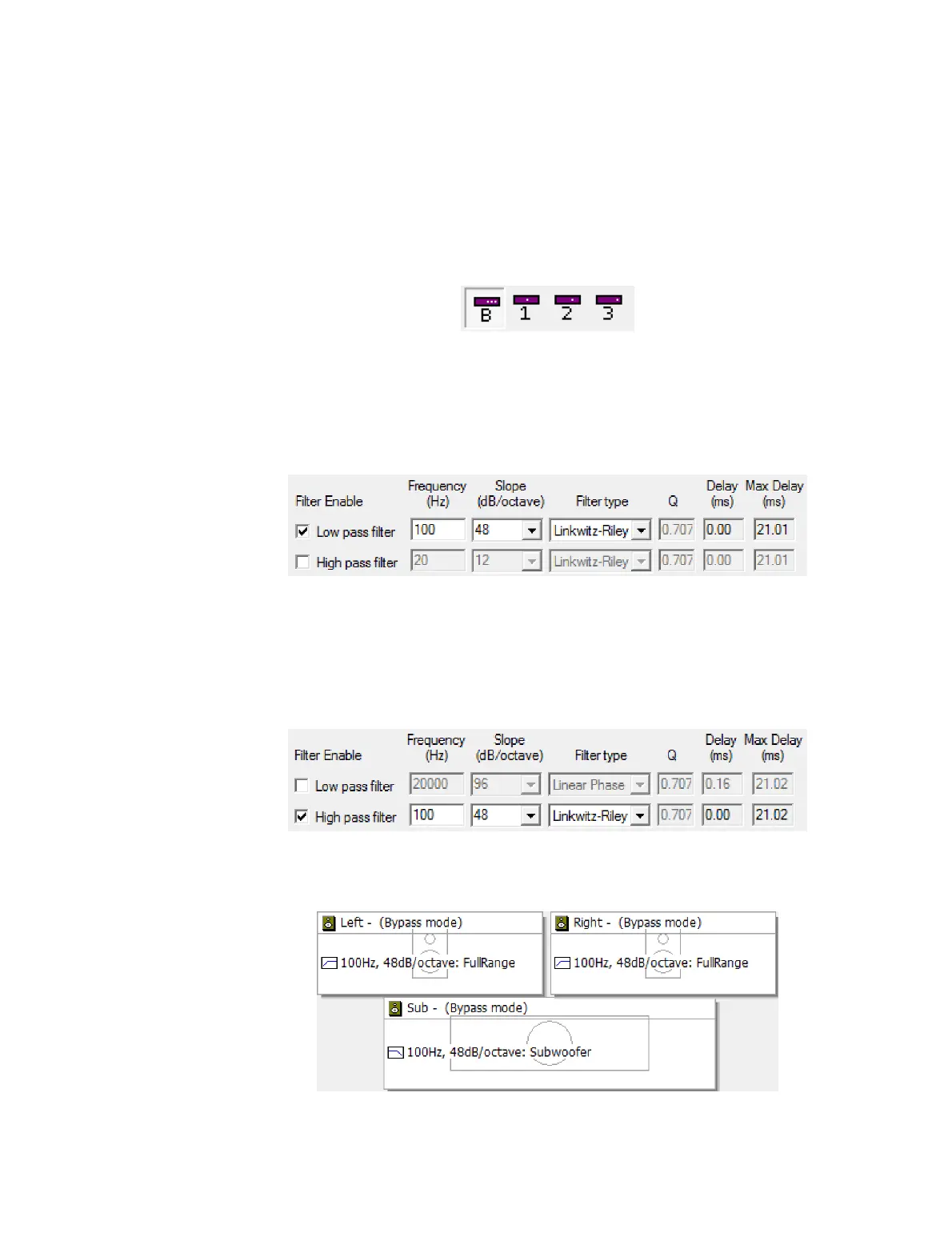
1. Select Profile 𝟢 from the toolbar:
2. Open the Filter Properties dialog of the subwoofer (or the left subwoofer if using
stereo subwoofers) and select the Limit Filters tab.
3. Enable the checkbox labeled “Low pass filter” and then set the desired filter type,
frequency and slope parameters. Typically, this is a Linkwitz-Riley filter between 80
and 120 Hz with a 24 or 48 dB/octave slope:
4. Close the dialog box. If using stereo subwoofers, repeat for the right subwoofer.
5. Open the Filter Properties dialog of the left speaker and select the Limit Filters tab.
6. Enable the checkbox labeled “High pass filter” and then set the desired filter type,
frequency and slope parameters. As a starting point, use the same values used for
the low pass filter:
7. Close the dialog box and repeat for the right speaker.
The speaker and subwoofer icons will display the limit filters:



 To Next Page