Chapter 3. The Front Panel
3.3 PROFILE SELECTION
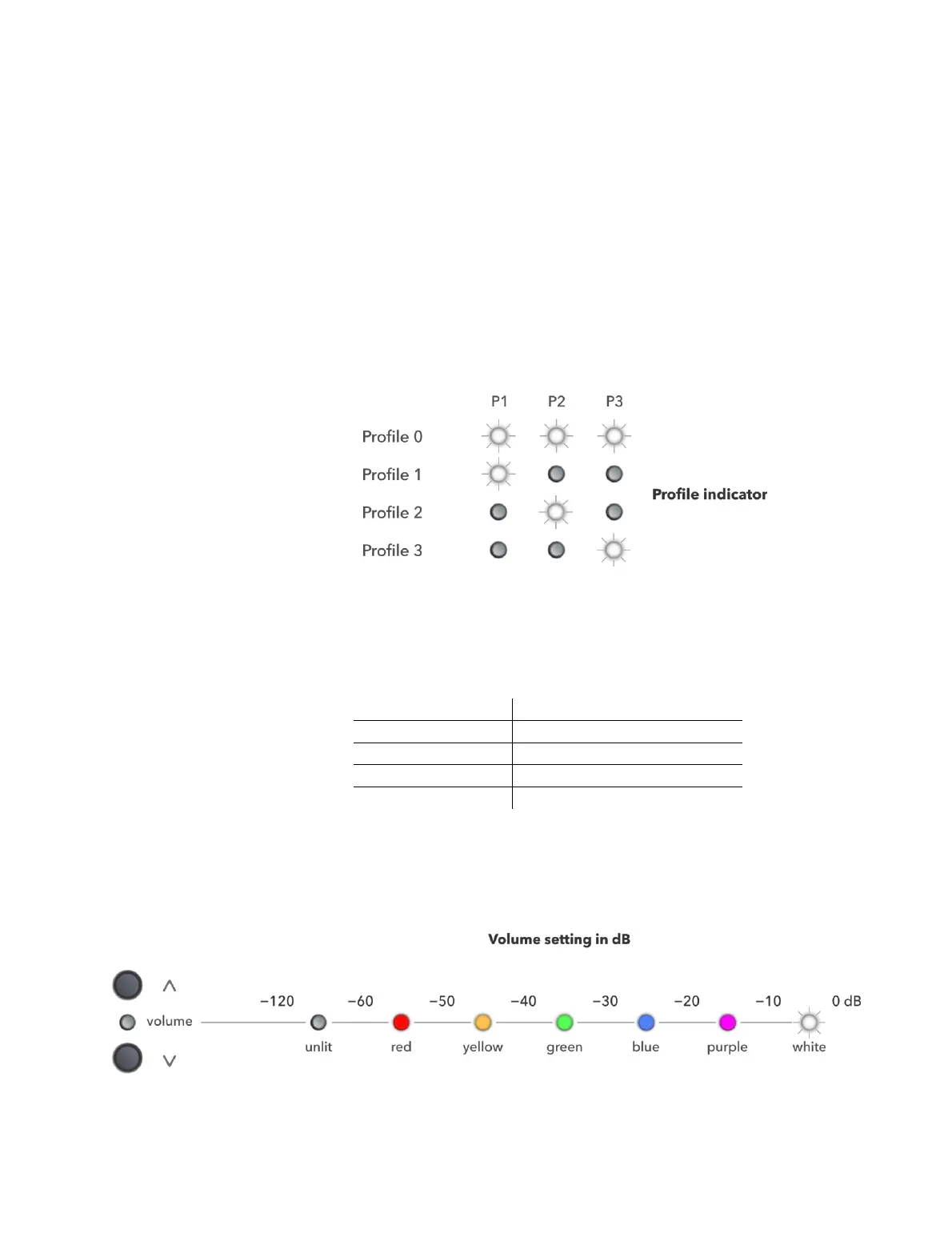
The P1, P2 and P3 buttons are used to select a profile. Each profile contains a set of
correction filters and room EQ, so switching between profiles can be used to audition
different correction filters and for different listening situations. Use a single button to
select Profiles 1 to 3 and any two buttons to select Profile 𝟢.
x PreMATE+ and HDP-5: Press and hold the button or buttons for two seconds.
x PreMATE, HDP-4, and HDP-Express II: Press the button or buttons and release
immediately.
The LEDs light white to indicate the currently selected profile:
3.4 VOLUME
Press the up and down buttons to increase or decrease the master volume. The change
in volume on each button press depends on the current volume setting:
Volume step size (approx.)
Below −120 dB, the DEQX is effectively muted. The Volume LED provides an indication
by color of the volume setting in 10 dB ranges, as illustrated in the diagram below.



 To Next Page