Chapter 9. Configuring the DEQX
9.3 THE CONFIGURATION WINDOW
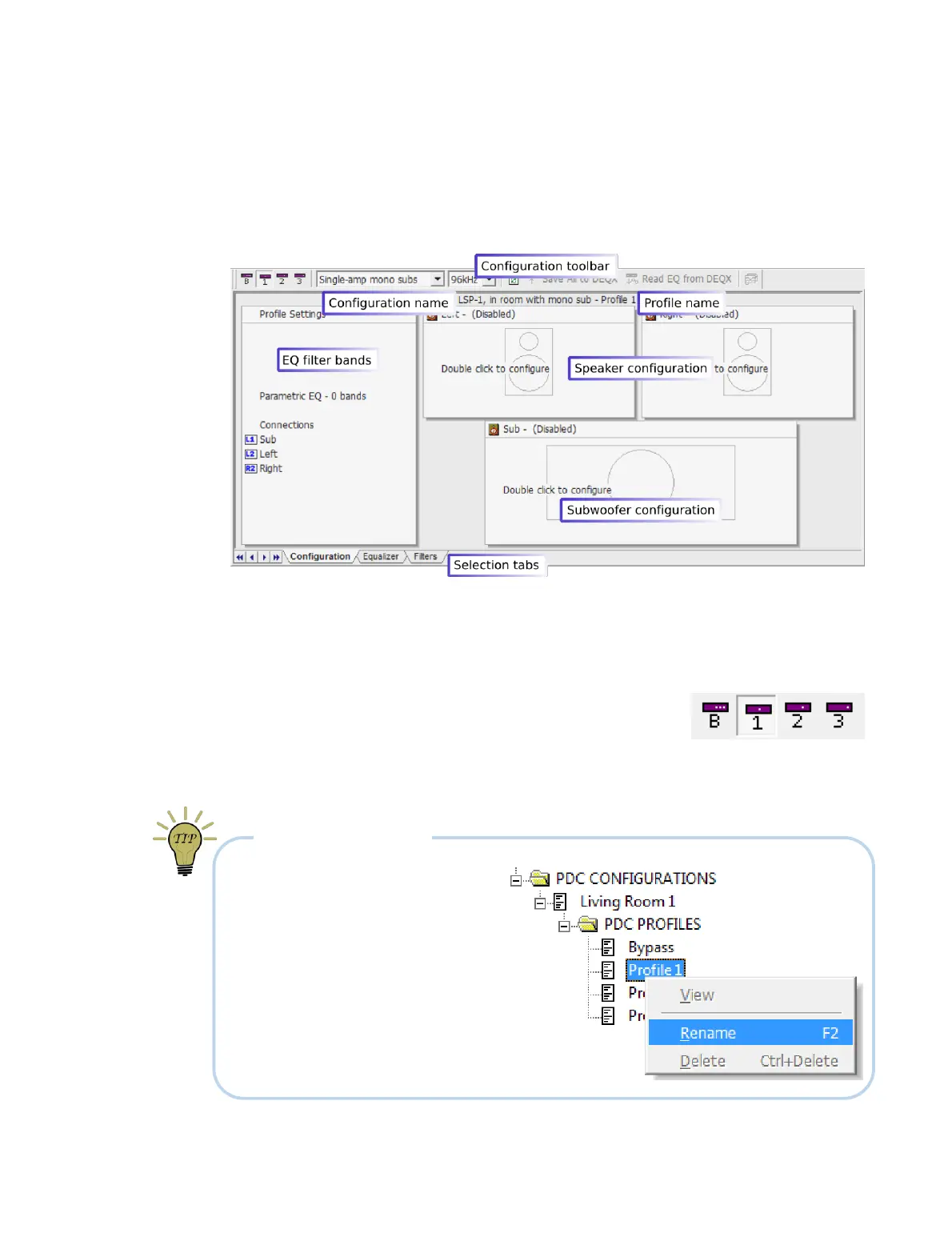
The configuration window contains a diagrammatic representation of the speakers,
with either one or two subwoofers. By default, all speakers in each profile of a new
configuration are disabled, as indicated by the labels “Left - (Disabled)” and so on.
At the top of the window is a toolbar containing a set of important controls. (While you
are becoming familiar with them, you may prefer to turn on text labels. To do so, see
page 158.) From left to right:
Profile selection
These buttons set the profile currently being
displayed or edited.
Check this selection every time you edit a configuration, to avoid changing the
wrong profile. To make these buttons more prominent, you can enable text labels
for the toolbar – see page 158.
RENAMING PROFILES
The profile name displayed in the
window can be changed by
renaming the profile, so that e.g.
“Profile 1” in the screenshot above
is replaced with a meaningful name.
Do this in the project explorer:
navigate to the configuration, right-
click on the profile, and select
“Rename” from the pop-up menu.



 To Next Page