DEQX User Manual
13.2 MEASURING MULTIPLE DRIVERS
Each driver of an active speaker is measured in turn, starting with the woofer.
Measurement technique for the bi-amp and tri-amp configuration modes generally
needs to be better than for single amp mode. A longer reflection-free time window will
be required not only for lower crossover points (in the case of tri-amp), but also to take
account of the transition of acoustic radiation from half-space to full-space as
wavelengths become greater than the baffle width (also known as diffraction loss or
“baffle step”).
The overall procedure is the same as for the single-amp configuration described in
Chapter 6, with specific differences noted here.
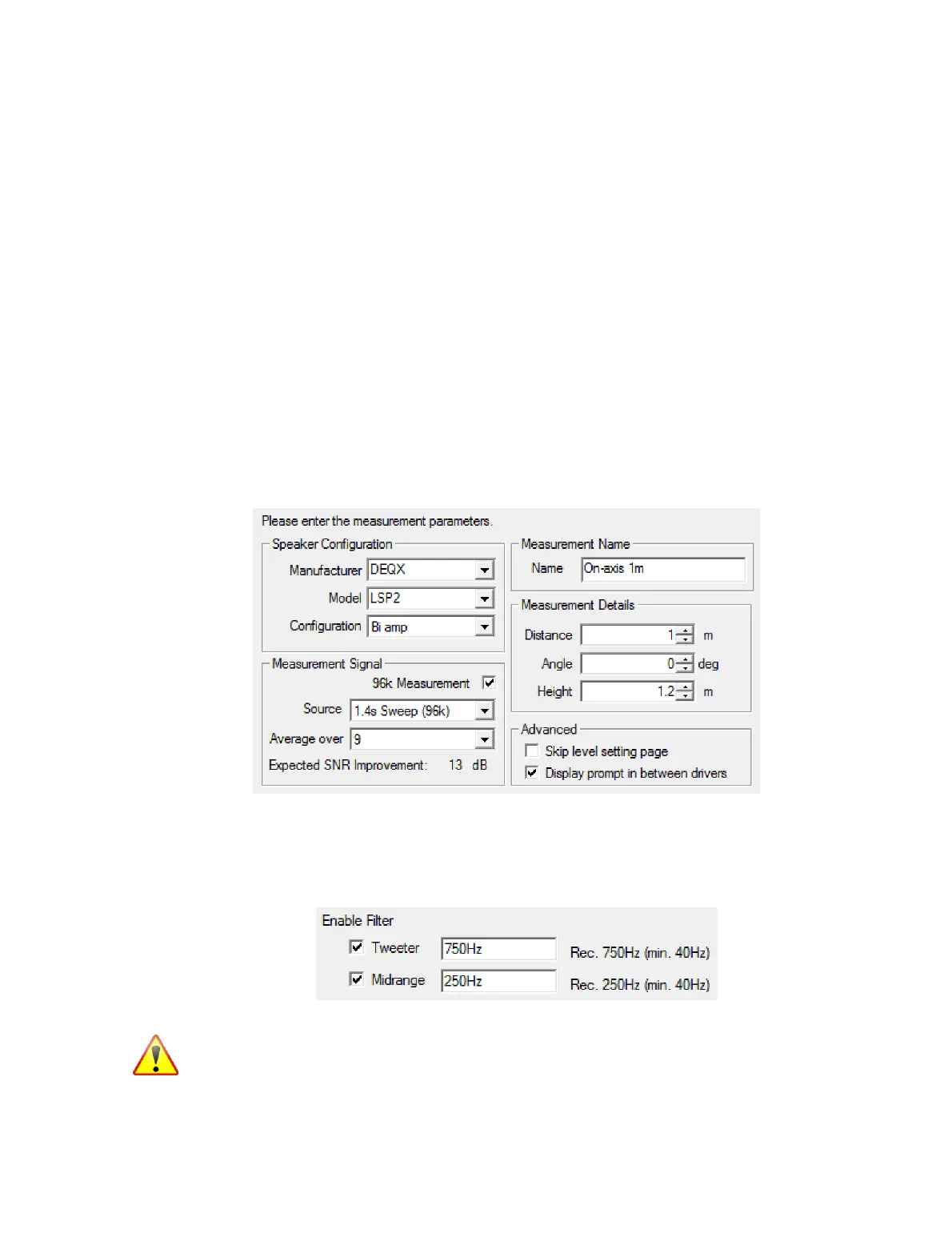
Screen 3. Set the Configuration parameter to “Bi amp” or “Tri amp.”
Usually, the option “Display prompt in between drivers” is checked, so that the
microphone can be moved between the measurements of each driver. This may not be
necessary in bi-amp mode, but usually will be in tri-amp mode.
Screen 3a. After clicking Next, an additional screen appears. This screen can be used to
set a lower frequency limit on the measurement sweeps for the tweeter and midrange
drivers. As a rule of thumb, the lower frequency limit should be set one to two octaves
below the intended crossover frequency.
The tweeter is especially prone to damage if this option is turned off. Be sure that you
understand the potential consequences before turning off this option.



 To Next Page