Chapter 2. Installation and Connectivity
ANALOG OUTPUT EXAMPLE
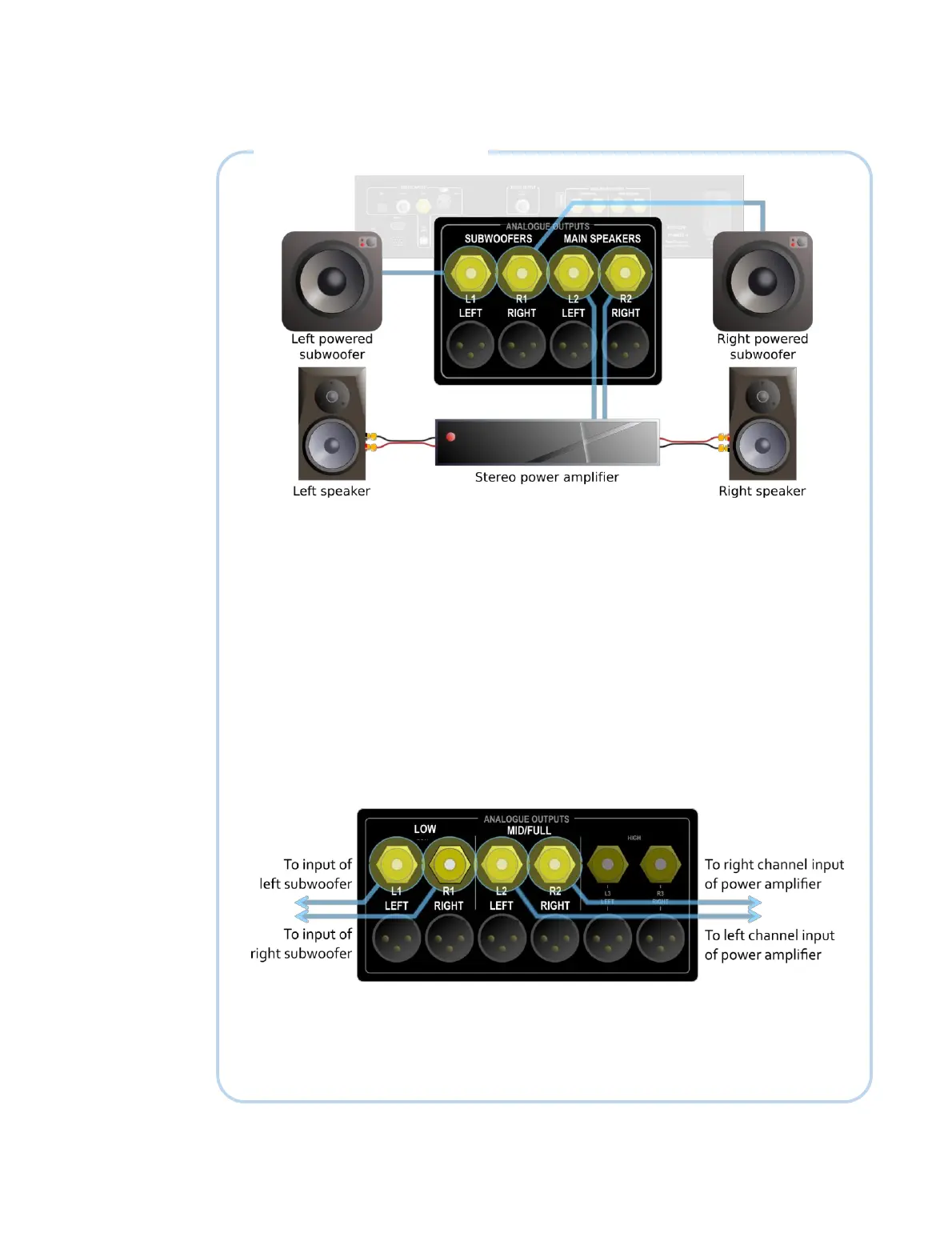
The diagram above illustrates the connections for a pair of full range speakers and a pair
of stereo subwoofers connected to a PreMATE or PreMATE+. Take the left channel
speaker output from L2 and the right channel speaker output from R2. Connect the left
and right subwoofers to L1 and R1 and in DEQX-Cal, set the speaker configuration
mode to “Single amp with optional stereo subwoofers.”
If using just one (mono) subwoofer, connect it to L1 and leave R1 unconnected. In that
case, set the speaker configuration mode in DEQX-Cal to “Single amp with optional
mono subwoofer.” If not using a subwoofer, simply leave the subwoofer outputs
disabled when configuring the DEQX in DEQX-Cal.
For the HDP-4 or HDP-5, the output connections are still taken from L2 and R2 for the
speakers and from L1 and R1 for the subwoofers. However, the labeling on the rear
panel is slightly different, as shown below.
In the case of the PreMATE, PreMATE+, HDP-4 and HDP-5, use the balanced outputs if
the connected amplifiers or subwoofers have balanced inputs.
For the HDP-Express II, the connections are as shown above for the HDP-4 and HDP-5,
but there are no balanced outputs.



 To Next Page