DEQX User Manual
3.1 BUTTONS AND INDICATOR LEDS
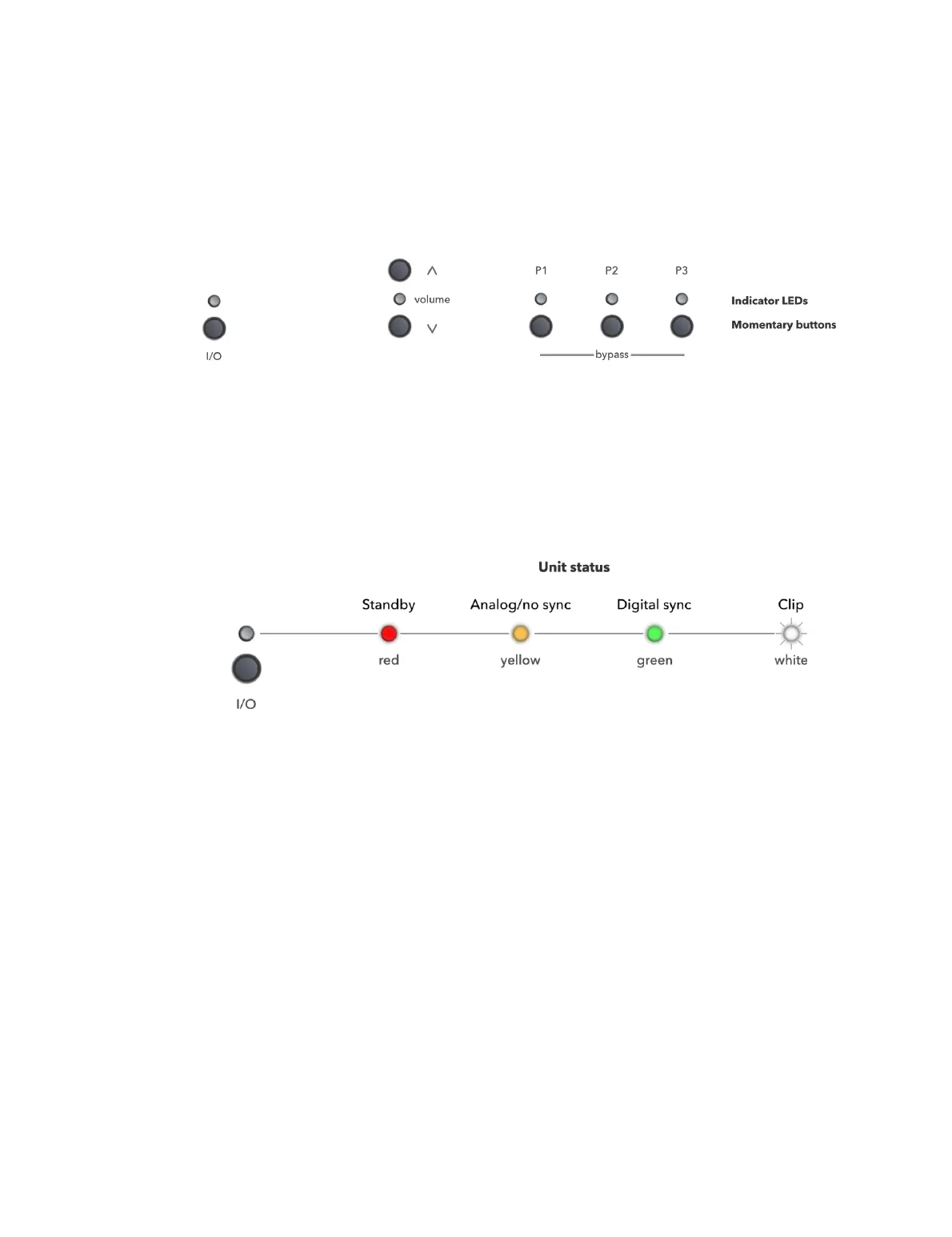
There are five sets of buttons and corresponding indicator LEDs on the front panel. The
standby (I/O) button and indicator is to the left of the panel, while the volume and
profile selection buttons and indicators are clustered on the right side of the panel.
Note: the HDP-Express II does not have the buttons on the front panel and relies on the
DEQX Remote for these operations. The indicator LEDs behave the same way as other
models.
3.2 STANDBY
Press the I/O button to take the DEQX out of or put it into standby mode. The indicator
LED displays current unit status as shown here:
Standby (red)
The DEQX is in standby mode.
Analog/no sync (yellow)
An analog input is selected, or a digital input is selected and there is no sync signal
detected.
Digital sync (green)
A digital input is selected and digital sync is detected. (Note that the USB Audio
input will always flag a sync detect even if there is nothing connected to the USB
Audio input port.)
Clip (white)
Clipping was detected on the analog input or on an output channel. The LED
remains white for several seconds after a clipping event is detected.



 To Next Page