DEQX User Manual
Roon
Roon (https://roonlabs.com/) is a music player that runs on Windows, Mac, and Linux. It
integrates various sources of music data, including content from the streaming audio
service Tidal (http://tidal.com/). From the Roon website: “Roon looks at your music and
finds photos, bios, reviews, lyrics, and concert dates, and makes connections between
artists, composers, performers, conductors, and producers.”
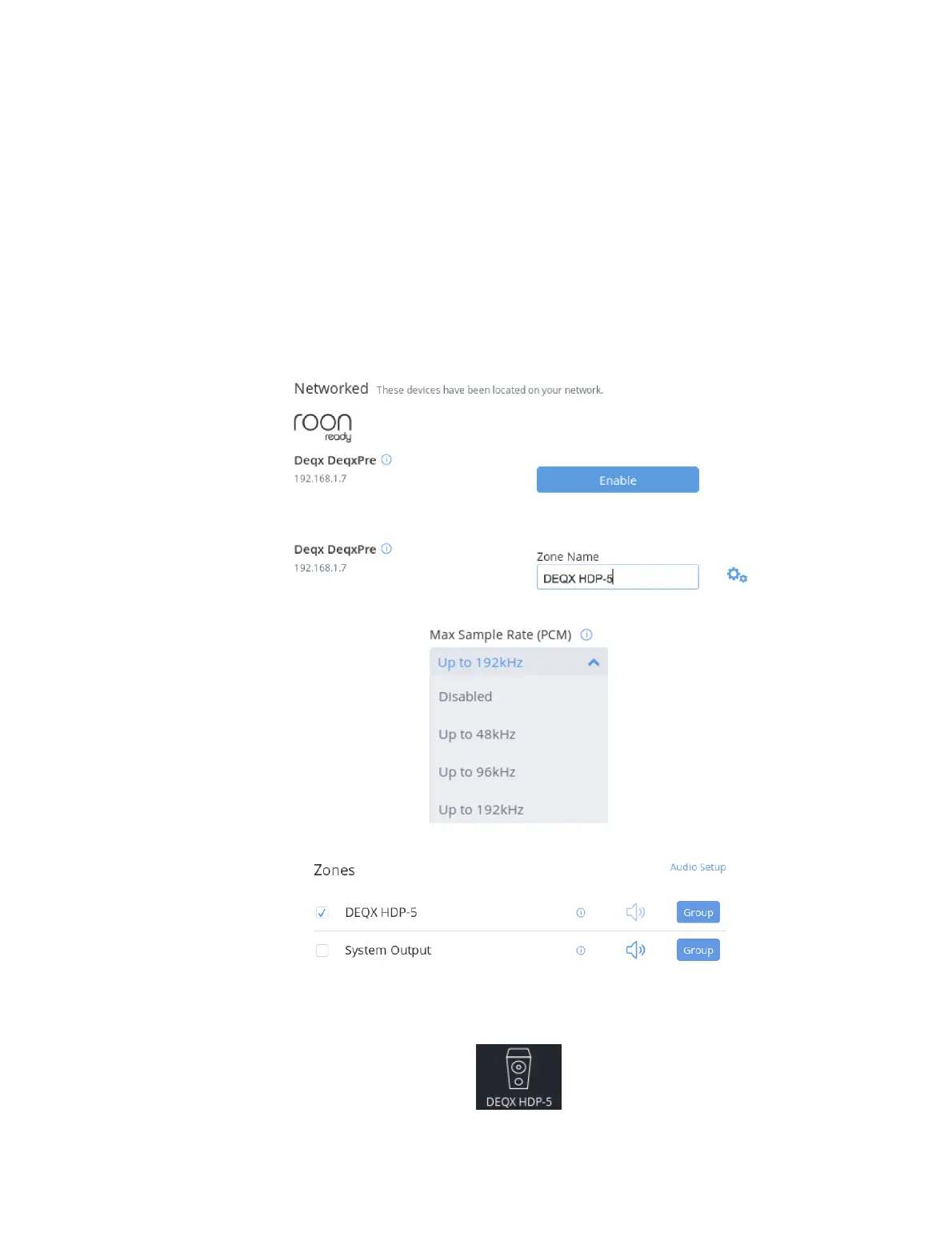
The DEQX HDP-5 and PreMATE+ are Roon Ready network players. To send audio from
Roon to your DEQX, open Roon’s Audio Setup panel. Scroll down, and you will see
“Deqx DeqxPre” listed in the “Networked” section:
Click the Enable button. You can now rename the DEQX as you wish:
Click on the “gears” icon to the right and select 192 kHz as the Max Sample Rate:
Select your DEQX as the playback zone:
Select music to play using the Roon interface. Roon will display your DEQX as its
playback device (lower right of player window). Control playback volume from the
DEQX touchscreen or with the DEQX Remote.



 To Next Page