System 3505 Installation & Operation Manual
Digitize, Inc. 700248-0002 Rev. C 02/16
Specification Subject to Change Without Notice
10-4
Acknowledges the Alarm on CGRMS or the RA unit. User can select which LAN ID or any
of several LAN ID devices can send the operator ACK via screen #3.
NOTES:
1. SEND 3505 ACK to D-LAN option and SHOULD OPER ACK FROM D-LAN, ALSO ACK THIS 3505 UNIT
option should not both be set to Y. If both are set to Y, the SYSTEM 3505 will only respond to SEND 3505 ACK
to D-LAN.
2. There is an automatic timeout that the user can set on screen page #3 selecting the auto ACK timeout from 1 to
240 seconds. Thus if no operator ACK is received by the SYSTEM 3505, it will auto self ACK in the selected
time. Setting the time to 0 seconds disables the auto ACK time. The factory default is 180 seconds.
SHOULD NETWORK RX ACK, be sent to D-LAN DEVICES – If an ACK is processed
via the Digitize Network option, and the “should I” menu is set to RX ACK = Y, then setting
this option to Y will result in the Network ACK being processed by the CGRMS or RA.
Additional setting may be needed on CGRMS or the RA to accomplish this at CGRMS or the
RA.
Allow In/Out of Service From D-LAN – Set to Y, taking an account O/S at CGRMS or the
RA will place this account O/S at the SYSTEM 3505. Additional settings may be required in
CGRMS or the RA to send this information to the 3505.
SEND OPER ACK TO 3505 NETWORK – When set to Y and an operator ACK is
received from one of the selected D-LAN ID’s, the ACK will be transferred to the SYSTEM
3505 Network. Please note that selection of Y to this selection will only transfer the ACK to
the Network, but will not ACK the 3505. The factory default is N.
Auto update D-LAN when link restored – When set to Y, the system 3505 will resend all
of its alarms to the D-LAN any time it detects that the RA or CGRMS comes back on-line.
The update includes a start and end command, allowing CGRMS to ADD or PURGE and
condition so its alarms are in sync with the 3505.
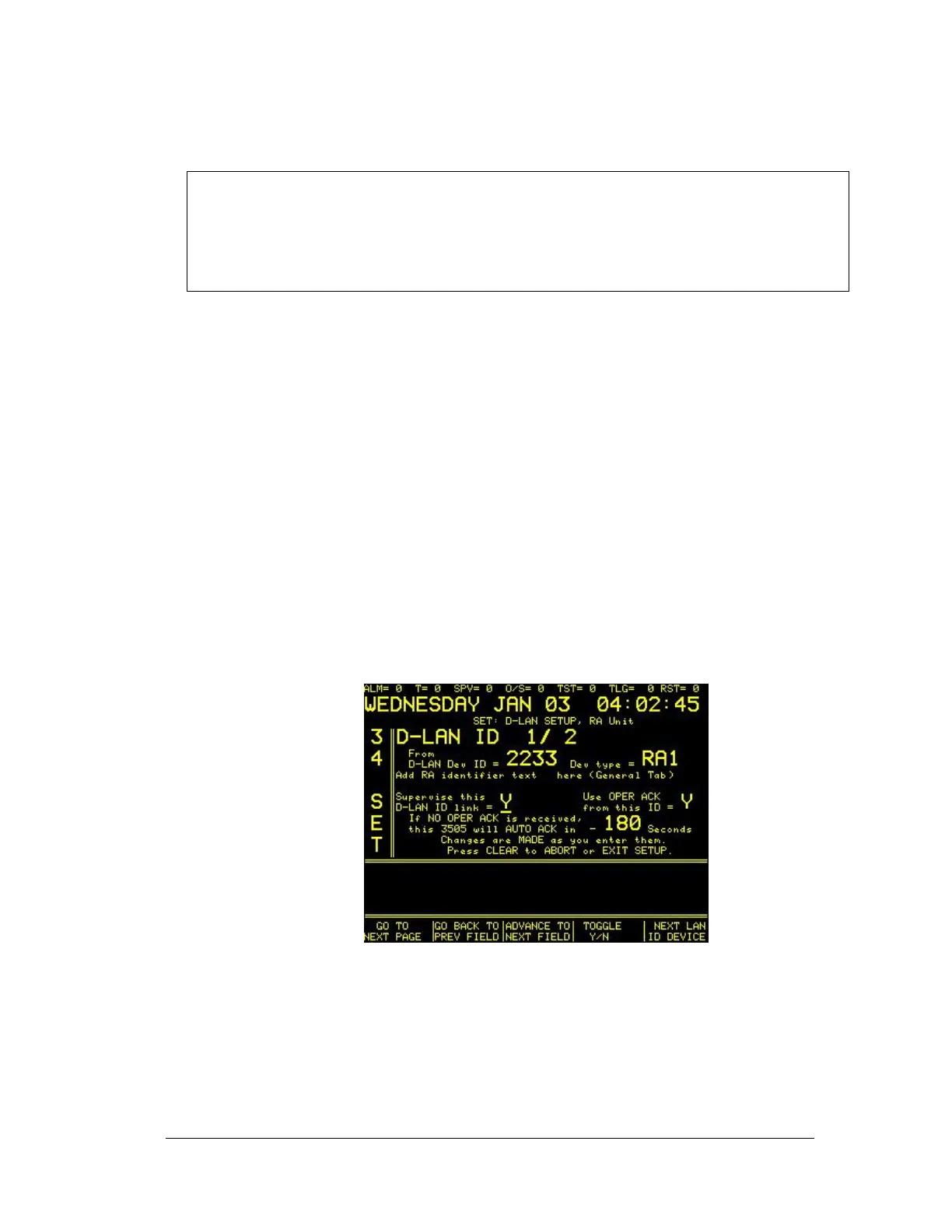
34 SET MENU: Screen 4 of 4
D-LAN ID 1/2 – The user cannot directly control this setting as well as the D-LAN Dev ID
or the type. Any time a new D-LAN device is connected, it will auto update this information.
Thus, the next D-LAN Dev that connects will change the 1/2 to 1/3. The 2233 is the D-LAN
ID for the first device that connected to the 3505. RA1 indicates that the D-LAN device is a
Remote Annunciator. CG1 is the designator for a CGRMS device. Press the NEXT LAN ID
DEVICE to switch between the D-LAN devices.





 To Next Page