System 3505 Installation & Operation Manual
Digitize, Inc. 700248-0002 Rev. C 02/16
Specification Subject to Change Without Notice
10-3
necessarily guaranty that the automation system actually processed the condition, just that the
automation system driver accepted the alarm. The factory default for this selection is N.
Send DDI or RAD DAILY Test Signals- Set to Y, the SYSTEM 3505 is set to pass the
daily tests that it receives from dialer or radio systems to the D-LAN. The automation system
selected must have a process to keep track of these daily tests and report any missed dialers or
radio boxes via the automation system. Activating this selection does not preclude the
SYSTEM 3505 from processing the daily test and reporting any missed dialers or boxes.
MY LAN ID = XXXX- The D-LAN assignment for the SYSTEM 3505. The LAN ID must
be unique, except when an overall system includes a primary and backup SYSTEM 3505
with D-LAN option, in which case both the Primary and the Backup 3505 units MUST BE
SET TO THE SAME D-LAN ID. Only the primary SYSTEM 3505 communicates via the D-
LAN, thus there is no confusion in setting the same LAN ID. The backup SYSTEM 3505
takes on the Primary ID and adds 1 to it. Thus, with a Primary and backup SYSTEM 3505,
do not issue the next sequential LAN ID number to any other device. Note that the IP address
is unique to each SYSTEM 3505, thus there is no issue on the Ethernet connection.
This Unit is Located At (Changeable via 34 SET)– Provide a unique location and
description of the D-LAN device. When a new D-LAN device is brought on-line, it responds
with its D-LAN device ID and 48-character text string. The SYSTEM 3505 records this
information in permanent memory and uses this ID and text to report any device failures.
The 34 SET menu allows the user an opportunity to identify the SYSTEM 3505 name and/or
location for other D-LAN devices. For example, CGRMS and the Remote Annunciator will
use this ID and text information to report a loss of communications with the SYSTEM 3505.
The text string should be unique enough so that the dispatcher can identify the location of the
failure. Factory default is as shown on the screen.
The 48 character text can b changed by having the flashing cursor in the 48-character text
field, plugging in the KBD-1 and using this external keyboard to modify the 48-character text
string.
Send Single/Multi Page– The factory default is Multi page, which sends all the Control
panel, account specific and generic information to the automation or RA systems.
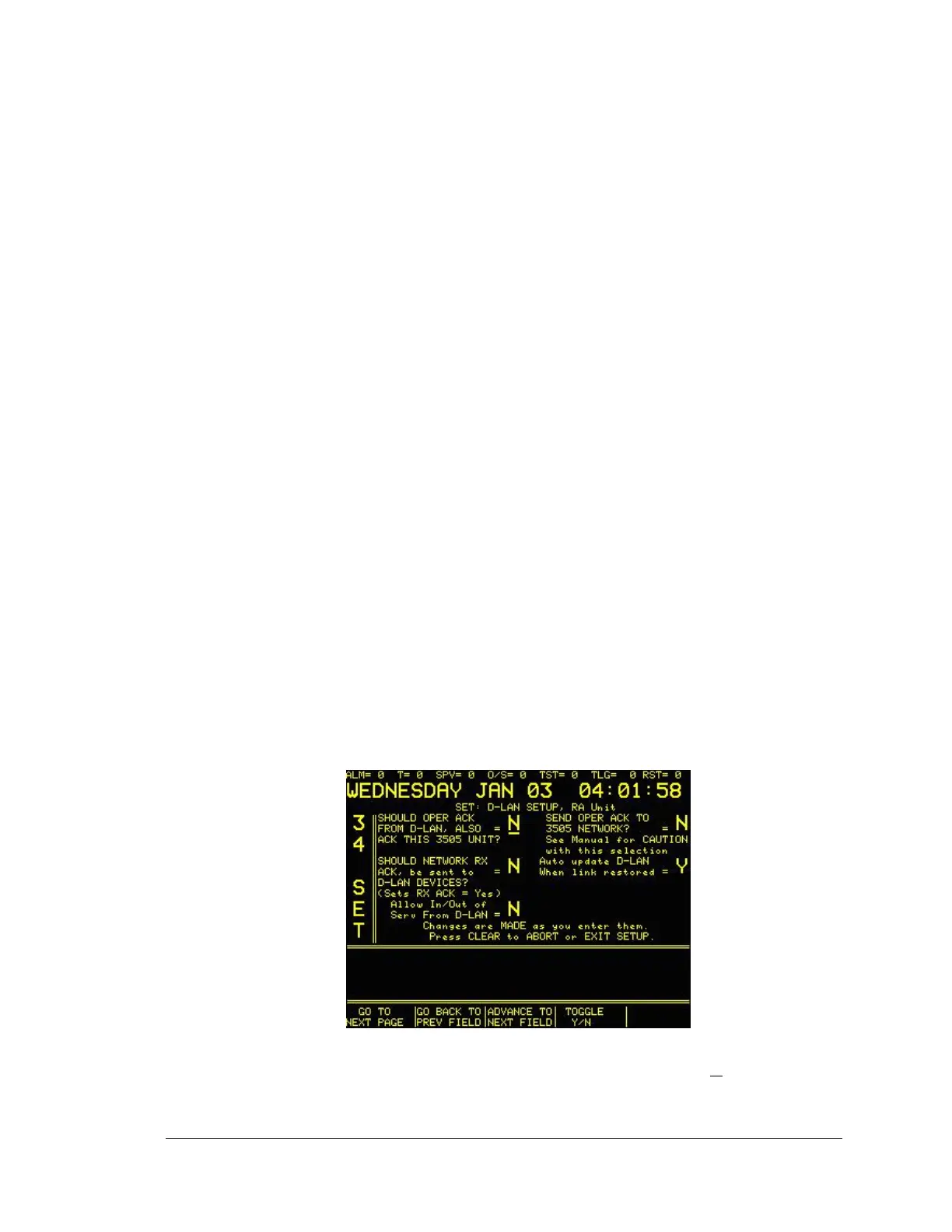
34 SET MENU: Screen 3 of 4
SHOULD OPER ACK FROM D-LAN, ALSO ACK THIS 3505 UNIT? – When set to Y,
the 3505 will continue to annunciate the Alarm until the selected operator (see screen #3)





 To Next Page