152 Upgrade and Maintenance Manual RX1330 M3
Hard disk drive (HDD) / solid state drive (SSD)
Left side 4 x 2.5-inch HDD backplane (A3C40196780)
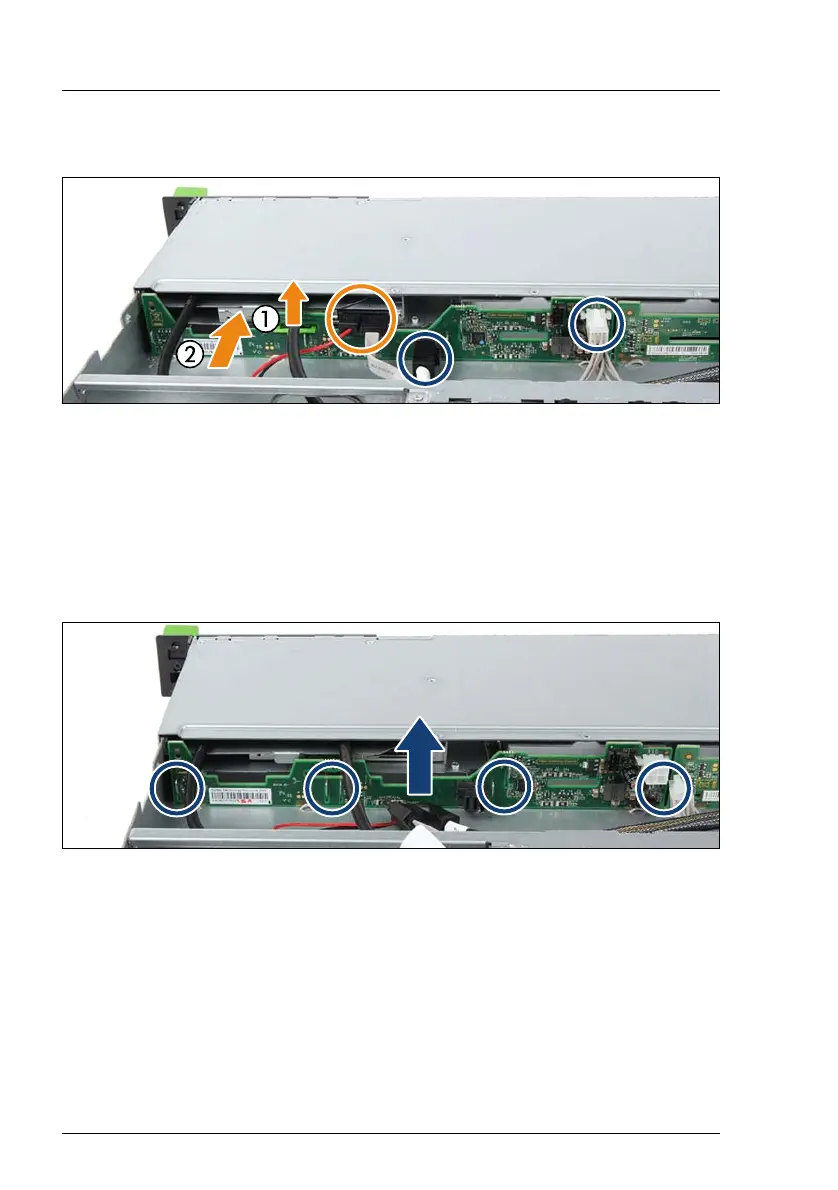
Figure 67: Releasing the ODD latch and disconnecting the cables
Ê If applicable, disconnect both cables from the ODD (see orange circle).
Ê If applicable, pull the ODD latch upward (1) until it disengages and push the
ODD somewhat in direction of the front side (2).
Ê Disconnect all cables from the HDD backplane (see blue circles).
I If applicable, remove the OOB cable from the HDD backplane, too.
Figure 68: Removing the 4 x 2.5-inch HDD backplane
Ê Pull the HDD backplane upward until the six hooks disengage (see circles).
Ê Take out the HDD backplane.



 To Next Page
 Loading...