Home
Fujitsu
Server
PRIMERGY RX1330 M3
Upgrade And Maintenance Manual
Page 270
Fujitsu PRIMERGY RX1330 M3 - Page 270
342 pages
Manual
To Next Page
To Next Page
To Previous Page
To Previous Page
Loading...
270
Upgrade and Maintenanc
e Manual
RX1330
M3
Front panel
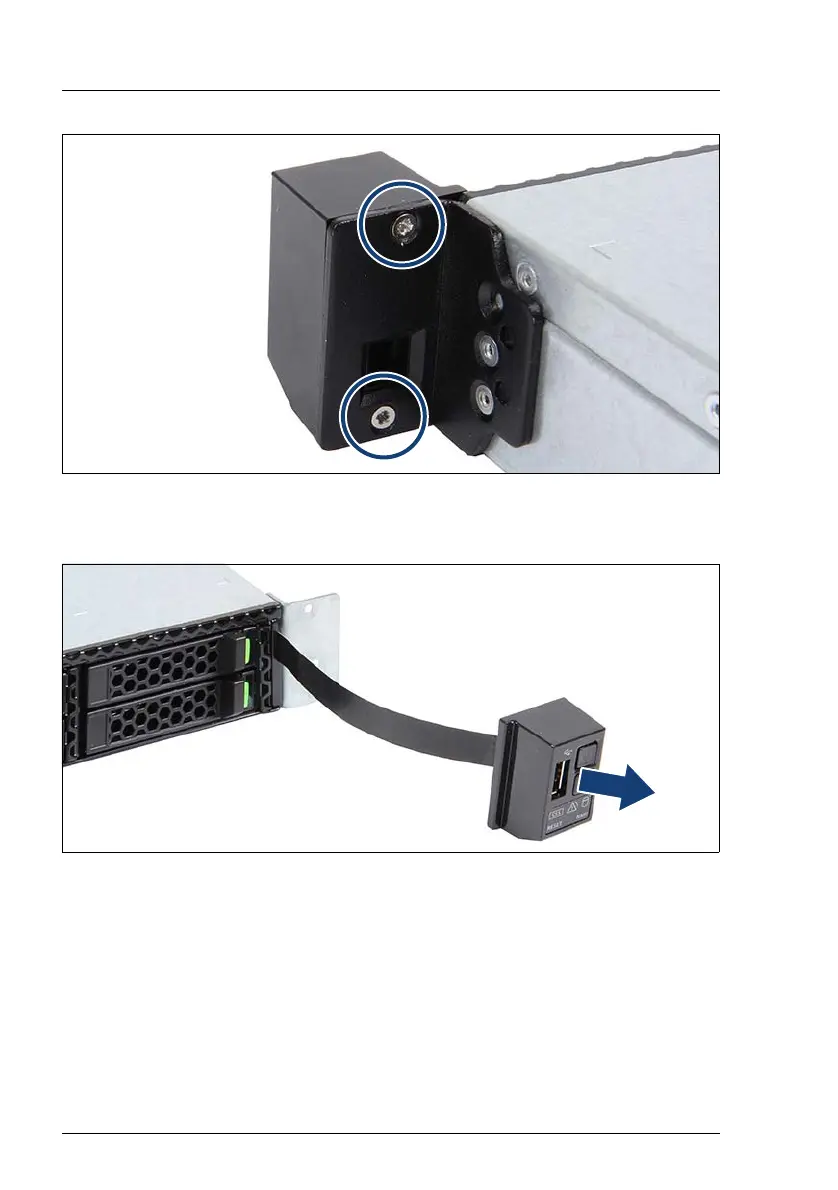
Figure 183: Removing the front p
anel on QRL (A)
Ê
Remove the two screws (see circles).
Figure 184: Removing the front p
anel on QRL (B)
Ê
Remove the front p
anel.
Ê
Pull the
front cable out of the opening.
269
271
Table of Contents
Main Page
Default Chapter
2
Copyright and Trademarks
2
Version History
6
Table of Contents
7
1 Introduction
21
Notational Conventions
22
2 Before You Start
23
Classification of Procedures
25
Customer Replaceable Units (CRU)
25
Upgrade and Repair Units (URU)
26
Field Replaceable Units (FRU)
27
Average Task Duration
28
Tools You Need at Hand
29
Documents You Need at Hand
32
3 Important Information
35
Safety Instructions
35
Energy Star
44
CE Conformity
44
FCC Class a Compliance Statement
45
Environmental Protection
46
4 Basic Hardware Procedures
49
Using Diagnostics Information
49
Locating the Defective Server
50
Determining the Error Class
50
Global Error Indicator
50
Customer Self Service (CSS) Indicator
51
Locating the Defective Component
51
Local Diagnostic Indicators on the Front
51
Local Diagnostic Indicators on the System Board
52
Shutting down the Server
53
Disconnecting the Power Cord
54
Getting Access to the Component
55
Extending the Server out of the Rack
56
Removing the Server from the Rack
57
Removing the Top Cover
59
Reassembling
60
Installing the Top Cover
60
Installing the Server in the Rack
61
Sliding the Server into the Rack
63
Connecting the Power Cord
64
Switching on the Server
66
Handling Riser Modules
66
Removing a Riser Module
66
Installing a Riser Module
68
5 Basic Software Procedures
71
Starting the Maintenance Task
71
Suspending Bitlocker Functionality
71
Disabling SVOM Boot Watchdog Functionality
72
Viewing Boot Watchdog Settings
72
Configuring Boot Watchdog Settings
73
Removing Backup and Optical Disk Media
74
Verifying and Configuring the Backup Software Solution
75
Note on Server Maintenance in a Multipath I/O Environment
75
Switching on the ID Indicator
78
Completing the Maintenance Task
79
Updating or Recovering the System Board BIOS and Irmc
79
Updating or Recovering the System Board BIOS
79
Updating or Recovering the Irmc
79
Verifying System Information Backup / Restore
81
Updating Expansion Card Firmware
82
Enabling Option ROM Scan
83
Reconfiguring the Backup Software Solution
84
Resetting the Boot Retry Counter
84
Viewing the Boot Retry Counter
84
Resetting the Boot Retry Counter
85
Resetting the Error Status after Replacing Memory Modules or Cpus
86
Memory Modules
86
Cpus
88
Enabling SVOM Boot Watchdog Functionality
89
Enabling Replaced Components in the System BIOS
90
Verifying the Memory Mode
91
Verifying the System Time Settings
91
Viewing and Clearing the System Event Log (SEL)
92
Viewing the SEL
92
Clearing the SEL
93
Updating the NIC Configuration File in a Linux and Vmware Environment
94
Resuming Bitlocker Functionality
95
Performing a RAID Array Rebuild
96
Looking up Changed MAC / WWN Addresses
97
Looking up MAC Addresses
97
Looking up WWN Addresses
97
Using the Chassis ID Prom Tool
98
Configuring LAN Teaming
99
After Replacing / Upgrading LAN Controllers
99
After Replacing the System Board
100
Switching off the ID Indicator
100
Performing a Fan Test
101
6 Power Supply Unit (PSU)
103
Basic Information
104
Standard Power Supply
105
Replacing the Standard PSU
105
Preliminary Steps
105
Removing the Defective Standard PSU
105
Installing the New Standard PSU
107
Concluding Steps
108
Redundant Power Supply
109
Installing a Hot-Plug PSU
109
Preliminary Steps
109
Removing the Dummy Cover
109
Installing a Hot-Plug PSU
110
Concluding Steps
111
Removing a Hot-Plug PSU
112
Preliminary Steps
114
Removing a Hot-Plug PSU
114
Installing the Dummy Cover
115
Replacing a Hot-Plug PSU
115
Preliminary Steps
116
Removing the Defective Hot-Plug PSU
116
Installing the New Hot-Plug PSU
117
Concluding Steps
117
Replacing the Power Distribution Board
117
Preliminary Steps
117
Removing the Defective Power Distribution Board
118
Installing the New Power Distribution Board
119
Concluding Steps
120
Fujitsu Battery Unit (FJBU)
121
Installing the FJBU
121
Preliminary Steps
121
Removing the Dummy Cover
121
Installing an FJBU
122
Concluding Steps
122
Removing the FJBU
122
Preliminary Steps
123
Removing an FJBU
123
Installing the Dummy Cover
124
Replacing the FJBU
124
Preliminary Steps
125
Removing the Defective FJBU
125
Installing the New FJBU
125
Concluding Steps
125
Converting a Standard PSU to a Redundant PSU
126
Preliminary Steps
126
Removing the Standard PSU
126
Installing the Upgrade Kit
127
Concluding Steps
131
7 Hard Disk Drive (HDD) / Solid State Drive (SSD)
133
Basic Information
134
Handling Hdds or Ssds Without Installation Frame
135
Inch HDD/SSD and 2.5-Inch Installation Frame
135
Inch HDD/SSD and 3.5-Inch Installation Frame
137
Inch HDD and 3.5-Inch Installation Frame
139
Inch HDD/SSD Configurations
141
Equipping the 2.5-Inch Hdds/Ssds
141
Configuration with up to Four HDD/SSD Modules
141
Configuration with up to Eight HDD/SSD Modules
142
Configuration with up to 10 HDD/SSD Modules
143
Installing 2.5-Inch HDD/SSD Modules
144
Preliminary Steps
144
Removing a 2.5-Inch HDD/SSD Dummy Module
144
Installing a 2.5-Inch HDD/SSD Module
145
Concluding Steps
146
Removing 2.5-Inch HDD/SSD Modules
147
Preliminary Steps
147
Removing a 2.5-Inch HDD/SSD Module
148
Installing a 2.5-Inch HDD/SSD Dummy Module
148
Concluding Steps
148
Replacing a 2.5-Inch HDD/SSD Module
149
Preliminary Steps
150
Removing the Defective 2.5-Inch HDD/SSD Module
150
Installing the New 2.5-Inch HDD/SSD Module
150
Concluding Steps
150
Replacing the 4 X 2.5-Inch HDD Backplane
151
Preliminary Steps
151
Removing the Defective 4 X 2.5-Inch HDD Backplane
151
Installing the New 4 X 2.5-Inch HDD Backplane
153
Concluding Steps
156
Replacing the 10 X 2.5-Inch HDD Backplane
157
Preliminary Steps
157
Removing the SAS Expander Board
157
Removing the Defective 10 X 2.5-Inch HDD Backplane
159
Installing the New 10 X 2.5-Inch HDD Backplane
160
Installing the SAS Expander Board
160
Concluding Steps
162
Replacing the SAS Expander Board
163
Preliminary Steps
163
Removing the Defective SAS Expander Board
163
Installing the New SAS Expander Board
163
Concluding Steps
163
Upgrading Configuration from up to Four to up to Eight 2.5-Inch Hdds/Ssds
164
Preliminary Steps
164
Removing the ODD Lock
164
Installing the Second HDD Backplane
165
Installing Additional HDD/SSD Modules
167
Concluding Steps
167
Inch HDD Configurations
168
Equipping the 3.5-Inch Hdds
168
Installing 3.5-Inch HDD Modules
169
Preliminary Steps
169
Removing a 3.5-Inch HDD Dummy Module
169
Installing a 3.5-Inch HDD Module
170
Concluding Steps
170
Removing 3.5-Inch HDD Modules
171
Preliminary Steps
171
Removing a 3.5-Inch HDD Module
172
Installing a 3.5-Inch Dummy Module
172
Concluding Steps
172
Replacing a 3.5-Inch HDD Module
173
Preliminary Steps
174
Removing the Defective 3.5-Inch HDD Module
174
Installing the New 3.5-Inch HDD Module
174
Concluding Steps
174
Replacing the 3.5-Inch HDD Backplane
175
Preliminary Steps
175
Removing the Defective 3.5-Inch HDD Backplane
176
Installing the New 3.5-Inch HDD Backplane
176
Concluding Steps
177
8 Fans
179
Basic Information
180
Numbering of the Fan Modules
180
Replacing a Defective Fan Module
181
Preliminary Steps
181
Removing the Defective Fan Module
181
Installing the New Fan Module
182
Concluding Steps
183
9 Expansion Cards and Backup Units
185
Basic Information
186
Equipping the Pcie Slots
186
Handling Slot Brackets
188
Installing a Slot Bracket
188
Removing a Slot Bracket
190
Removing the Slot Bracket
190
Handling SFP+ Transceiver Modules
191
Installing SFP+ Transceiver Modules
191
Removing an SFP+ Transceiver Module
194
Expansion Cards and Riser Cards
197
Installing an Expansion Card
197
Preliminary Steps
197
Removing the Slot Cover
197
Installing the Expansion Card
198
Concluding Steps
198
Removing an Expansion Card
199
Preliminary Steps
199
Removing the Expansion Card
199
Installing the Slot Cover
200
Concluding Steps
200
Replacing an Expansion Card
201
Preliminary Steps
201
Removing an Expansion Card
202
Installing an Expansion Card
202
Connecting Cables to the Expansion Card
202
Concluding Steps
202
Replacing a Riser Card
204
Preliminary Steps
204
Removing the Riser Card
204
Installing the Riser Card
205
Concluding Steps
205
Replacing a TFM
206
Preliminary Steps
206
Removing the Defective TFM
206
Installing the New TFM
208
Concluding Steps
209
Upgrading to the Full Height Riser Module
210
Preliminary Steps
210
Installing the Upgrade Kit
211
Flash Backup Unit (FBU)
214
Installing an FBU
214
Preliminary Steps
214
Preparing the FBU
214
Installing the FBU
216
Concluding Steps
217
Removing an FBU
218
Preliminary Steps
218
Removing the FBU with the Holder
218
Disconnecting the FBU Cable from the FBU
219
Removing the FBU from the Holder
219
Concluding Steps
220
Replacing an FBU
220
Preliminary Steps
220
Removing the Defective FBU
220
Installing the New FBU
221
Concluding Steps
221
10 Main Memory
223
Basic Information
224
Memory Sequence
224
Population Rules
224
Modes of Operation
225
Installing a Memory Module
226
Preliminary Steps
226
Selecting the Memory Slot
226
Concluding Steps
227
Removing a Memory Module
228
Preliminary Steps
228
Concluding Steps
229
Replacing a Memory Module
229
Preliminary Steps
229
Removing the Defective Memory Module
229
Installing the New Memory Module
229
Concluding Steps
230
11 Processor (CPU)
231
Basic Information
232
Upgrading or Replacing the CPU
232
Preliminary Steps
232
Removing the Heat Sink
233
Removing the CPU
234
Installing the CPU
235
Applying the Thermal Paste
238
Installing the Heat Sink
240
Concluding Steps
241
Replacing the Heat Sink
242
Preliminary Steps
242
Removing the Defective Heat Sink
242
Installing the New Heat Sink
242
Concluding Steps
243
12 Accessible Drives
245
Basic Information
246
Optical Disk Drive (ODD)
248
Installing the ODD
248
Preliminary Steps
248
Removing the Dummy Cover
248
Installing the ODD
249
Concluding Steps
251
Removing the ODD
252
Preliminary Steps
252
Installing the Dummy Cover
254
Concluding Steps
255
Replacing the ODD
255
Preliminary Steps
255
Removing the Defective ODD
255
Installing the New ODD
255
Concluding Steps
256
13 Front Panel
257
Basic Information
257
Front Panel Module
258
Replacing the Front Panel Module
258
Preliminary Steps
258
Removing the Front Panel Module
259
Installing the Front Panel Module
261
Concluding Steps
263
Front VGA Board
263
Installing the Front VGA Board
263
Preliminary Steps
263
Removing the Dummy Cover
264
Installing the Front VGA Board
264
Concluding Steps
265
Removing the Front VGA Board
265
Preliminary Steps
265
Removing the Front VGA Board
266
Installing the Dummy Cover
266
Concluding Steps
266
Replacing the Front VGA Board
267
Preliminary Steps
267
Removing the Defective Front VGA Board
267
Installing the New Front VGA Board
267
Concluding Steps
267
Front Panel on QRL (10 X 2.5-Inch HDD Configuration)
268
Replacing the Front Panel on QRL
268
Preliminary Steps
268
Removing the Front Panel on QRL
269
Installing the Front Panel on QRL
271
Concluding Steps
272
14 System Board and Components
273
Basic Information
273
CMOS Battery
274
Replacing the CMOS Battery
274
Preliminary Steps
275
Replacing the Defective CMOS Battery
275
Concluding Steps
276
USB Flash Module (UFM)
276
Installing the UFM
276
Preliminary Steps
276
Installing the UFM
277
Concluding Steps
278
Software Configuration
278
Removing the UFM
279
Preliminary Steps
279
Removing the UFM
280
Concluding Steps
281
Replacing the UFM
282
Preliminary Steps
282
Removing the Defective UFM
282
Installing the New UFM
283
Concluding Steps
284
Software Configuration
284
Trusted Platform Module (TPM)
285
Installing the TPM
285
Preliminary Steps
285
Installing the TPM
286
Concluding Steps
287
Removing the TPM
288
Preliminary Steps
289
Removing the TPM
290
Concluding Steps
292
Replacing the TPM
292
Preliminary Steps
293
Removing the Defective TPM
293
Installing the New TPM
293
Concluding Steps
293
Sata Dom
294
Installing the SATA DOM
294
Preliminary Steps
294
Concluding Steps
295
Removing the SATA DOM
296
Preliminary Steps
296
Concluding Steps
296
Replacing the SATA DOM
297
Preliminary Steps
297
Concluding Steps
297
Irmc Microsd Card
298
Installing the Irmc Microsd Card
298
Preliminary Steps
298
Concluding Steps
299
Removing the Irmc Microsd Card
299
Preliminary Steps
299
Removing the Irmc Microsd Card
300
Concluding Steps
300
Replacing the Irmc Microsd Card
301
Preliminary Steps
301
Concluding Steps
301
System Board
302
Replacing the System Board
302
Preliminary Steps
304
Removing the Defective System Board
305
Installing the New System Board
307
Concluding Steps
308
15 Cables
311
Overview Cables
311
Cabling Plans
312
16 Appendix
319
Mechanical Overview
319
Server Front
319
Server Rear
321
Server Interior
322
Connectors and Indicators
324
Connectors and Indicators on the System Board
324
Onboard Connectors
324
Onboard Indicators and Controls
326
Server Front
328
Indicators on the Front Panel
328
Led Indicator
328
Indicators on the Accessible Drives/Components
332
Server Rear
334
Connectors on the I/O Panel
334
Indicators on the I/O Panel
335
Indicator on Hot-Plug Psus (Slide-In Unit)
338
Indicator on Fujitsu Battery Unit (FJBU)
339
Onboard Settings
340
Recovery Mode
340
Minimum Startup Configuration
341
Other manuals for Fujitsu PRIMERGY RX1330 M3
Operating Manual
84 pages
Related product manuals
Fujitsu PRIMERGY RX1330 M1
84 pages
Fujitsu PRIMERGY RX1330 M4
106 pages
Fujitsu PRIMERGY RX1330 M5
413 pages
Fujitsu PRIMERGY TX1310 M3
68 pages
Fujitsu PRIMERGY TX1320 M3
92 pages
Fujitsu PRIMERGY TX1330 M3
92 pages
Fujitsu PRIMERGY RX100 S8
82 pages
Fujitsu PRIMERGY RX100 S7
86 pages
Fujitsu Primergy RX100 S3
287 pages
Fujitsu Primergy RX100 S5
105 pages
Fujitsu Primergy RX100 S4
43 pages
Fujitsu Primergy RX100 S2
275 pages



 To Next Page
 Loading...