RX1330 M3 Upgrade and Maintenance Manual 327
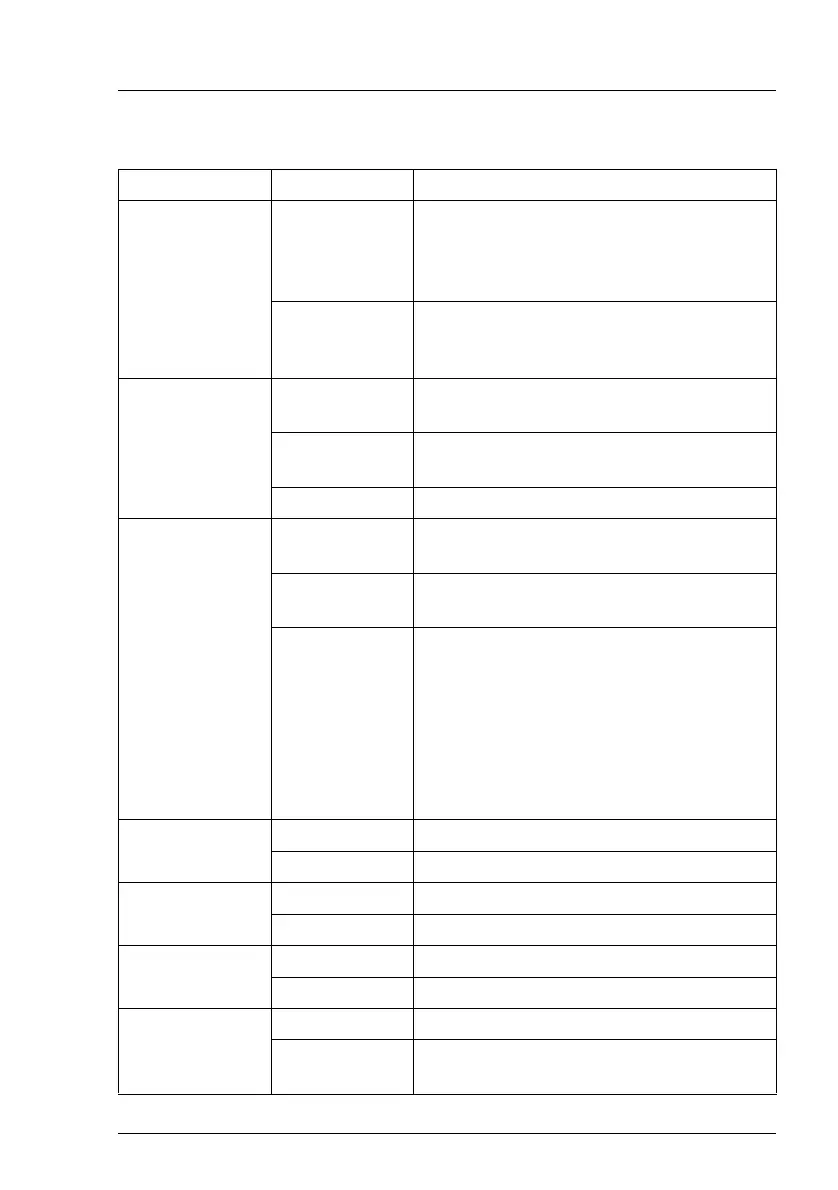
The LEDs have the following meaning:
LED Indicator Meaning
A - Identification blue on The server has been highlighted using
iRMC web frontend, ServerView
Operations Manager or the ID button on
the front panel for easy identification.
blue flashing The server has been highlighted using
IRMC (AVR) when local VGA off for easy
identification.
B - CSS
(Customer Self
Service)
off No critical event detected (CSS
component).
orange on Prefailure event detected (CSS
component).
orange flashing CSS component failure detected.
C - GEL
(Global Error
LED)
off No critical event detected (non CSS
component).
orange on Prefailure event detected (non CSS
component).
orange flashing Non CSS component failure detected.
Possible causes:
– System is out of the specified
temperature range
– Defective sensor
–CPU error
– Error detected by server management
software
D - Memory off memory module running
orange on memory module failure
E - AUX power off
orange on voltages okay
F - System fan off system fan running
orange on system fan failure
G - PCI card off PCI card okay
orange on PCI card failure (PCI card installed on riser
card)



 To Next Page
 Loading...