6.1 Printing Type and Workflow
90
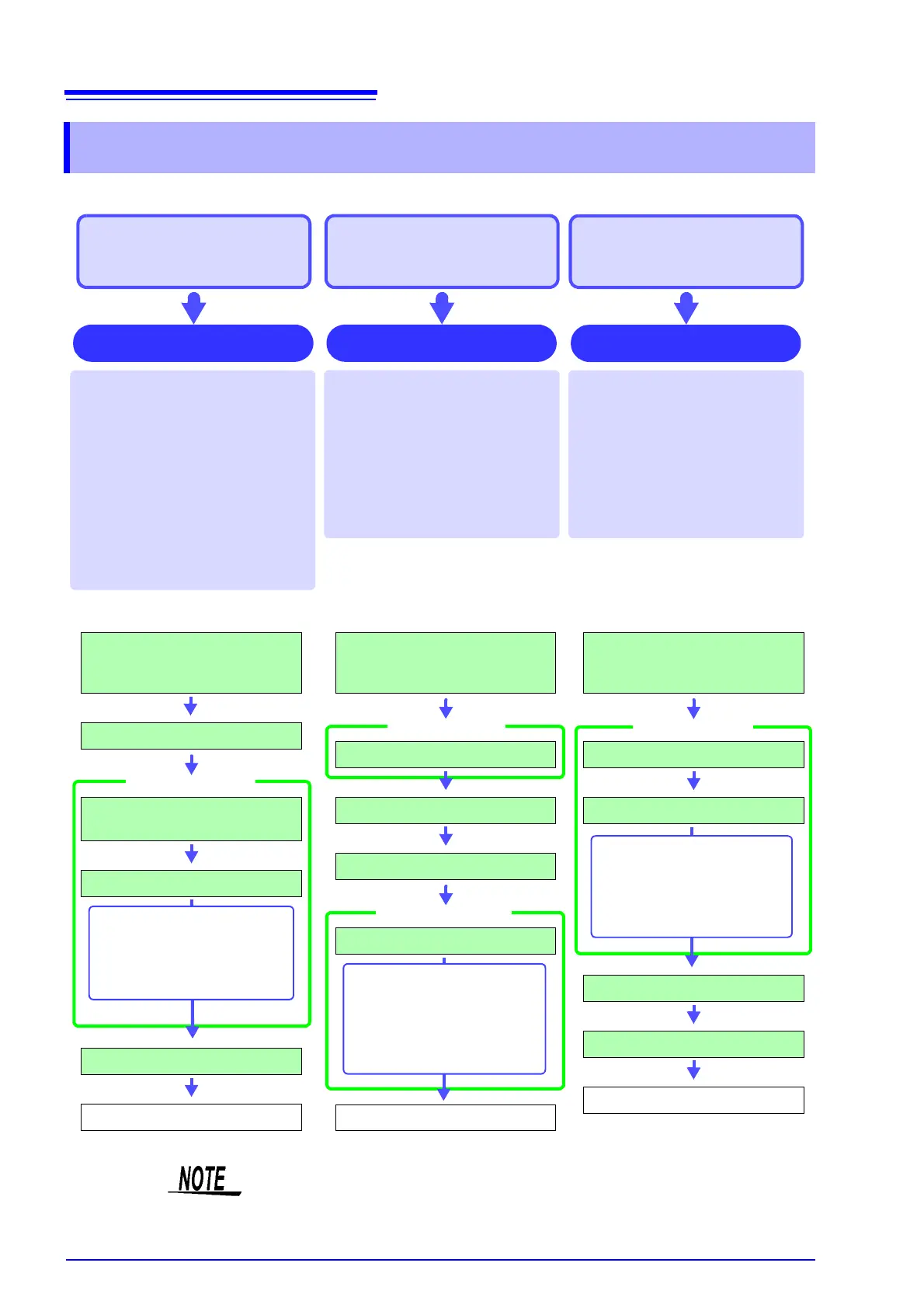
There are basically three types of printing operations.
6.1 Printing Type and Workflow
To print data automatically
during measurement
To selectively print data
after measurement
Auto Print
(default setting)
When the PRINT key is pressed at
the File screen, print contents can
be selected before printing. This is
convenient to print different items
each time.
At the File screen, the file list is print-
ed. At other screens, a list is printed.
Selection Print
When the Memory function
*
is used,
data are acquired for the recording
length and then printed automatically.
When the Recorder function is used,
printing is carried out in real time along
with recording.
When the FFT function is used, data is
printed automatically after FFT analy-
sis is exited.
In both cases, print contents are se-
lected before the measurement.
*: When the Roll Mode function is used, printing can be carried out simultaneously with waveform display.
(However, at time axis range settings higher than 500 ms/div, the print timing will be slower.)
To print data in bulk after
measurement by pressing
the PRINT key
Print content when PRINT key is
pressed
At Waveform screen: Waveform
At File screen: File list
At other screen: List
During waveform printing, the range
specified with [Slct Print Area] is
printed.
Quick Print
Load recording paper
After installation and connections
are completed, turn power on
Set measurement configuration
Set print target for
[Auto Print]
Set the data to save
Measurement
Print
The followings can be print-
ed simultaneously.
• Waveform data
• Numeric value calculation
results
Load recording paper
After installation and connections
are completed, turn power on
Set [Print Select] to [Yes].
Start and Stop Measurement
Press the PRINT key.
Set the data to save
Print
Either of the following can
be printed.
•Whole waveforms
• A-B waveforms
• Post-/Pre-Trigger waveforms
• Lists (Settings List)
Load recording paper
After installation and connections
are completed, turn power on
Set [Print Select] to [No].
Set the save area
Start and Stop Measurement
Press the PRINT key.
Print
During waveform printing,
either of the following can
be printed.
•Whole waveforms
• A-B waveforms
When both Auto Print and Auto Save are enabled, Auto Save is executed first.
However, when the Roll Mode function (default setting: Auto) is used with the
Memory function, Auto Print has priority.


 To Next Page