5.4 Automatically Loading Settings (Auto Setup Function)
79
5
Chapter 5 Saving/Loading Data & Managing Files
When settings are saved as described below, they can be loaded automatically at power-up.
5.4 Automatically Loading Settings
(Auto Setup Function)
The Auto setup function is compatible with CF cards only.
If the STARTUP file is on the HDD, USB memory stick, or RAM (internal mem-
ory), it is not referenced. Always create the STARTUP file on a CF card.
Procedure
To open the screen: Press the FILE key → File screen To change the media: ( p.66)
1
Select [Change Media] and specify CF Card.
2
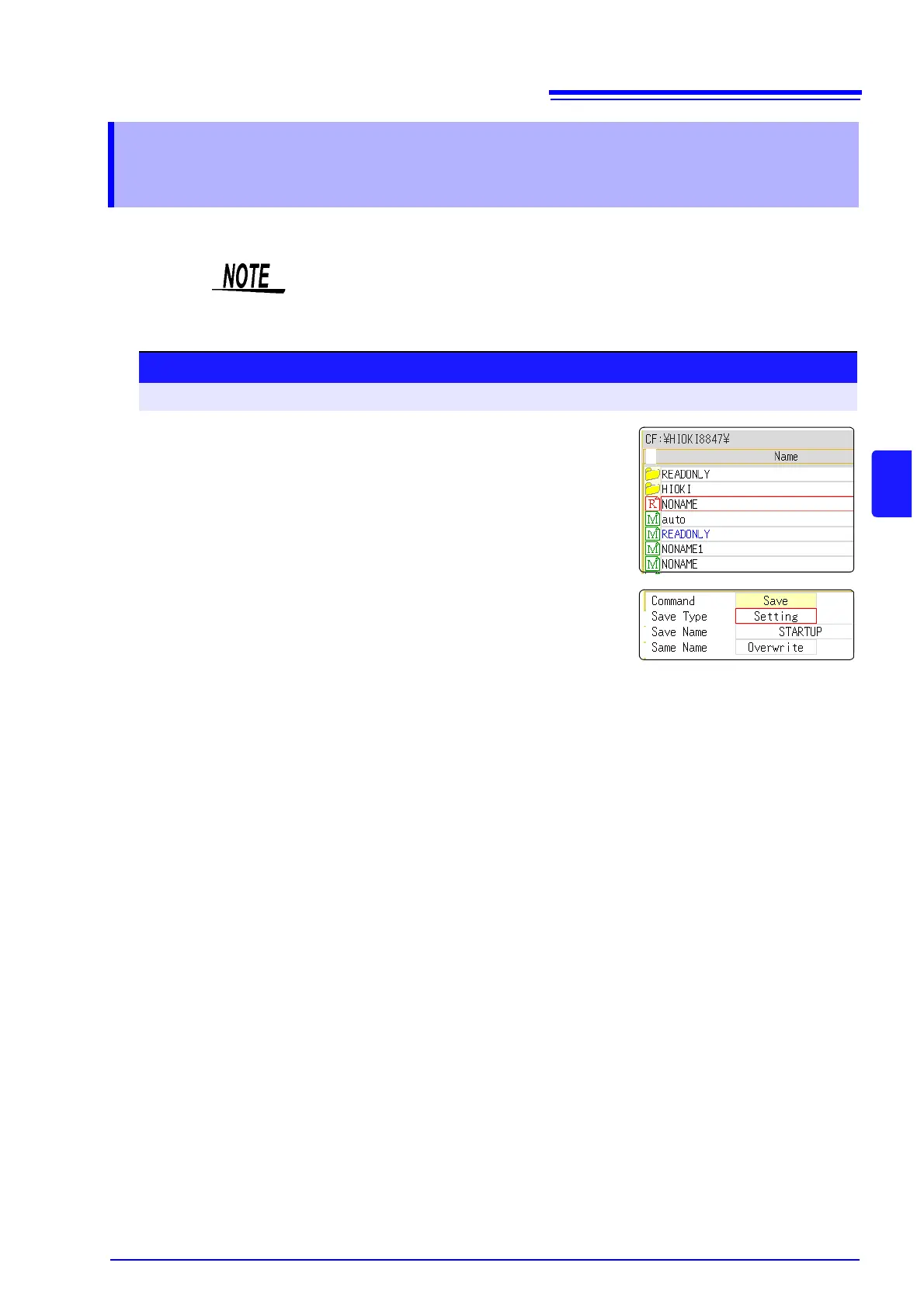
If a folder named "HIOKI8847" exists in the root directory (top-
most folder on media), move the cursor to that folder.
If the folder does not exist, go to the root directory. (A folder named "HIOKI8847"
will be created automatically and used as save target.)
3
Select [Save] and set the [Save Type] to [Setting].
4
Move the cursor to the [Save Name], and enter "STARTUP".
See: "8.1.3 Alphanumeric Input" ( p.121)
5
Move the cursor to the [Same Name] item, and select [Over-
write].
6
Select [Exec].
To cancel:
Select [Cancel].
The next time the instrument is turned on, the settings will be
automatically loaded.


 To Next Page