1.3 Screen Organization
13
1
Chapter 1 Overview
Explanation of Screen Contents __________________________________
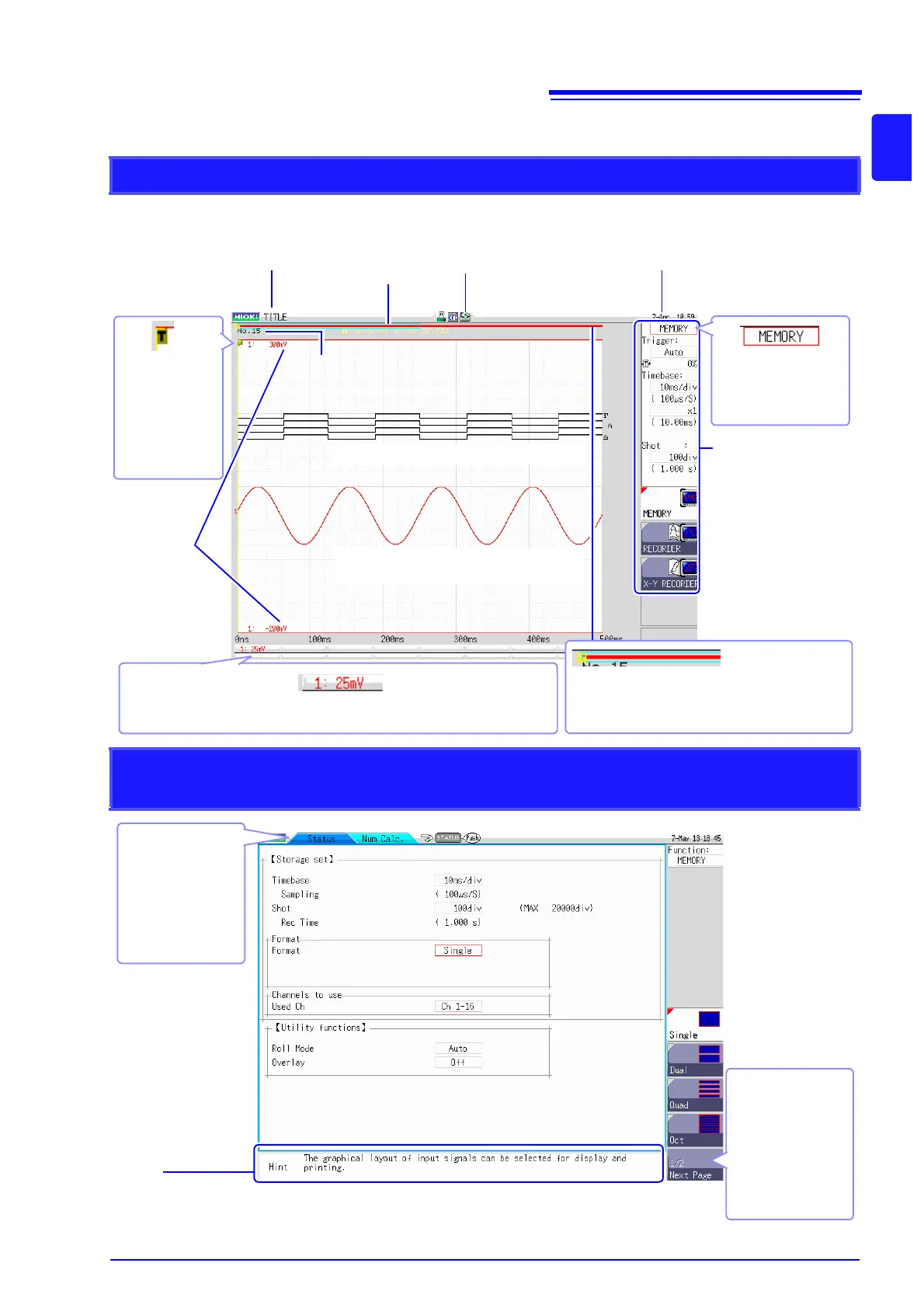
Waveform screen
Logic waveform ( p.55)
Analog waveform ( p.52)
Storage counter
Shows how many trigger events occurred.
(
p.57)
Current date and time
Shows the date and time as set for
the internal clock. (
p.35)
Settings cursor
The current cursor lo-
cation is indicated by
flashing.
Title comment
Shows the specified title
comment. (
p.118)
Trigger
symbol
Shows the point
where the trigger
event occurred.
(
p.151)
Settings window
Measurement parameters
are set here. (
p.41)
Trigger time
Shows the date and time
of the last trigger event.
(
p.151)
Vertical axis display
Shows the value per increment for each channel. This is linked to the range set-
ting. (
p.52)
Upper and
lower limit
The upper and lower
limit values for each
channel are shown
here. (
p.114)
Scroll bar
The stored waveform is indicated by a red bar, and
the displayed waveform by a blue frame. (
p.106)
Media icon
Shows the media status.
(
p.28)
Elements common to Status screen, Channel screen, System screen, and
File screen
Sheet tab
Shows names of
sheets that can be
selected.
Use the MENU keys
to switch to a differ-
ent sheet.
Hint
Shows details about the item where the settings cursor is currently located.
Messages such as "Online", "Key Lock active." and error messages are also shown here.
Next Page
This is shown if there
are more than six
setting items.
Selecting this button
brings up other
items.


 To Next Page