15.7 Controlling the Instrument with Command Communications (LAN/USB)
285
12
Chapter 15 Connection to a Computer
15
When using the USB interface for command communications, the following differences exist, compared
to using a LAN connection.
• Select [COMX] as [Connect using] in 3-1. (X is a letter that will differ depend-
ing on the environment.)
• After completing 3-4., make the following settings.
4
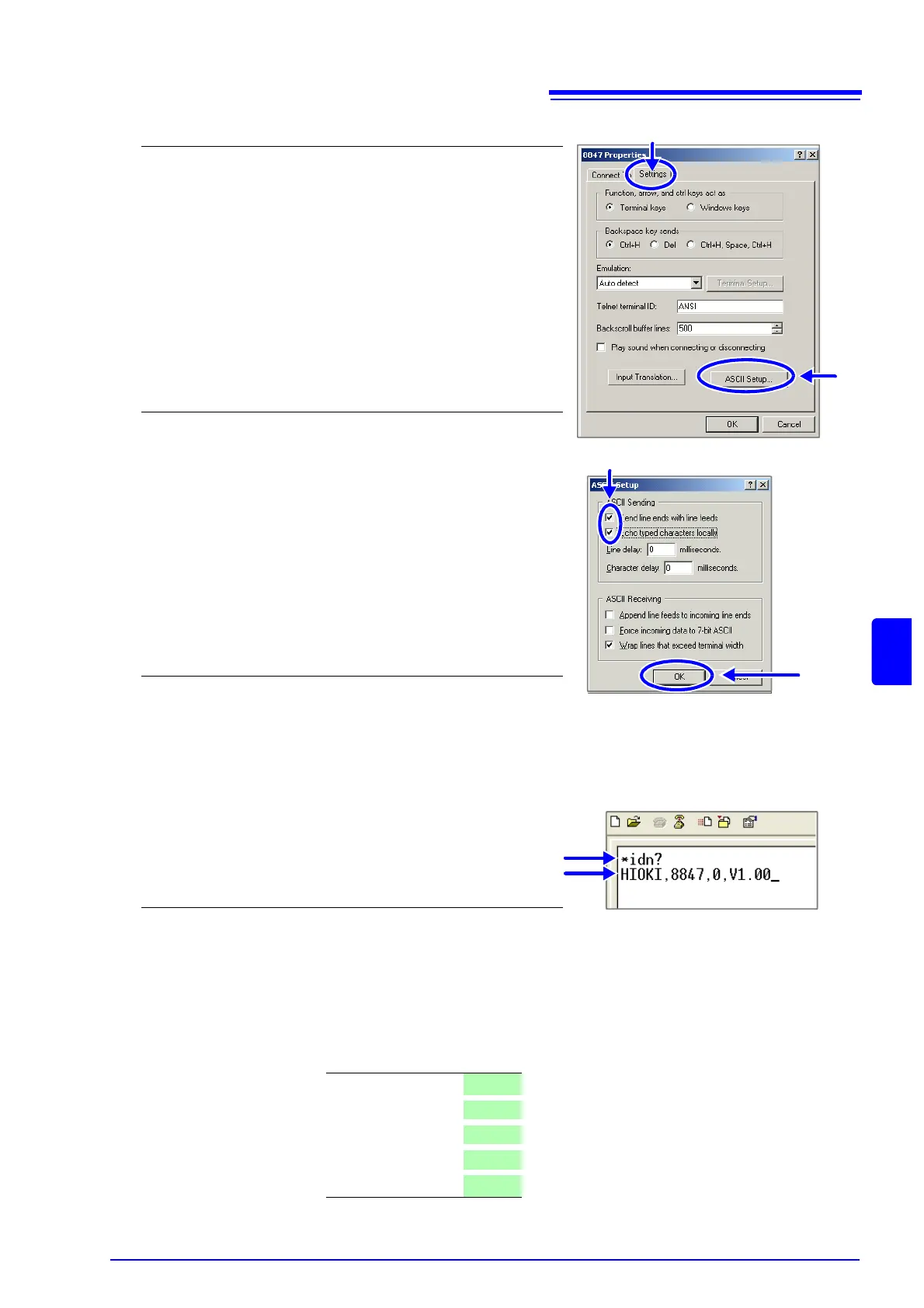
Make detailed connection settings.
1. Select [Properties] in the [File] menu.
The Properties dialog for the specified connection name ap-
pears.
2. Click the [Settings] tab.
3. Click the [ASCII Setup...] button.
The [ASCII Setup] dialog appears.
5
Make detailed settings
1. Check the [Send line ends with line feeds] and
[Echo typed characters locally] check boxes.
2. Click the [OK] button to return to the Properties
dialog.
3. Click the [OK] button to return to the HyperTermi-
nal window.
6
Try sending a command.
Enter "*idn?" and press the Enter key.
A response is returned from the instrument.
2
3
Command
Response
1
2
Bits per second 19200
Data bit
8
Parity
None
Stop bit
1
Flow control
None


 To Next Page