Comfort Control Unit
117
Pos: 21.13.3 /B A/Info-Center/La dewagen/Ha uptmenüs/Hau ptmenü 2 Zähler/M enü 2-1 Kun denzähler @ 25\mod_1244 100887072_7 8.doc @ 254796
9.11.1 Menu 2-1 „Customer counter“
L400130
A
B
L400141_1
t
2356
3312
6532
0
0
Fig. 80
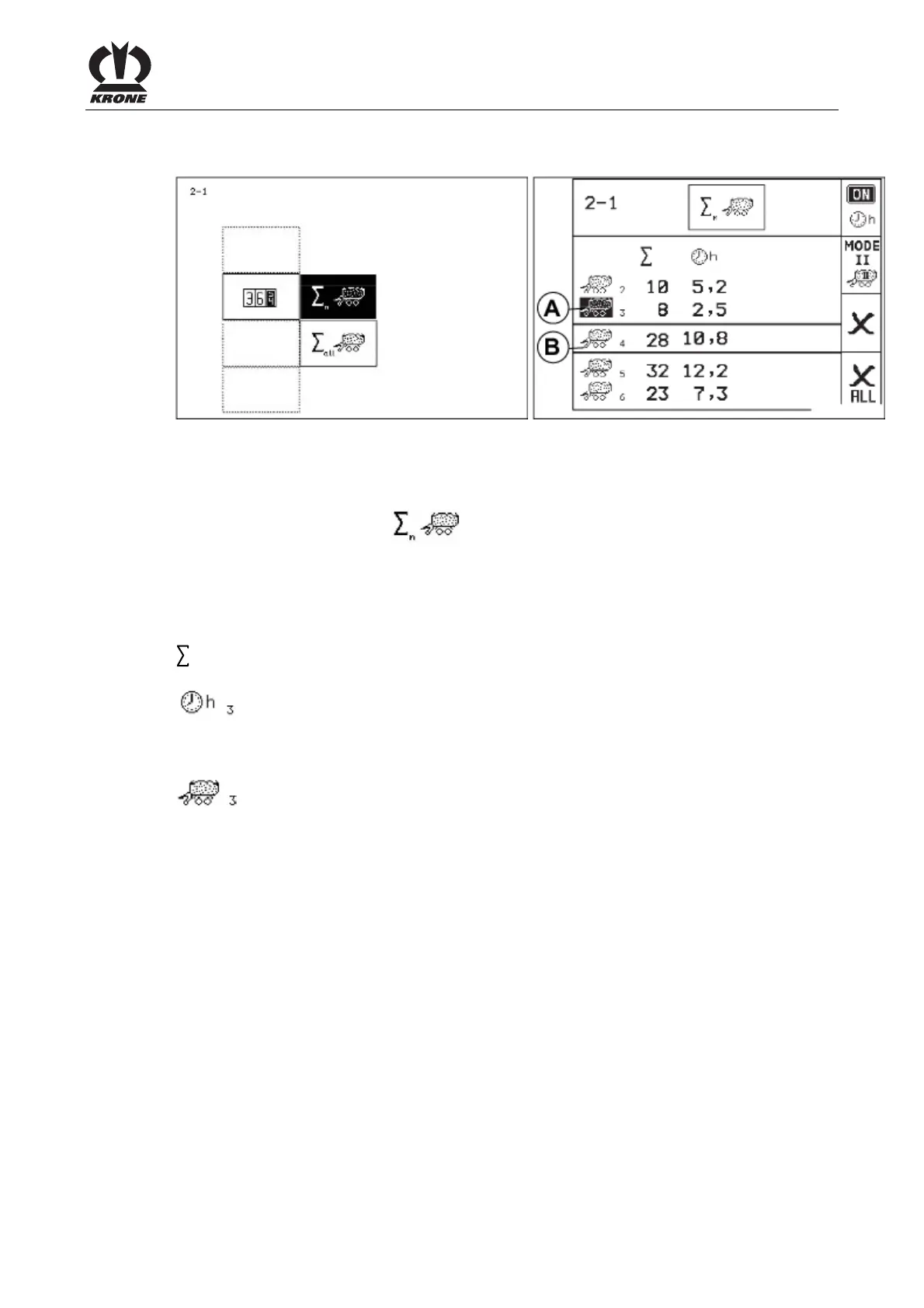
Displaying the menu
Main menu 2 "Counters" is displayed
• You can select menu 2-1 with the rotary potentiometer. The icon is shown in
reverse colours.
• Press the rotary potentiometer.
The display shows menu 2-1 "Customer counter".
Meaning of the icons:
Total number of wagonloads (the counting of one wagonload is depending on the set
counter mode)
Operating hours counter
The operating hours counter is running when the electronics is turned on and the
operating counter is activated.
t Total of all weights (with option weight control)
Customer counter (1-20)
The activated customer counter (A) is shown in reverse colours. The selected customer
counter (B) is between the two crossbars.
Pos: 21.13.4 /B A/-----Seitenu mbruch------ @ 0\mod_119617 5311226_0.doc @ 4165











 To Next Page