215676 99 Revision A
1009066
CXXX
MXXX
WINDROWER SETUP?
NO/YES
A
B
C
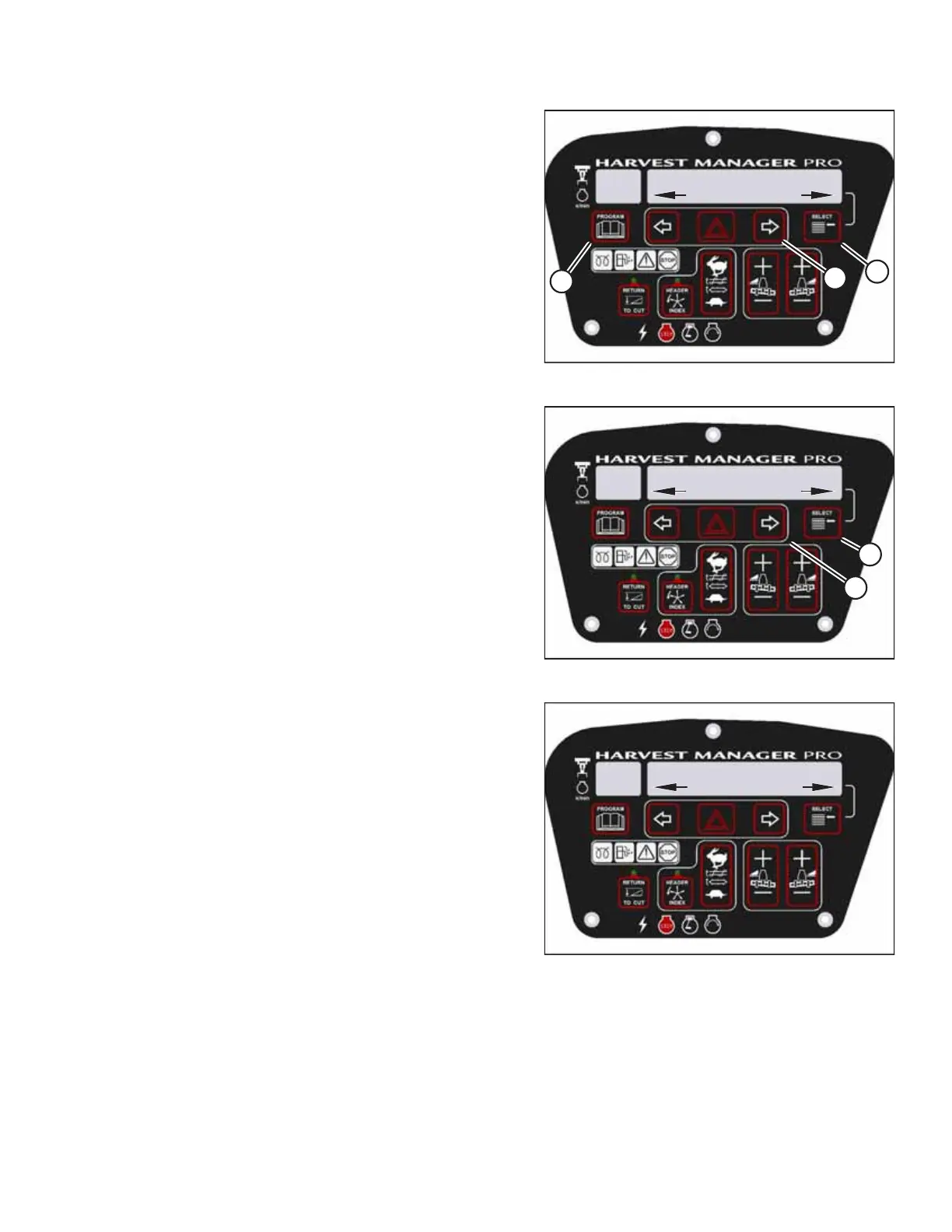
Figure 3.92: CDM Programming Buttons
1. Turn the ignition key to the RUN position, or start the
engine.
2. Press PROGRAM (A) and SELECT (C) simultaneously on the
cab display module (CDM) to enter programming mode.
• WINDROWER SETUP? appears on the upper line.
• NO/YES appears on the lower line.
3. Press right arrow (B) to select YES. Press SELECT (C).
• SET KNIFE SPEED? appears on the upper line.
1009360
CXXX
MXXX
DWA INSTALLED?
NO/YES
B
A
Figure 3.93: DWA Controls
4. Press SELECT (B) until DWA INSTALLED? appears on the
upper line.
• NO/YES appears on the lower line.
5. Press right arrow (A) to select YES. Press SELECT (B).
1022619
CXXX
MXXX
SWAP DWA CONTROLS?
NO/YES
Figure 3.94: DWA Controls
6. SWAP DWA CONTROLS? appears on the upper line.
• NO/YES appears on the lower line.
NOTE:
This step is necessary to enable the ground speed lever’s
(GSL) reel fore-aft buttons to control the DWA.
OPERATOR’S STATION



 To Next Page