215676 133 Revision A
Forcing Header Identification
The windrower’s cab display module (CDM) must recognize the header model in order to proceed with troubleshooting. If
the header wiring has been damaged, or if no header is available, you can force the windrower control module (WCM) to
behave as if a header is attached to the windrower by manually inputting a header identification code.
IMPORTANT:
Forcing a header ID that is different from that of the attached header can damage the windrower and/or the header. Doing
so can cause the header to run too fast, which can cause excessive vibration and component failure.
NOTE:
The WCM will revert to reading NO HEADER each time the engine ignition is cycled.
1009099
CXXX
MXXX
WINDROWER SETUP?
NO/YES
A
B
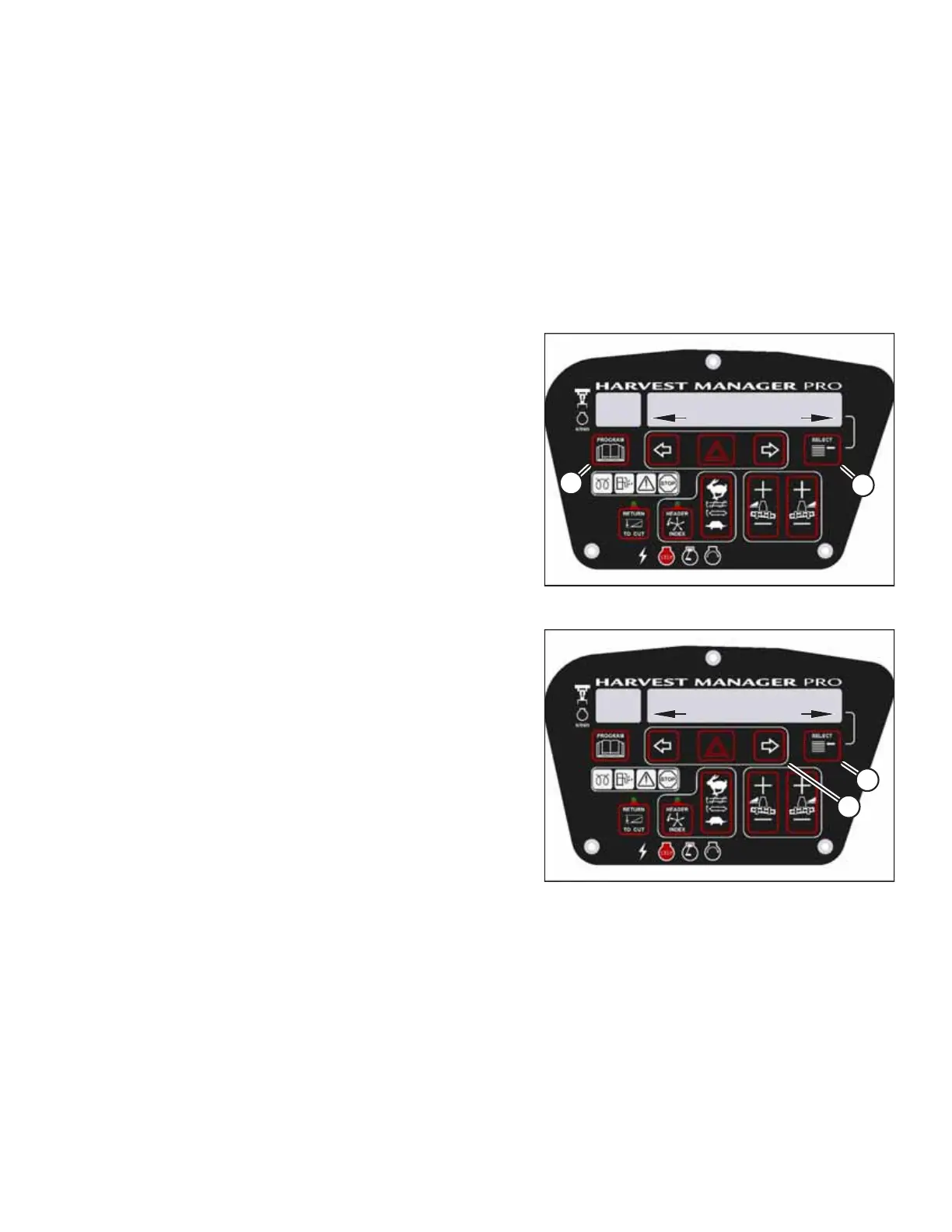
Figure 3.172: CDM Programming Buttons
1. Turn the ignition key to the RUN position, or start the
engine.
2. Press PROGRAM (A) and SELECT (B) simultaneously on the
CDM to enter programming mode.
• WINDROWER SETUP? will appear on the upper line.
1009288
CXXX
MXXX
DIAGNOSTIC MODE?
NO/YES
A
B
Figure 3.173: Diagnostic Functions
3. Press SELECT (B) until DIAGNOSTIC MODE? appears on the
upper line.
• NO/YES will appear on the lower line.
4. Press right arrow (A) to select YES. Press SELECT (B).
OPERATOR’S STATION



 To Next Page