215676 331 Revision A
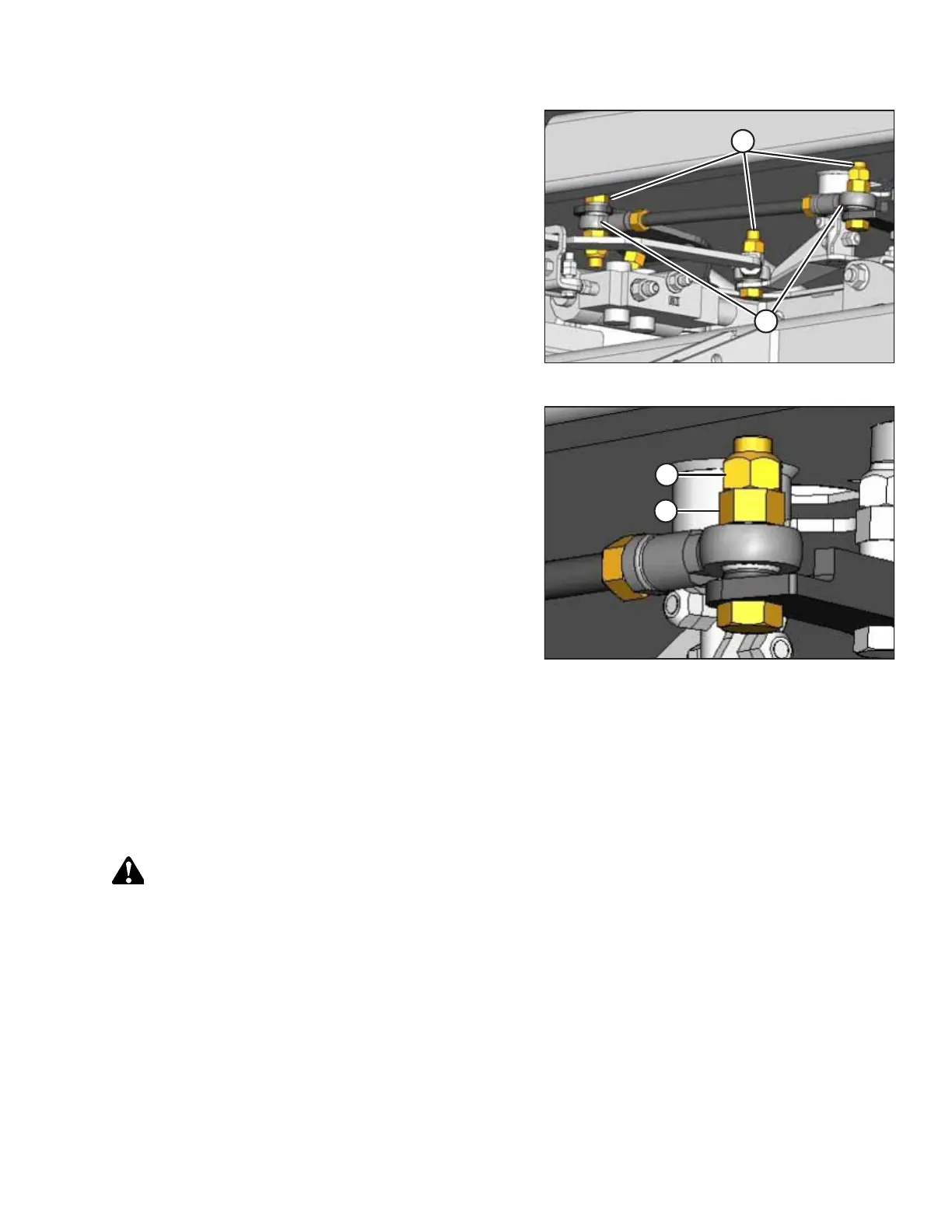
Figure 5.24: Steering Link
4. Check steering link bolts (A) for looseness and ball joints (B)
for any perceptible movement.
Figure 5.25: Steering Link
5. If the bolts are loose:
a. Loosen jam nut (A).
b. Tighten inside nut (B) to 95 –108 Nm (70–80 lbf·ft).
c. Hold inside nut (B) and tighten jam nut (A) to
81–95 Nm (60–70 lbf·ft).
6. To replace loose steering link ball joints or steering rod ball joints, contact your MacDon Dealer.
7. After replacing parts or making adjustments, ensure that the steering lock and neutral interlock are functioning
correctly. For instructions, refer to 5.6.2 Safety Systems, page 326.
Checking and Adjusting Steering Chain Tension
If the windrower’s steering feels vague or sloppy, the steering chain tension may require adjustment.
DANGER
To prevent bodily injury or death from the unexpected startup of the machine, always stop the engine and remove the
key from the ignition before leaving the operator’s seat for any reason.
1. Check the steering for binding or excessive play, which may be the result of the steering chain being too tight or too
loose. If the steering is satisfactory, then this procedure does not need to be performed.
2. If the chain tension requires adjustment, swivel the operator’s station to position the steering column close to
the door.
MAINTENANCE AND SERVICING



 To Next Page