215676 295 Revision A
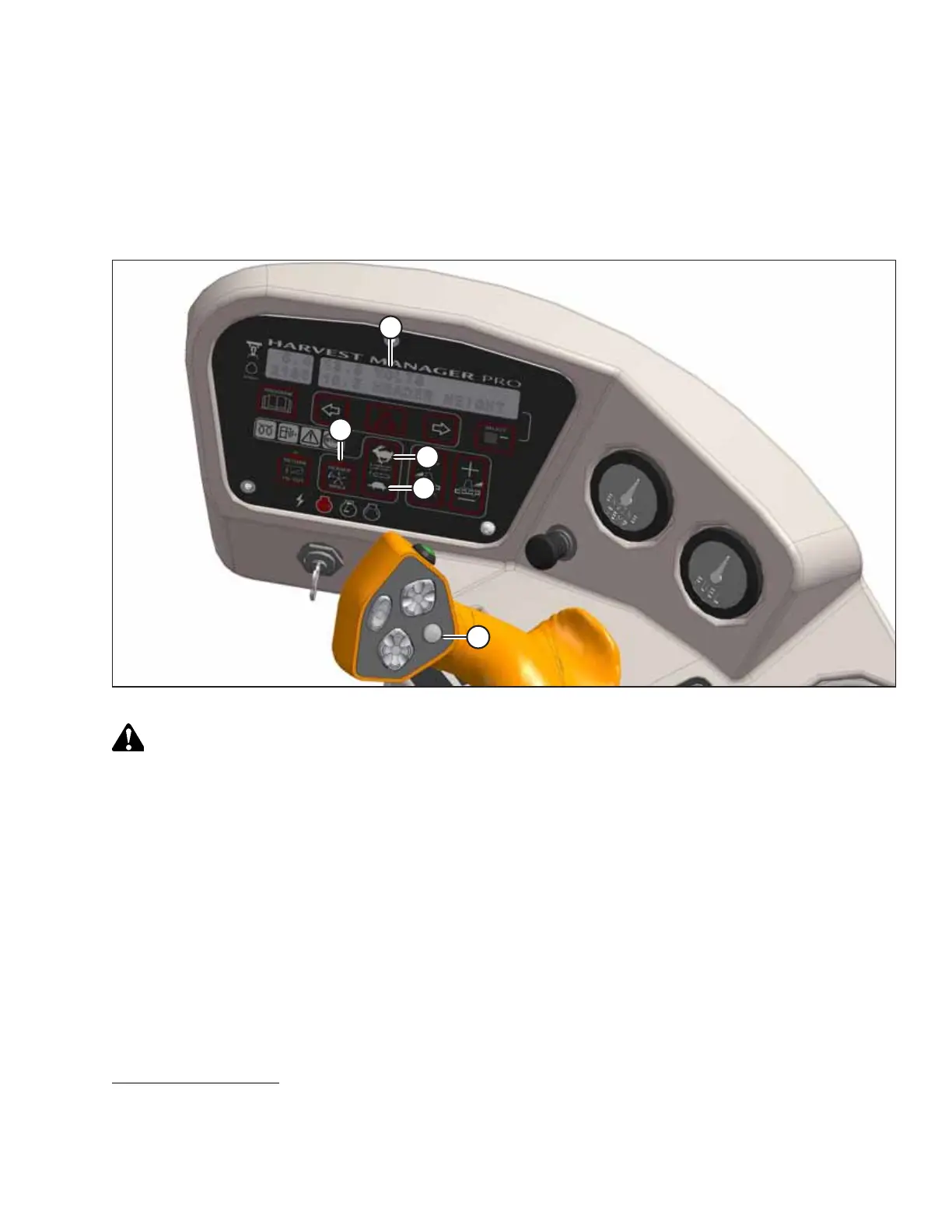
4. Press DISPLAY SELECTOR button (E) until CDM (A) displays the message ##.## DRAPER MIN.
23
5. Use FAST button (C) or SLOW button (D) to set the desired minimum draper speed.
Setting Draper Index
In order to index the speed of the draper to the windrower’s ground speed, the draper index setting must be configured in
the cab display module (CDM).
Figure 4.297: Operator Console
DANGER
Ensure that all bystanders have cleared the area.
IMPORTANT:
The draper index can only be adjusted while the windrower is traveling at a ground speed greater than the sum of the
minimum draper speed and the draper index value.
1. Start the engine.
2. Engage the header.
3. Set HEADER INDEX switch (B) to ON.
4. Press DISPLAY SELECTOR (E) on the ground speed lever (GSL). The message DRAPER INDX will appear
24
at location (A)
on the cab display module (CDM).
OPERATION
23. The reel speed can also be displayed in km/h or rpm, depending on the CDM’s display settings.
24. DRAPER INDX will only appear when the windrower is traveling at a ground speed greater than the sum of the
minimum draper speed and the draper index value.



 To Next Page