215676 177 Revision A
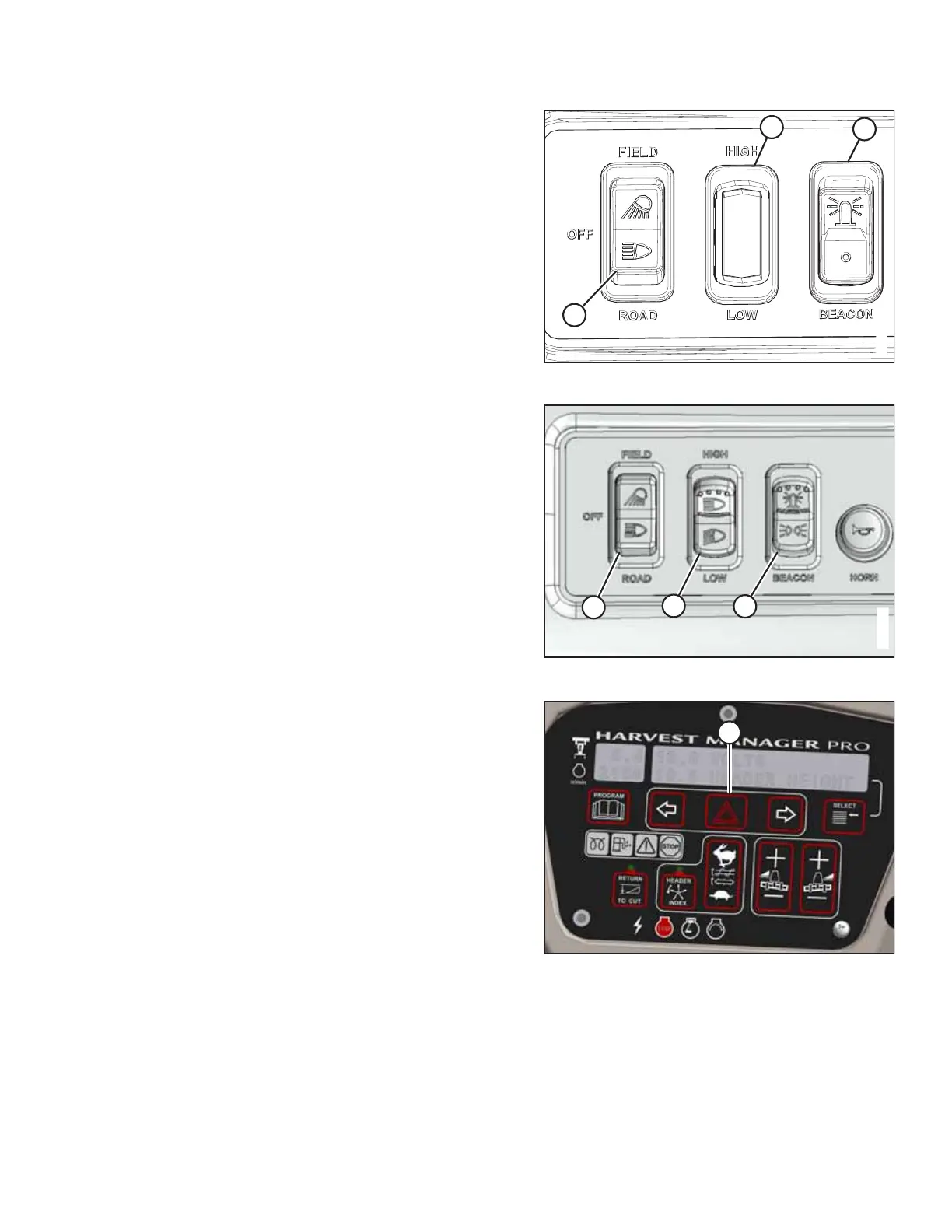
Figure 4.33: Light Switches
Figure 4.34: Light Switches – Russia
6. Push the LIGHT switch to ROAD position (A) to activate the
lamps. Always use these lamps when operating the
windrower on public roads. For more information, refer to
3.7 Exterior Lighting, page 47.
NOTE:
If the auto-road light feature is activated (that is, when the
windrower is in the engine- or cab-forward mode, is out of
park, is in high range switch position, and has the header
disengaged), only the two front corner field lights will turn
on; the other field lights will be inactive.
7. Use HIGH/LOW LIGHTS (B) as needed to see farther. Turn
the high beams off when other vehicles are approaching;
refer to your local regulations to learn the legally required
minimum distance at which the high beams must be
turned off.
8. Push BEACON switch (C) to the ON position to activate the
beacons.
Figure 4.35: CDM
9. Press switch (A) on the cab display module (CDM) to
activate the hazard lights.
IMPORTANT:
Switch ON the beacon and hazard lights when travelling on
the road with the transmission in the low range.
OPERATION



 To Next Page