215676 375 Revision A
1. Open the hood. For instructions, refer to 5.3.3 Opening Hood – Highest Position, page 317 .
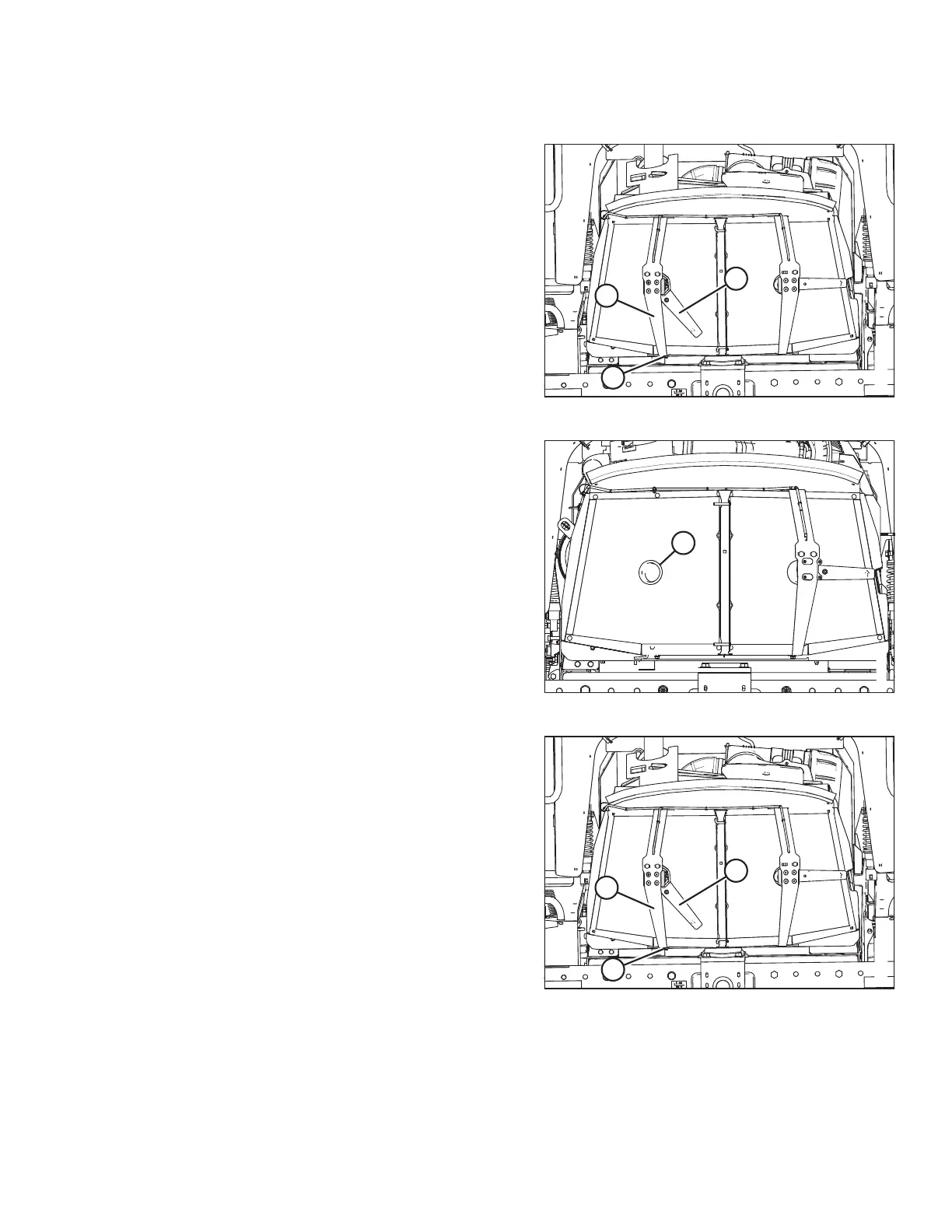
Figure 5.100: Screen Cleaner Assembly
2. Remove nuts (B).
3. Pivot screen cleaner assembly (C) away from the screen.
4. Blow debris away from cleaner duct (A) using
compressed air.
5. If the duct is plugged, open the cooler box screen. For
instructions, refer to Opening Cooler Box Screen, page 373.
Figure 5.101: Cooler Box Screen
6. Blow debris out of duct (A) using compressed air.
7. Clean the screen using compressed air.
Figure 5.102: Screen Cleaner Assembly
8. Move screen cleaner assembly (C) back into position.
Secure it with bolts and nuts (B).
9. Check the clearance between duct (A) and the screen. For
instructions, refer to Adjusting Screen Cleaner Rotor to
Screen Clearance, page 377 .
10. Close the cooler box screen. For instructions, refer to
Closing Cooler Box Screen, page 378.
11. Close the hood. For instructions, refer to 5.3.4 Closing Hood
– Highest Position, page 318.
MAINTENANCE AND SERVICING


 To Next Page
 Loading...








