4.3.6 Acquiring and Saving Error Log 200
4.3 Working with MUTOH Service Assistance Software VJ628XE-M-00
You can also save the data by selecting [File] - [Save as] from [Error log download]
window.
(2) Referring Error Log
In the case of the format error of the specified Error log file, an error message is
displayed.
Moreover, when there is no history data in the specified Error log, it is displayed on
a list as < no data>."
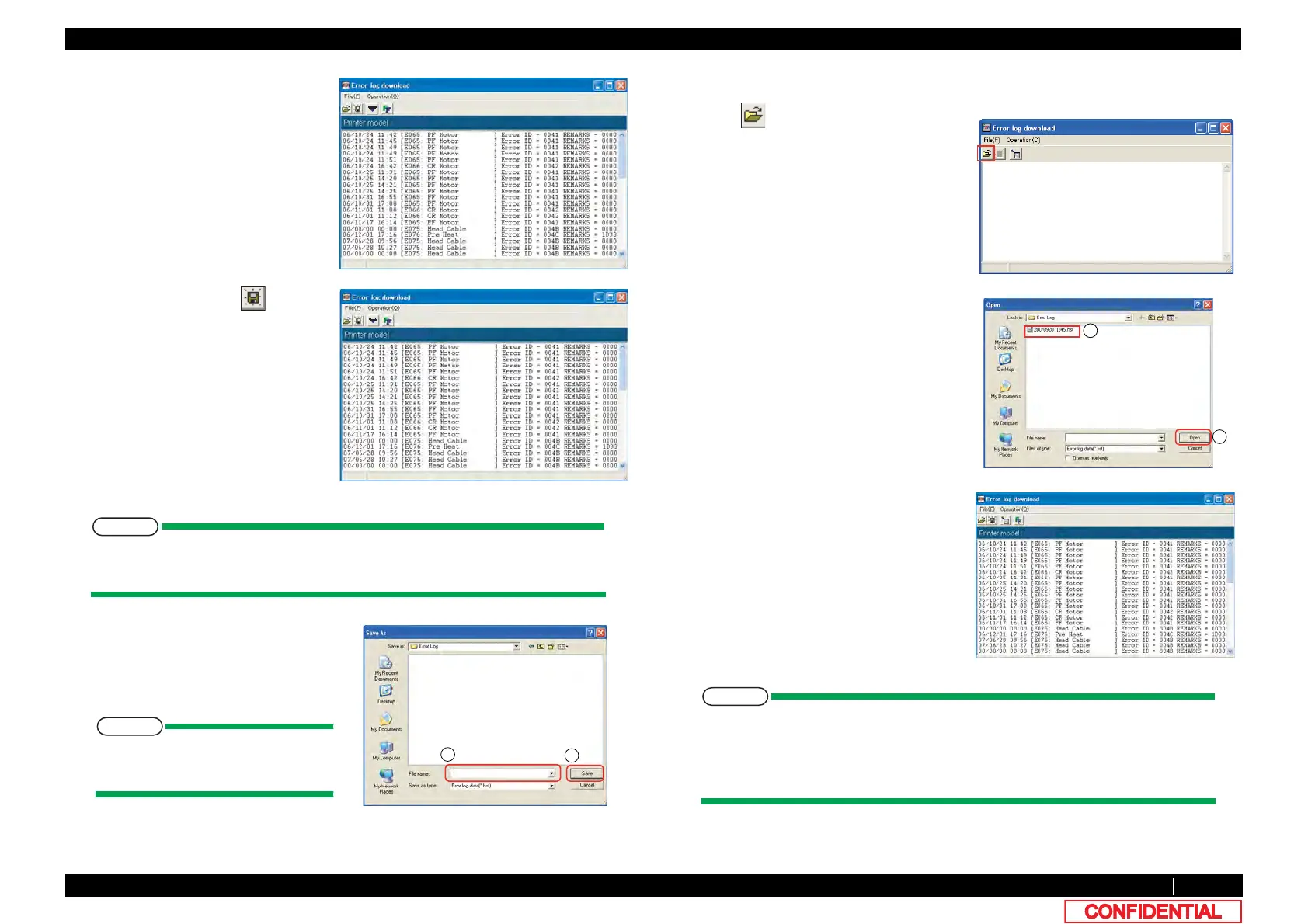
6 After completion of acquiring failure
record information, [Error log
download] window appears.
If there is no failure record in printer,
[<No data>] appears on [Error log
download] window.
7 If saving the data, click on [Error
log download] window.
8 On [Save as] window, enter desired file
name ① and click [Save] ② .
The File extension will be *hst.
* When saving Error log as a text
file, choose "Textdata (*. txt)."
1 Click on [Error log download]
Window.
Also form[File]-[Open]is the same.
2 Click appropriate failure record
information file (*.hst) ① and click [Open]
② .
3 Record data appears on [Error log
download] window.









 To Next Page