2.3 Troubleshooting Without Error Messages VJ628XE-M-00
2.3.7 Problems in Using MUTOH Service Assistance 57
2.3.7 Problems in Using MUTOH Service Assistance
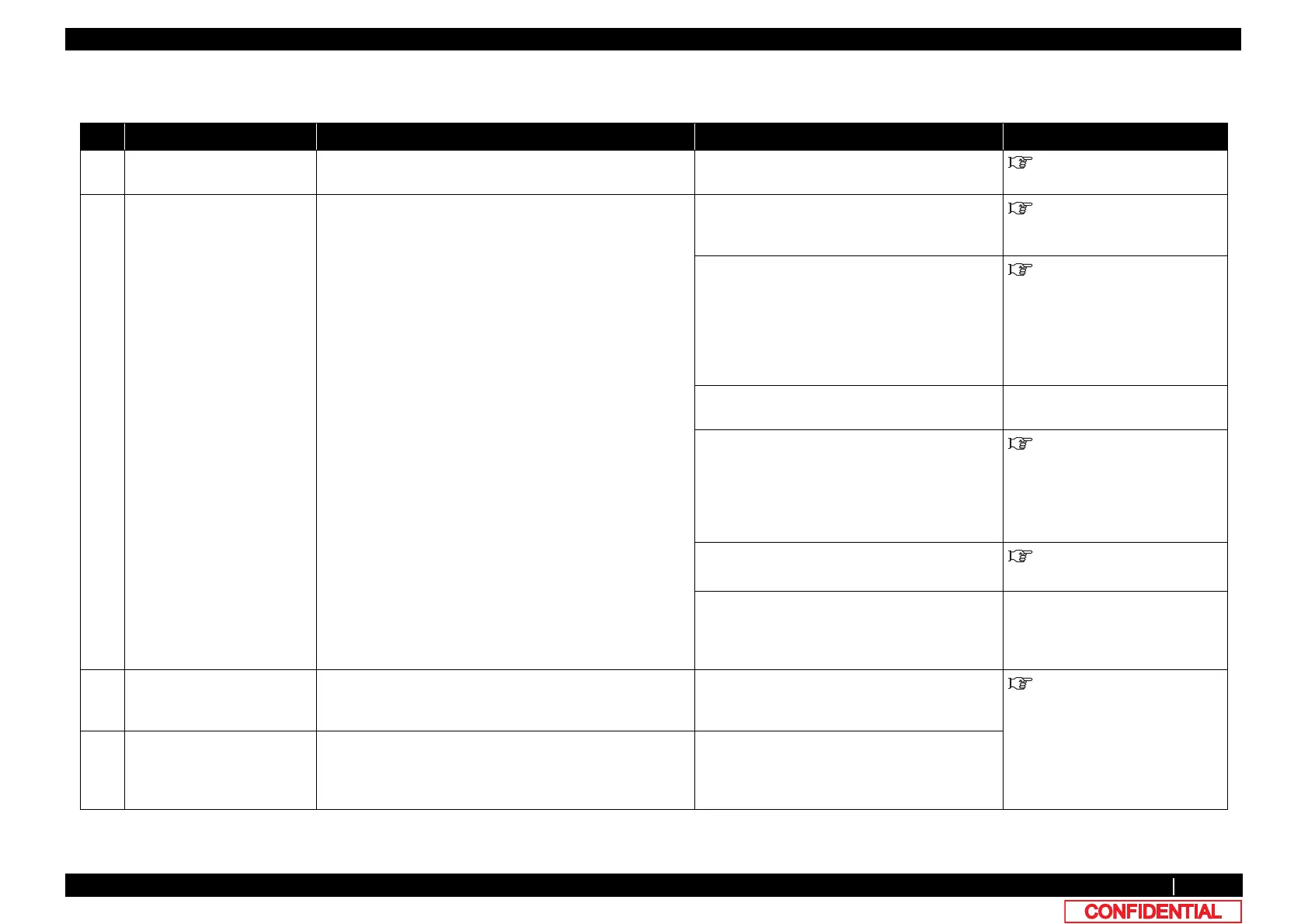
Table 2-12 Problems, Check Items, and Actions in Using MUTOH Service Assistance
No. Symptom Check item Action Reference
1 MUTOH Service Assistance
does not start up
‐
Reinstall and perform initial settings. Network administration
Manual
2 "Transfer failed (Data
timeout)" is displayed during
transfer.
1. Are the printer and computer correctly connected with a
LAN cable (when directly connected, use a cross cable
and when connected via a hub, use a straight cable)?
Yes: Proceed to (2).
No: Connect the printer and computer correctly.
4.3 Working with MUTOH
Service Assistance Software
2. Is the computer’s IP address correct? Yes: Proceed to (3).
No: From the computer’s network connection
settings, use the property of local area
connection to adjust the properties of TCP/IP.
The computer and printer must have the same
sub net addresses (such as 192.168.1.1/24 and
192.168.1.253, etc).
4.3 Working with MUTOH
Service Assistance Software
3. Does the device connected to the hub have the same IP
address as the computer or printer?
Yes: Remove the relevant device from LAN.
No: Proceed to (4).
‐
4. Was the printer started in Board manager mode and only
Power LED is lit?
Yes: Proceed to (5).
No: Start in Board manager mode.
If there is nothing displayed on LCD monitor,
MAIN board maybe faulty or firmware is not
installed (including a
power shutdown due to
power outage during installation).
4.3 Working with MUTOH
Service Assistance Software
5. Is the computer’s IP address correct? Yes : Proceed to (6).
No: MAIN board may be faulty.
4.3 Working with MUTOH
Service Assistance Software
6. Can the computer communicate with other devices via
LAN?
Yes: Connect the computer with other devices
via LAN cable and check with ping command,
etc.
No: The computer or MAIN board may be faulty.
-
3 "The main F/W data is
incorrect." is displayed during
firmware transfer.
Is the firmware data (*.jfl) to be transferred correct? Transfer the correct firmware data again.
4.3 Working with MUTOH
Service Assistance Software
4 "The main F/W data is
incompatible with the printer."
is displayed during firmware
transfer.
Does the firmware data (*.jfl) to be transferred match the
printer model?
Transfer the firmware date (*.jfl) that matches the
printer model again.















 To Next Page