2.3 Troubleshooting Without Error Messages VJ628XE-M-00
2.3.3 Printing Problems 39
2.3.3 Printing Problems
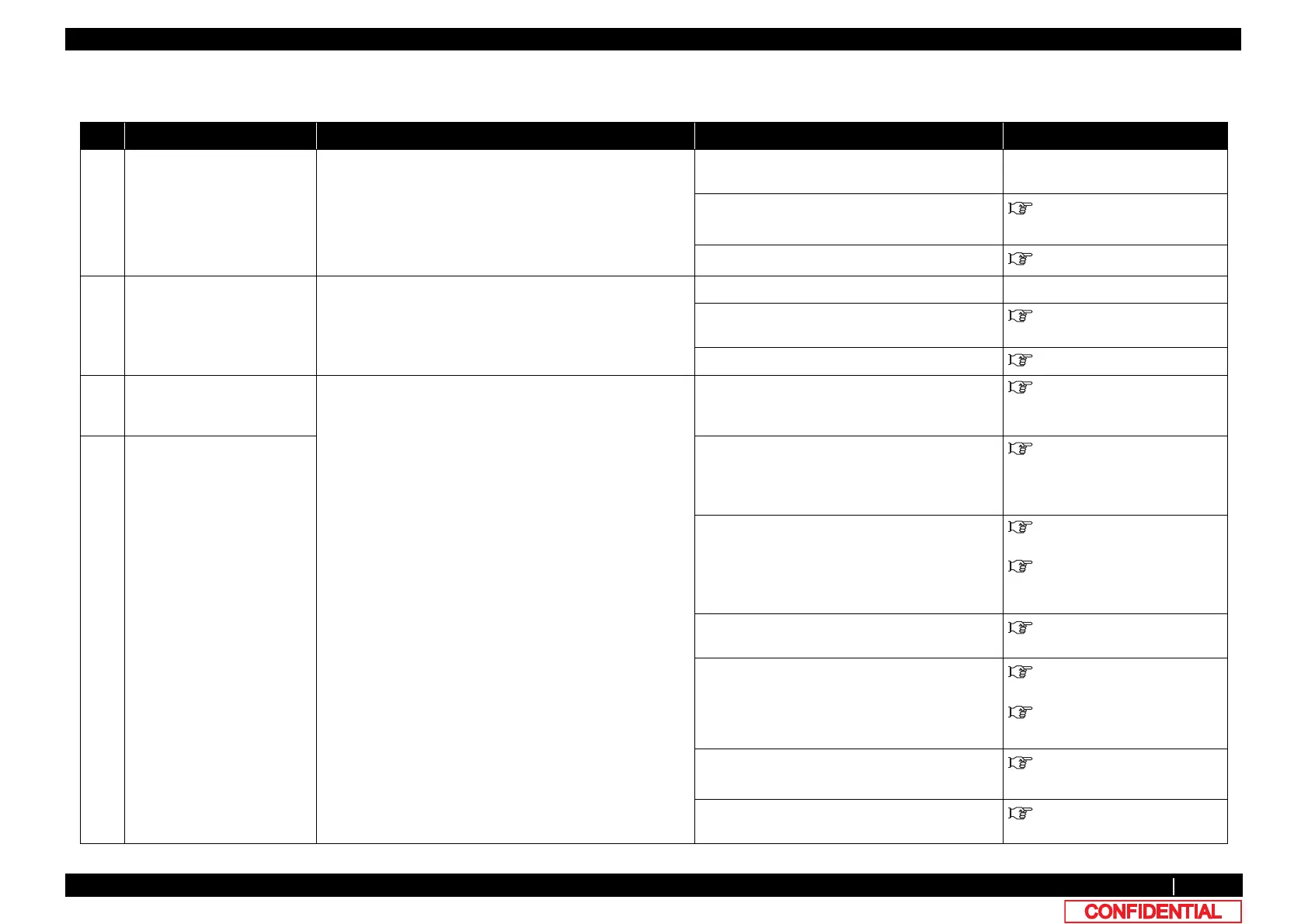
Table 2-8 Symptoms, Check Items and Actions for Printing Problems
No. Symptom Check item Action Reference
1 The printer does not print
continuously.
1. Check if you can print with a different data. Data may be faulty.
-
2. Firmware on the Main side may be faulty. Upgrade Firmware on the Main side.
4.3 Working with MUTOH
Service Assistance Software
3. MAIN board may be damaged. Replace MAIN board.
"3.5.10Replacing MAIN Board
2 After printing, the printer
feeds an extra amount of
media.
1. Check if you can print with a different data. Data may be faulty. -
2. Firmware on the Main side may be faulty. Upgrade Firmware on the Main side.
4.3 Working with MUTOH
Service Assistance Software
3. MAIN board may be damaged. Replace MAIN board. "3.5.10Replacing MAIN Board
3 Nozzles are clogged during
printing
1. Is ink accumulated in Flushing box? If not, instruct him/her to perform daily
maintenance.
Replace Flushing box.
Operation Manual
4 Cleaning does not mend the
clogged nozzles or skewed
ink discharge.
2. Is cleaning sufficiently done? Perform cleaning twice in a row. Operation Manual
3. Is ink adhered on Wiper?
4. Check if Wiper correctly operates in “Sen.: Wiper” in the
self-diagnosis function.
• After wiping the surface of Cleaning wiper
with the attached Cleaning stick, perform
cleaning twice in a row.
• If Cleaning wiper is sticky with ink, replace
it with a new one.
Operation Manual
"3.10.6Replacing Cap Head
Assy
5. Print out Nozzle check pattern in “Test : Adjustment” –
“Adj : NozzleChk” in the self-diagnosis function.
If Nozzle check pattern is correctly printed, refer
to the check item 4 for action.
"5.6.8Test Printing Menu
6. Is Pump rotating during cleaning operation?
7. Is the nozzle surface correctly wiped?
• Correctly plug the connectors of MAIN
board again.
• Replace Maintenance Assy.
• Replace MAIN board.
"3.5.10Replacing MAIN Board
"3.10.7Replacing Maintenance
Assy
Confirm the mounting status of Wiper, and fix it
correctly.
"3.10.6Replacing Cap Head
Assy
8. Is the rank of Head actually installed the same as the
registered rank?
Input the correct Head rank.
"5.9.2Parameter Update Menu















 To Next Page