5.6.5 Uni-D/ Bi-D Adjustment Menu 290
5.6 Adjustment Menu VJ628XE-M-00
5.6.5
Uni-D/ Bi-D Adjustment Menu
This menu is used to adjust the gap of the nozzle rows and perform the print position of the
bi-directional printing.
• For the gap of the nozzle rows, check the printing results of the Uni-D
adjustment check patterns and adjust gaps.
• For the print position of the bi-directional printing, check the printing results of
the Bi-D adjustment check patterns and adjust the positions.
• “Uni-D (Uni-Direction)” stands for a print of one-way direction.
• “Bi-D (Bi-Direction) ” stands for a print of two-way direction.
• Since the characteristics of the print head, only one adjuted value can be applied
for all nozzles.
• CPS (Characters Per Second) is the unit for printing speed.
• Print the pattern using only line C (Cyan, odd-numbered lines) and enter the set
value.
• If ALL is selected, all the possible combination of the the wave form (VSD1/VSD3/
VSD4) and speed (320cps/400cps) are used.
• When you select High, the panel display changes from “Low" to “High".
.
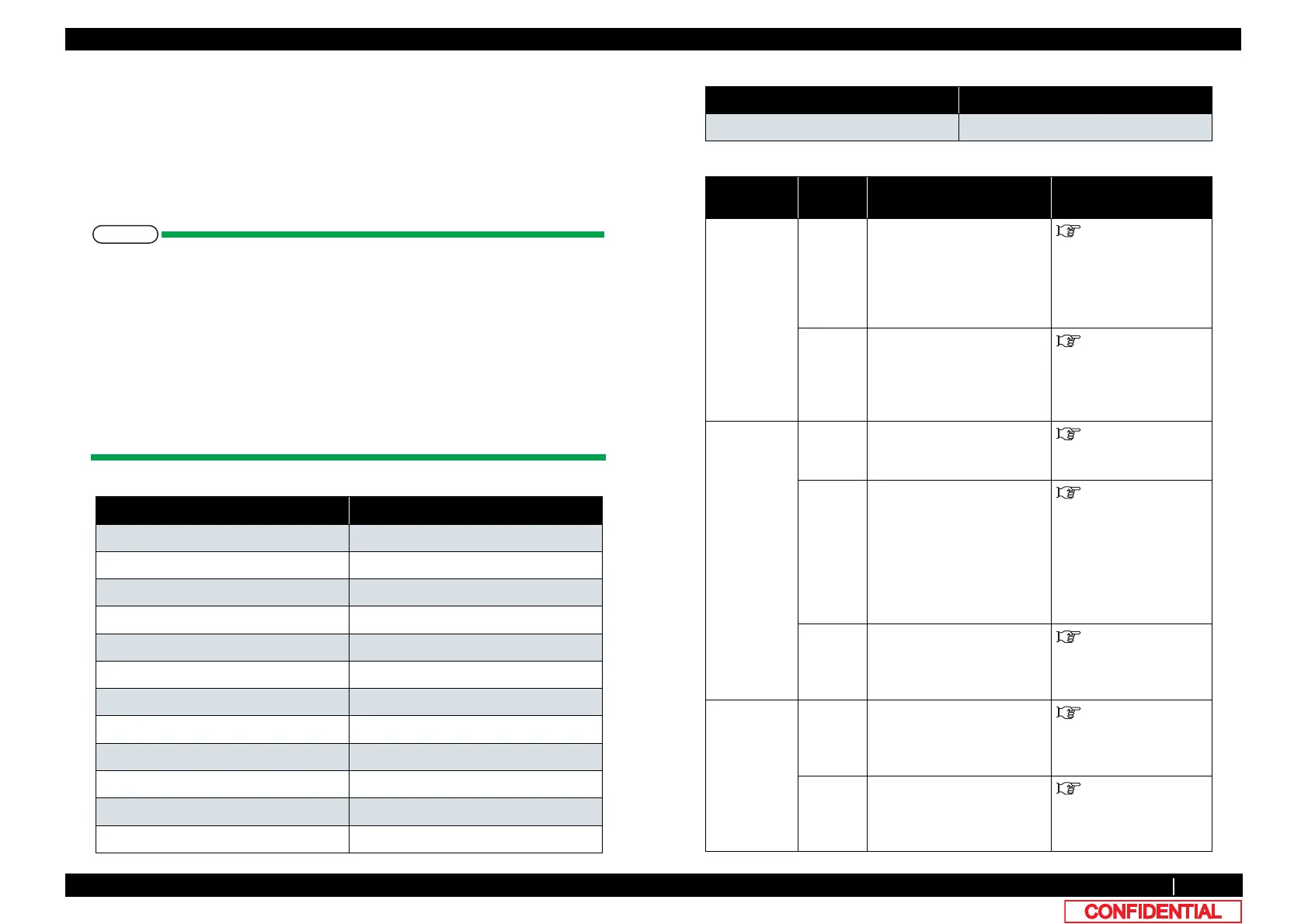
Table 5-1 Uni-D/Bi-D adjustment items
Panel contents
Uni-D 320 VSD1 CW adjustment with 320cps, VSD1
Uni-D 320 VSD3 CW adjustment with 320cps, VSD3
Uni-D 320 VSD4 CW adjustment with 320cps, VSD4
Uni-D 400 VSD1 CW adjustment with 400cps, VSD1
Uni-D 400 VSD3 CW adjustment with 400cps, VSD3
Uni-D 400 VSD4 CW adjustment with 400cps, VSD4
Bi-D 320 VSD1 Bi-D adjustment with 320cps, VSD4
Bi-D 320 VSD3 Bi-D adjustment with 320cps, VSD2
Bi-D 320 VSD4 Bi-D adjustment with 320cps, VSD3
Bi-D 400 VSD1 Bi-D adjustment with 400cps, VSD1
Bi-D 400 VSD3 Bi-D adjustment with 400cps, VSD3
Bi-D 400 VSD4 Bi-D adjustment with 400cps, VSD4
Bi-D ALL Bi-D ALL adjustment of all items
Table 5-2 The details of the adjustment item
Adjustment
Item
1st sub
item
Contents Refer to
Uni-D Setup Enter the adjusted value for
each line when adjusting the
misalignment of other lines
between the reference line.
Adjusted value input unit:
720dpi
"(5-a) Uni-D Setup
Print Print out Adjust pattern with
the current adjusted value
and check the misalignment
between the reference line
and other lines.
"(1) Uni-D Print
Bi-D Setup Enter the misalignment
degree of bidirectional
printing of the reference line.
"(5-c) Bi-D ALL Setup
Print1 Print out the patterns with
the current parameters and
the patterns with the current
parameters ±2, ±4, ±6, and
±8 (one vertical line with
each parameter).
Check the degree of
misalignment.
"(2) Bi-D Print 1
Print2 Print out the patterns with
the current parameters and
check the degree of
misalignment.
"(3) Bi-D Print 2
Bi-D ALL Setup Enter the misalignment
degree of bidirectional
printing of the reference
line.(all Bi-D items)
"(5-b) Bi-D Setup
Print3 Print out the current
parameters of all Bi-D items
and check the current
misalignment.
"(5-c) Bi-D ALL Setup
Table 5-1 Uni-D/Bi-D adjustment items(continued)
Panel contents















 To Next Page