5.6.2 Head Nozzle Check Menu 273
5.6 Adjustment Menu VJ628XE-M-00
5.6.2 Head Nozzle Check Menu
This menu is used to check if Head nozzles can discharge ink correctly from the printing
results.
• CW : In this manual, it indicates the direction from origin to opposite side of the
origin.
• CCW : In this manual, it indicates the direction from opposite side of the origin to
origin.
To check Head nozzles, follow the procedure below.
1 Set media as necessary.
• After media is set, the machine prints out head nozzle check patterns in the
following modes:
• 1 pass, Uni-D
• PF: 360 dpi
• CR: 360 dpi
• 320cps
• VSD4, Large dot
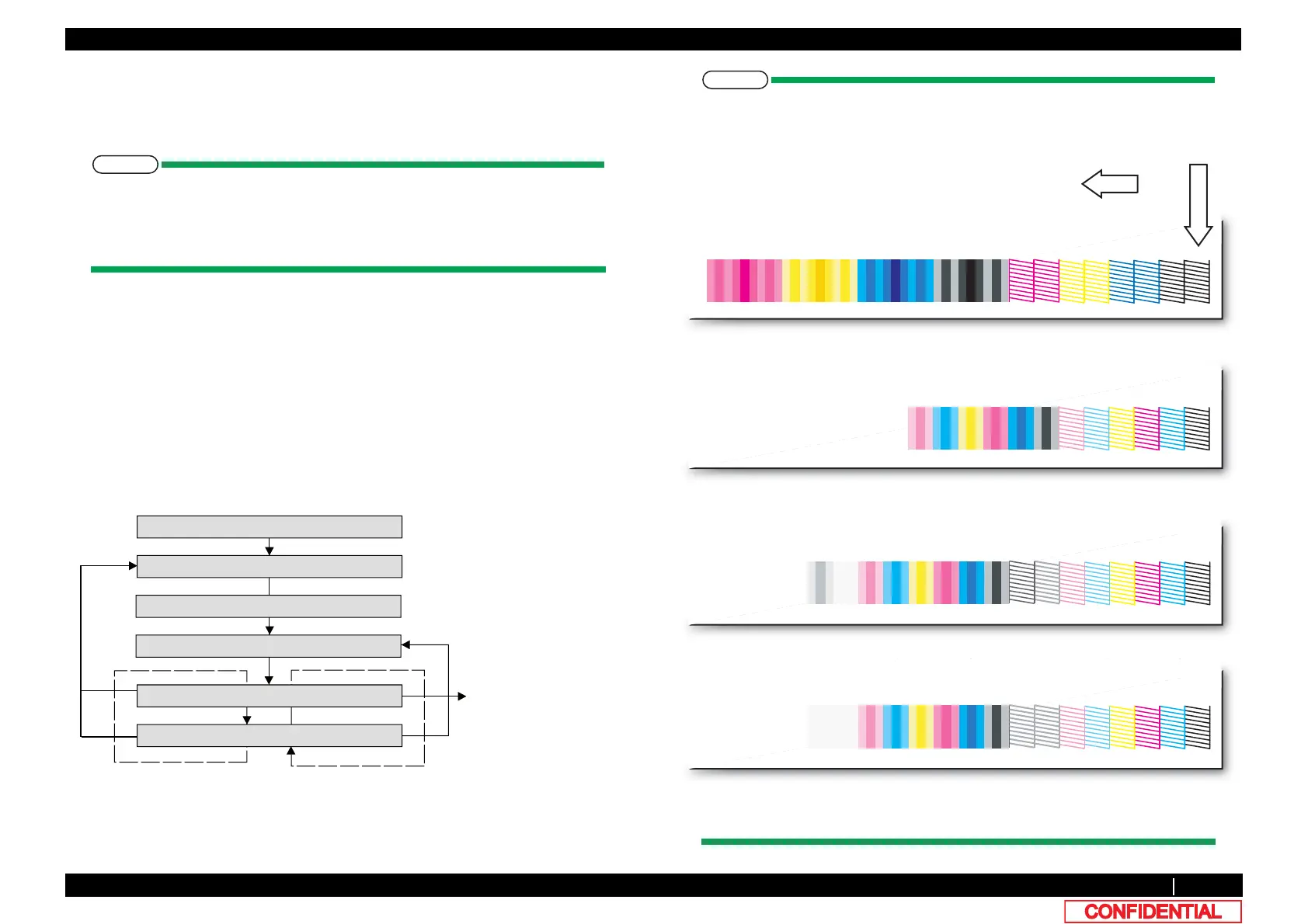
2 Nozzle check pattern will be printed.
• The following pattern will be printed.
• The letters and arrow will not be printed.
• Adjustment pattern is different in 4 colors, 6 colors and 8 colors.
[Enter]
[Cancel]
㹌㹭㹸㹸㹪㹣㹁㹦㹩㸸㹎㹰㹧㹬㹲
㹌㹭㹸㹸㹪㹣㹁㹦㹩㸸㹁㹪㹣㹟㹬㹧㹬㹥
press [Enter]
to Cleaning menu
If media is not set
㸿㹢㹨㸬ࠉ㸰㸸㹌㹭㹸㹸㹪㹣
㹁㹦㹣㹡㹩ࠉ㸱㸸㸿㹢㹨㹳㹱㹲㹫㹣㹬㹲
>!@
Dispkay during adjustment printing
㹑㹣㹲ࠉ㹎㹟㹮㹣㹰
6HWSDSHU
㸿㹢㹨㹳㹱㹲㹫㹣㹬㹲ࠉ㹎㹰㹧㹬㹲
>@
[Enter]
ABCDEFGHAA+BBCC+DDEE+FFGG+HH
4 color
Nozzles
KKCCYYMMKKKCCCYYYMMM
Color
ABCDEFABCDEF
KCMYLcLmKCMYLcLm
6 color (G and H are using Cleanig fluid, so they are not discharged.)
W 8 color
ABCDEFGHABCDEFGH
KCMYLcLmWhMtKCMYLcLmWhMt
Nozzles
Color
Nozzles
Color
W 7 color
ABCDEFGHABCDEFGH
KCMYLcLmWhMtKCMYLcLmWhMt
Nozzles
Color
PHGLDIHHGLQJ
SULQWLQJ



 To Next Page